Mario welcomes Steven Rosenbaum, author of Curation Nation and Russ Parr to the show.
Category: Uncategorized
Guest, Hanan Lavy
Mario talks with Hanan Lavy, co-founder and CEO of United Parents.
Guest, Albert Werth, CEO and Founder of 3feet.
Mario speaks with Albert Werth, the CEO and Founder of 3feet. To learn more about 3feet, visit www.3feet.com.
Monday App Roundtable
Every week on Mario’s radio show (5-6pm on SiriusXM channel 128), the Small Biz Go Mobile writers and friends get together to discuss some of their favorite apps. Here’s what we took a look at this week:
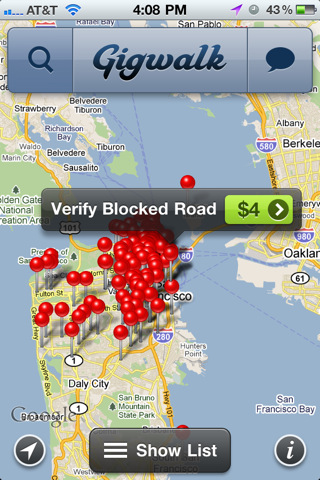 Terrance’s Pick: Gigwalk
Small Biz Go Mobile’s Terrance (@Brothatech) is talking about a way to put the millions of iPhone owners to work, by offering them payments to complete tasks and take pictures? Gigwalk let’s you create gigs for freelance walkers to collect business info and photographs, verify map information, and capture the retail experience at your location.
Are you a freelancer looking to make some extra cash? The Gigwalk app lets you pick up these jobs, ranging anywhere from a few hundred to more than a thousand dollars. Take some pictures, write some descriptions, and get paid, all from within the app.
Though it hasn’t been rolled out across the country, Gigwalk is currently available in the following major areas: Los Angeles, New York City, San Francisco, Philadelphia, South Florida, Boston, and Chicago.
Get Gigwalk from the iTunes store.
 Ramon Ray’s pick: Qik
@RamonRay writes for Small Biz Technology, a site that shares weekly business tips with us here at SmallBizGoMobile. His app pick this week is Qik, the easiest way to share video because it streams it right from your phone or tablet device. With no need to edit or upload anything, your viewers can check out what you’re recording like right from Qik’s site.
Head on over to Qik’s website to get the app for your device.
Shy’s pick: Chrome to Phone
With so many people trying out Google’s Chrome web browser this week to take advantage of the free Angry Birds app for Chrome, I’m sure a lot of people are wondering what makes Chrome a better browser than say, Firefox or Internet Explorer. One extension that I use all the time is Chrome to phone which lets you send links and phone numbers easily to your Android phone or tablet. Need an easy way to download the apps we’re talking about today? If you had Chrome to phone, you could just send this page to your device and install the apps from the market links I’m including.
http://youtu.be/pQb243niMlg
How My Wife Replaced Her Computer with an iPad
 My wife was probably the first Apple fangirl I’ve met. Years ago, when we lived on college-kid budgets, she scrimped and saved over $1300 to get her first 12-inch G4 Powerbook. It was the start of a love affair. With the laptop she read blogs, participated in comment forums, did research and schoolwork, wrote, did our family finances, designed magazines, edited videos, kept organized, and even made our wedding menus and programs. She had it open more often than not!
Years later, her cousin absent-mindedly knocked it from a high table and it broke beyond repair. She was heartbroken, and so we replaced it with a newer Intel model immediately (again, another thousand dollars). This seems expensive even now, but we really felt like she needed it. We couldn’t think of any other machine that would enable her to get as much done. We were also the earliest of our friends and family to adopt the smart phone; we had Treos and Blackberries to play with when most people were just figuring out this “texting” thing. We loved our mobile devices very much, but they were strictly for entertainment and communication (not business or school).
One day, everything changed. I got a Blackberry Torch, new in the box, free as swag. Since my wife and I both had the iPhone 4, we were set for phones. So, we found an interested party on Craigslist, went down to Kew Gardens and sold the device for about $450. The same day she took that money to the refurb iPad section of the apple store and bought the most basic iPad, 16 gigs and WiFI only. At checkout the total cost was only a bit more than the $450 we had gotten for the Blackberry.
Here’s the thing; she hasn’t touched her Macbook since. I love this, as I’ve now hooked it up to the TV for use as a media center. But, I have to admit that I was surprised. I knew that she would love the iPad, since we had always liked Apple’s mobile devices, but the iPad is so much more than a big iPod. She easily consumes and creates content for her tumblr, using tumblr’s iPad app. She is able to get into it with the folks in the forums over at the hairpin using Safari. She makes videos like this one with ReelDirector. She quickly does research to find deals or make plans, and she writes at least 750 words a day. She uses Art Studio to add text to images, Photoshop Express for cropping and adding effects, and Adobe Ideas for sketching. Calendar apps keep her organized and the alarm function of the clock app start her day. She even banks and pays bills, all without touching the laptop. It’s all done with iPad, a device that cost less than half as much as her last machine, weighs less than half as much, and lasts almost twice as long on a single charge. We truly live in the future.
(spoof) President Obama on Death of Osama Bin Laden
Today on the show we had the funny and intelligent Russ Parr of the Russ Parr Morning show talking about his new movie 35 & Ticking and how technology has changed the film business from his perspective.
We also spoke with Craig Tanner, the Co-Founder of FlickLaunch and we also had comedian Iman Crosson who did an incredible spoof of Pres. Obamas announcement – see below
Android™ Phones for All Budgets
 It’s Android Mania at AT&T Premier! We have buzzed-about smartphones for every budget, including LG Phoenix™, MOTOROLA ATRIX™ 4G, and HTC Inspire™ 4G. Experience the apps and features people are talking about—for business and entertainment. Find your Android.
(This message brought to you by our sponsor, AT&T. Elig. voice & data plans req’d. 4G in ltd. areas. Add’l restr. apply.)
Guest, Craig Tanner, CEO/Co-Founder of Flicklaunch
Mario interviews Craig Tanner, CEO/Co-Founder of Flicklaunch – the first global film distribution platform built on Facebook.
Website of the Day:
http://scratch.mit.edu and http://www.squaretrade.com
Digital Deal = Dell Laptop at NewEgg.com:
http://www.newegg.com/Product/Product.aspx?Item=N82E16834200142
Guests, Cameron Evans and Pat Yongpradit
Mario talks to Cameron Evans, the national technology officer and CTO for Microsoft Education in the US, and Pat Yongpradit about the US Innovative Education Forum.
Monday Roundtable
Listen to the Monday Roundtable segment from the May 9th Mario Armstrong show.