Get To Your Files Locked Up On Your PC with iTap RDP

Yeah, we have all heard about cloud computing where you can store all your files “in the cloud” to access them anywhere at anytime. But we all know the ONE TIME you forget to sync up or upload that document to your online storage, is the one time you will need to refer to it while on the go.

Traditionally, before the cloud, folks would use the tried and true Remote Desktop function as a last ditch effort to get to that file located up on your computer. Even still, you needed another computer to access your files stored on a computer at home or in the office. We all know that it is all about smartphones now, so wouldn’t it be nice to Remote into your desktop or laptop and get to that one file using your smartphone?

Enter iTap Mobile RDP available for all Apple iPod touch, iPhone, or iPad mobile devices running iOS 2.1 or later that gives Windows users the ability to remote access their PC and tackle many of the remote functions they are used to when logging into their PC using another computer.

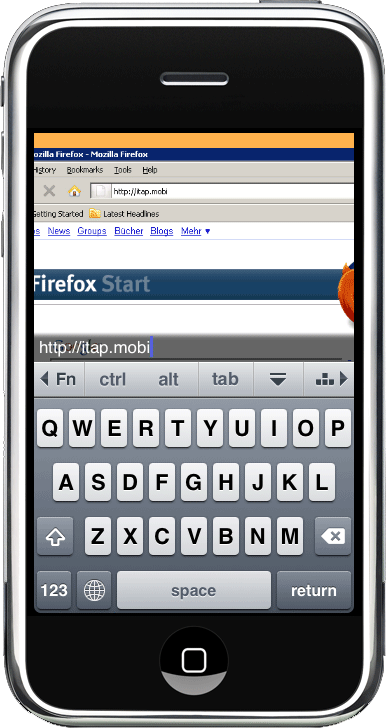
Using the same convenient gestures as iTap touchpad, iTap puts you in full control over your desktop. Whether you need to scroll, drag and drop, or just right-click, you can perform all your tasks without having extra buttons or bars cluttering up you screen.

The built-in keyboard features all the keys and modifiers found on a traditional PC keyboard. Additionally it has full support for international languages, including eastern asian input methods.

In other words, with iTap, you know can remotely access your computer via mobile device and without much fuss, browse, navigate, and control your computer using your Apple mobile device. So if you absolutely NEED that document that you forgot to dump into your DropBox folder, you can access the file via iTap, and email it your yourself…or better yet, drop it in your DropBox folder from your computer via iTap for instant access without waiting for an email. Now at 12 bucks, this is pricey for a mobile app, but for accessibility like this, it might be well worth the price tag.

My only issue with the app is that it’s only for Apple mobile devices and only for Windows computers (yes, there are some people who haven’t completely converted). Not sure if iTap has plans for additional mobile devices and Mac Access, But i’m pretty sure there are similar apps that can handle your specific smartphone/computer configuration. Check out Xtralogic Remote Desktop Client for Android phones to name a few.

So if you haven’t quite got a handle on the cloud storage trend, or just need to make sure your can spring that document from its ‘desktop jail’ without too much fuss, you might want to try out iTap RDP
eBay Buys RedLaser Barcode App to Encourage Online Buying and Selling

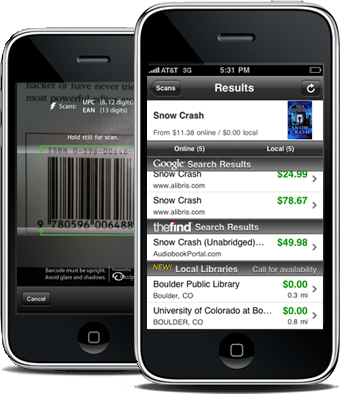
Do you have an Ebay business?  Wouldn’t it be cool to look up eBay prices for products your are selling (or thinking about selling) by scanning barcodes with your iPhone?

Well eBay was thinking along those same lines by buying the uber-popular barcode scanning RedLaser app developed by Occipital in hopes to encourage users to scan barcodes to find and buy the item on eBay.

The RedLaser app was originally designed for shoppers to scan barcodes of physical products to compare prices in surrounding brick and mortar stores. And it was a hit too, getting downloaded over 2 million times since it was put up in the Apple App Store. eBay is looking to duplicate that success with giving users the ability to not only search for the best price at local physical stores, but to expand that search throughout it’s 200 million listings on eBay. RedLaser will be a free app from eBay and will be integrate listings from all the eBay iPhone apps (including StubHub and Shopping.com).

RedLaser was originally a $1.99 app, but by dropping the price to a whopping free.99, eBay hopes to get that money back by way of increasing the number of shoppers using its app to scan barcodes of physical products and finding a better virtual prices online. As more people recognize the power of mobile technology and feel more secure with buying items online, the RedLaser app by eBay should bring in some BIG numbers for eCommerce businesses looking to expand their customer base to those mobile pros, as well as casual shoppers just looking for a better deal.

Get Your Mobile Payments Squared Up

Allow me to paint a picture.  You’ve got a hot product (at least you think it’s hot) that you want to sell at your local festival, expo, or event.  You know you’re going to get those “I only carry plastic with me” folks that want your product, but are not willing to go hunt down an ATM and pay a ba-jillion dollars in ATM fees.  Now you’ve just started and may not have the credit history to be extended a merchant account (or have no clue what a merchant account is) and you don’t have the funds to buy a credit card machine. Let’s be honest, you really don’t want to bother with messing around with the receipt paper that ALWAYS gets stuck in those machines either!

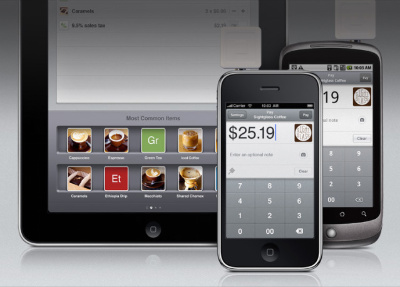
Enter Square, a mobile credit card system that allows users to accept credit card payments anywhere without a merchant account using your mobile device.  Imagine how smooth a transaction would go if you could just whip out your mobile device, and swipe your customer’s credit card and email them a receipt?  With Square you can do just that.

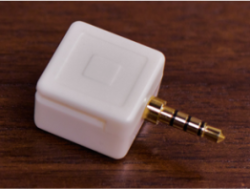
Whether it’s an iPhone, iPod Touch iPad, or Android mobile device (sorry BlackBerry folks), you can use Square’s mobile card reader that’s about the size of a tic-tac container that plugs into your device’s headphone port and allows you to accept credit cards as payments.

You don’t need the reader or merchant account to accept credit card payments, simply download the app from your smart phone’s respective app store, link a bank account and you’re set.  It would behoove you to go ahead and apply for the reader, because the fees associated with swiping a card versus manual input are cheaper, I mean, more monetarily advantageous.

Speaking of fees, although you don’t need a merchant account, there are no setup fees, fees for the mobile reader, monthly charges, or contract required (crazy right?).  All Square asks of you is a 2.75% + 15 cents per swiped charge and 3.5% + 15 cents per manual card input per transaction.  Which, I might add, is lower than most merchant account fees per transaction

Again, imagine how smooth your credit card transactions would go, and how cool you would look doing them if you were using Square.

For more information, and how to get signed up, visit squareup.com Or watch the video below:

Don’t hand me your card – BUMP it! (Happy Hour Friday)

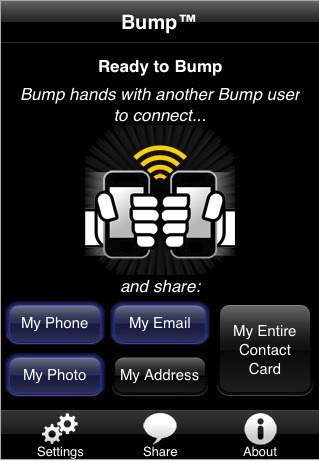
Every Friday we review a FREE mobile app that you can use right away to help you biz grow–we call it Happy Hour Friday). This week I want you to take a look at a FREE mobile app called BUMP! This app enables you to quickly and accurately exchange biz cards with people. The BUMP app can work on the iPhone, iTouch and on Android phones like the Motorola Backflip.

Here are the steps to making it work easy for you:
1. Install the FREE BUMP application on your mobile (both phones must have the app to exchange info)
2. When you are ready to exchange info, simply launch the app and then bump the 2 phones together
3. The app will accept the info and ask you to confirm that you want to receive it
4. The info will now appear in your contacts!

I’ve used BUMP quite a bit and love its ease of use! It’s the new way of quickly & accurately capturing contact info. However I do miss the good ‘ol days of whipping out the PalmPilot and exchanging contact info by a beaming infared light – that was so 90’s :-)

Here’s a short video of BUMP in action, take a peek:

BUMP has been downloaded by 80+ million people so it is has some significant penetration. Ask around, I bet some of your colleagues, peers, customers have the BUMP app on their phones. Why not get it on yours???

Read more about BUMP: http://mobile.venturebeat.com/2010/03/08/bump-10-million/

Download app: http://itunes.apple.com/us/app/bump/id305479724?mt=8
Available on: iPhone, iTouch, Android phones
Cost: FREE