Apple ditches MobileMe, introduces iCloud at exciting price point: free

Although Apple’s cloud services have been rumored for years, no real information has surfaced before today about exactly what to expect. But at their Worldwide Developer Conference (WWDC) today, Apple announced that they’re going cloud in a big way: starting this fall, MoibleMe (a paid service to synchronize your mail, contacts, and calendar) will be replaced by a new, free service called iCloud.

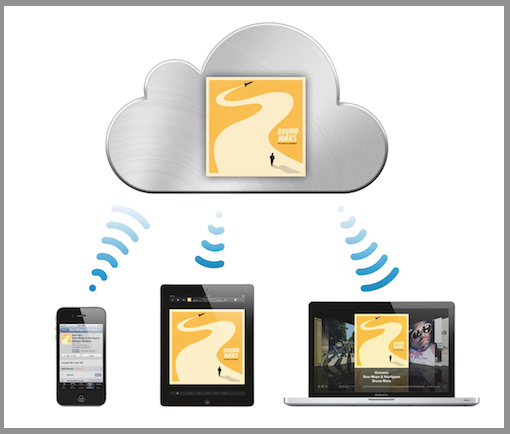
What is iCloud? At a basic level, it’s a replacement for all of the services that MobileMe used to cover: iCloud provides free synchronization for your Mail, Calendars and Contacts through new applications that push your updates to any iOS devices you may own, including the iPad, iPhone and iPod touch. Similarly, App Store and iBookstore purchases are now automatically synchronized between multiple devices. What does that mean for you? Hassle-free work from the field, with the same calendar and mail set-up on your phone or tablet (provided those phones and tablets are the iPhone and iPad!)
The real win for small business users comes in the form of document sync, however. Last week, Apple announced that their iWork suite of apps, including Pages, Numbers and Keynote, we’re being ported to work not just on the iPad but also the iPhone and iPod touch. These apps, for those who aren’t familiar, are Apple’s answers to Microsoft’s Word, Excel, and PowerPoint, respectively.

Today Apple is announcing that their iWork suite of apps will allow document sync through their iCloud service, with 5GB free storage for documents. While 5GB isn’t a huge amount of storage for music or pictures, it translates into thousands of documents sync’d seamlessly across your devices. For users on the go, this may finally make Apple’s iWork suite of software a viable alternative to Microsoft’s suite of desktop software or even Google Documents.

A few other features of note: Apple is also announcing iBackup, a feature that securely backs up your iOS devices over Wi-Fi whenever you charge your devices. Not only are your apps, books, and music backed up, but also your device settings. This should make things easier for users upgrading from the iPad to the iPad 2, or from the iPhone 4 to whatever comes next from Apple. As well, it should relieve some stress from users worried about having to connect their iPad or iPhone to their computer via USB every time they want to manually backup their devices.

Other things like photo sync and iTunes in the cloud offer services to sync your photographs and music between devices, and you can read the full details in Apple’s press release.
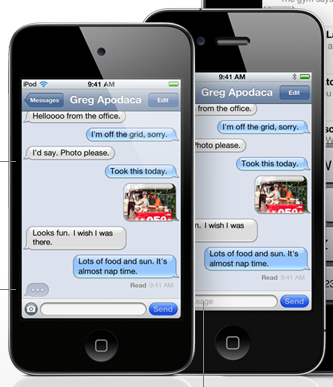

iMessages for iPhone, iPad and iPod touch bring rich messaging experience to iOS 5

Tons of exciting news coming from Apple today regarding their new version of their mobile operating system, iOS 5. One feature in particular that may interest our readers is iMessage, part of the new Message app that will come free with the new OS update.

iMessage is something that should be familiar to BlackBerry phone users, as it brings to iOS features similar to BlackBerry Messenger. In addition to multimedia features like rich text and being able to send pictures to your contacts, iMessage is launching with an enterprise-ready feature set including:

  • Delivery receipts
  • Read receipts
  • Typing indication
  • Pushed to all devices (meaning you get the same messages on your iPad, iPhone and iPod touches, if you own multiple Apple devices)
  • Works over 3G and Wifi
  • Secure Encryption

This last feature, secure messaging, is something users have long associated exclusively with the BlackBerry platform. That will soon be baked into iOS for all your devices is a huge, free upgrade for businesses that have already transitioned to the iPhone for their employees.

The news keeps rolling in, so stay tuned to this space to find out what else is changing on mobile from Apple, and be sure to check out Apple’s overview of new features coming to iOS 5.

Small Biz Tips from SmallBizTechnology.com

We are pleased to work with Ramon Ray, CEO and editor of SmallBizTechnology.com, journalist, and technology evangelist, to bring you new Small Biz tips. Each week they’ll be sharing videos and articles featuring hot topics, products and trends in small business.

Last Chance to Register for an Exclusive Demo Event in NYC with Verizon Wireless TODAY

Join Smallbiztechnology.com and the Verizon Wireless New York Metro team at Lily’s Bar at the Roger Smith Hotel at 501 Lexington Avenue on Thursday, June 2, 2011 for an evening of demos, networking and prizes. Verizon Wireless will be showcasing its latest solutions for businesses and the latest lineup of devices, including the DROID Charge, Incredible 2 and X2, HTC ThunderBolt, Motorola Xoom, and 4G LTE USB Aircards, among others. We’ll be raffling off select devices at the event. Space is limited to just 75 single tickets, which are only available here.

Your Data Storage Needs Are Exploding…Here’s A Tip Sheet For Storage Solutions

Cloud computing is great and many of us are moving more and more of our data to the cloud through online applications. However, there is also a big market for on premise storage solutions – PDFs, images, video and other files are straining our server storage needs. Here are some tips on choosing a data storage solution.

Printing Is Boring But So Important: Manage It. Secure It. Green It.

Very small businesses have minimal printing needs (they want to buy low cost printers and ensure each sheet looks good but also the per print page is low cost). As your business grows you must deal with more printers, more users who want to use those printers, mobile users who need to print, some printing that is secure and managing the maintenance and consumables of each printer. HP recently announced some solutions to help you.

Customers Not Following You On Twitter? Invite Them (Don’t Be Shy)

We’re not celebrities so few of us will have over 10,000 or even 1 million followers on Twitter. However, if you’re a small business owner and wondering how to at least get your customers to follow you – just ask them advises Chris Brogan (a social media super star). As you think about your social media strategy give your customers a reason to follow you.

Get into an exclusive Verizon Demo Event in NYC with Smallbiztechnology.com

Join our friends at Smallbiztechnology.com and the Verizon Wireless New York Metro team at Lily’s Bar at the Roger Smith Hotel at 501 Lexington Avenue on Thursday, June 2, 2011 for an evening of demos, networking and prizes. Verizon Wireless will be showcasing its latest solutions for businesses and the latest lineup of devices, including the DROID ChargeIncredible 2 and X2, HTC ThunderBoltMotorola Xoom, and 4G LTE USB Aircards, among others.

We’ll be raffling off select devices at the event. Space is limited to just 75 single tickets, which are only available here

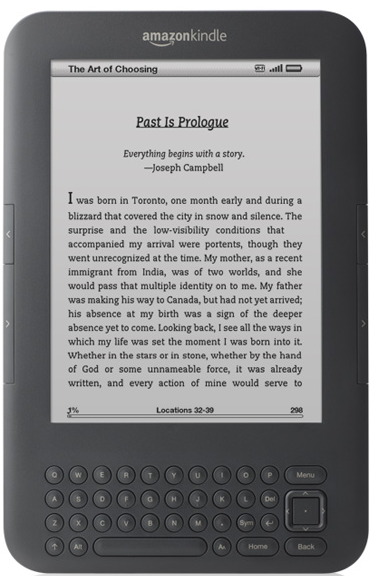
The World is Going Mobile: Amazon Kindle E-Books Outselling Print Books

At first, I didn’t see the Small Biz Go Mobile angle in the news from Amazon today that Kindle e-books are outselling print books. Sure, the Kindle is a mobile device, but compared to an iPad or an Android-based smartphone it’s a relatively dumb device. On a smartphone you tweet out advice to your followers, reply to urgent email, and locate a decent restaurant at the last minute for a business meeting. On a Kindle you can… read e-books. And take notes. And buy e-books. And… you get the picture.

The fact is, the world isn’t simply going digital, it already has. Amazon, founded back in 1995, made it’s name and it’s business by selling books better than not just the “Mom & Pop” stores, but the Barnes and Nobles of the world. That the e-book is now a better selling product for them than the physical book says a lot—the majority of Amazon customers have now gone digital.

So too must your business. Whether you’re accepting credit card payments with an iPhone, taking your meeting notes with a web app, or finding ways to become more productive while on the go, you need to take advantage of the benefits of digital technologies in order to stay competitive in today’s market.

ON24 Brings Social Media to Online Webcasting

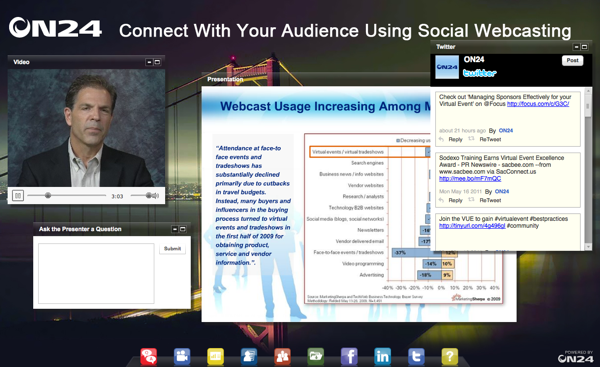
You can tell from the minute you sign into an ON24 webcast that something different is going on. For one, the interface looks like the Mac operating system, with a dock-like area of icons at the bottom of the screen. This is the interface to ON24’s widgets, programs that run inside the webcasting application, including Twitter and Facebook apps. Currently, there are about 20 widgets available with ON24, with more being added each week.

Picture of ON24 Webcasting Demo Page

I had the chance to sit down and try out some of ON24’s features recently, and came away impressed. Whereas other webcasting solutions are often dull, with a single video pane or slideshow available, ON24 seamlessly combines video, slides, Twitter feeds, sharing buttons, LinkedIn, presenter questions and even group chat into a single interface. You can move windows around, hide windows you’re not interested in seeing, and share links live all from their easy-to-use interface.

The ON24 webcasting platform brings a rich feature set together as well, with multi-presenter webcam options and desktop sharing. They bill it as a solution for “one or few to many,” meaning that a single person or a small team can manage the webcast stream (handling different tasks within the platform, like video or fielding questions) that goes out to a much wider audience.

Because the entire platform is built on Adobe Flash technology, mobile users are already able to access ON24 webcasts with their Android phones or BlackBerry tablets.  Although iOS support is not possible with the current version of the product, I’ve been told that h.264 video streams are being added and that iPad and iPhone users should expect to be able to join ON24 webcasts by next release of the software, coming this summer.

To learn more, be sure to check out the ON24 Webcasting Platform 10.  If you’re interested in seeing how the technology works first-hand, there are live demos coming up tonight, Friday and next Monday.

Contract-free 3G Data on your Laptop without a Contract: Introducing HP Data Pass

A small business owner or an entrepreneur operating on a budget can’t simply sign up for an unlimited data plan. The costs add up quick unless you know that you’re going to be constantly on the go. For those who only occasionally need 3G data on the go, DataPass-enabled laptops from HP provide a way to get 3G Internet access only when you need it.

Several HP laptops come with the technology necessary to take advantage of DataPass, which required both the 3G hardware and the latest version (4.1) of the HP Connection Manager software. New HP laptops are bundling the technology required for DataPass, including the ProBook 5330m we recently highlighted on the site, as well as newer models in the EliteBook line.

Pricing is very reasonable for those only needed occasional 3G access, starting at $5 for 5 hours of access, going all the way up to $30 for a whole month:

$5 = 5hr / $10 = 3d / $20 = 14d / $30 = 30d

Is this a technology you think you’d take advantage of? Let us know what you think!

Monday App Roundtable

Every week on Mario’s radio show (5-6pm on SiriusXM channel 128), the Small Biz Go Mobile writers and friends get together to discuss some of their favorite apps.  Here’s what we took a look at this week:

Terrance’s Pick: Gigwalk

Small Biz Go Mobile’s Terrance (@Brothatech) is talking about a way to put the millions of iPhone owners to work, by offering them payments to complete tasks and take pictures? Gigwalk let’s you create gigs for freelance walkers to collect business info and photographs, verify map information, and capture the retail experience at your location.

Are you a freelancer looking to make some extra cash? The Gigwalk app lets you pick up these jobs, ranging anywhere from a few hundred to more than a thousand dollars. Take some pictures, write some descriptions, and get paid, all from within the app.

Though it hasn’t been rolled out across the country, Gigwalk is currently available in the following major areas: Los Angeles, New York City, San Francisco, Philadelphia, South Florida, Boston, and Chicago.

Get Gigwalk from the iTunes store.

Ramon Ray’s pick: Qik

@RamonRay writes for Small Biz Technology, a site that shares weekly business tips with us here at SmallBizGoMobile.  His app pick this week is Qik, the easiest way to share video because it streams it right from your phone or tablet device.  With no need to edit or upload anything, your viewers can check out what you’re recording like right from Qik’s site.

Head on over to Qik’s website to get the app for your device.

Shy’s pick: Chrome to Phone

With so many people trying out Google’s Chrome web browser this week to take advantage of the free Angry Birds app for Chrome, I’m sure a lot of people are wondering what makes Chrome a better browser than say, Firefox or Internet Explorer.  One extension that I use all the time is  Chrome to phone which lets you send links and phone numbers easily to your Android phone or tablet. Need an easy way to download the apps we’re talking about today? If you had Chrome to phone, you could just send this page to your device and install the apps from the market links I’m including.

http://youtu.be/pQb243niMlg

Android™ Phones for All Budgets

It’s Android Mania at AT&T Premier! We have buzzed-about smartphones for every budget, including LG Phoenix™, MOTOROLA ATRIX™ 4G, and HTC Inspire™ 4G. Experience the apps and features people are talking about—for business and entertainment. Find your Android.

(This message brought to you by our sponsor, AT&T. Elig. voice & data plans req’d. 4G in ltd. areas. Add’l restr. apply.)

The ProBook 5330m: A New Business Laptop from HP Combines Sleek Design with Pro Media Features

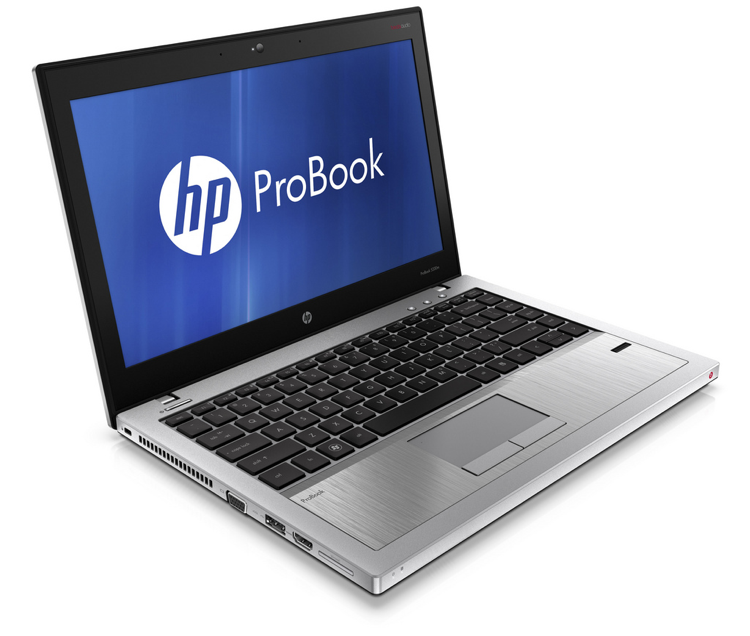
You’d be forgiven if at first glance you mistook the HP ProBook 5330m, pictured right, for a MacBook Pro.  The brushed aluminum chasis and backlit chiclet keyboard are both plays straight out of Apple’s book. These are a part what HP is calling FORGE, a new design framework that brings a contemporary look to HP’s line of professional laptops.

Less than an inch thick, under four pounds, and sporting a 13.3″ HD screen, the ProBook 5330m is not a typical business offering from the company. HP reps at a recent New York City event told me that they’re starting to broaden their horizons for what can be considered a product for their corporate customers. With features like Beats Audio built-in, the new ProBook brings high-quality media playback capabilities to an attractive and rugged machine. Apparently, business laptops can no longer be sold entirely on the strengths of their corporate-friendly features—employees are increasingly demanding laptops that they want to bring home.

The 5330m is built on top of Intel’s latest notebook technologies, with Sandy Bridge-backed Core i3 and i5 dual-core processors available. It is available today starting at a very reasonable $799.