They say the devil is in the details, but it for Apple it seems like the small stuff is actually the most redeeming feature of their latest software update, iOS6, which is otherwise getting killed by complaints about the new Apple Maps. You’ve seen http://theamazingios6maps.tumblr.com/, right? These small updates aren’t as obvious (or glamorous!) as Maps, but they’re way, way more useful, and not just because they seem to work.
Reminders Badges
Badges are what Apple calls those little circle notifications that show up on the top right of your apps (like when you have App updates to install, for example). If you’ve got reminders piling up, the Badges will remind you of your reminders.
Improved GPS Reminders
I love reminders, can you tell? In iOS5 we were able to set a reminder based on our current GPS location so we’d be reminded of something whenever we arrived or left that location. The problem was that the only location you could be reminded about was wherever you were. Now you can set an address and be reminded whenever your in the vicinity of that location: near the grocery store or the library for example.
Phone Calls “Reply With Message”
I have one phone for personal and work use, and no landline. That means I spend a decent amount of time on it, and in things like conference calls you’re usually not free to do any call waiting magic! The new reply with message feature lets you send a pre-written message letting the caller know you’re on the phone and you’ll call them back when you can, so they know you’re not just ignoring their call.
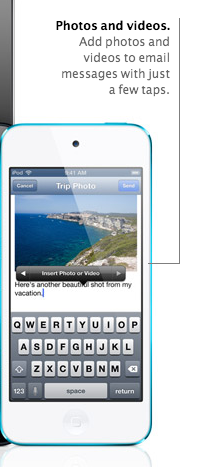
Add a Picture from Mail
This one is so obvious (and handy) it’s almost infuriating we didn’t have it before! How many times have you gone into mail to send a picture, only to realize you can only do it from your photos? This is finally fixed so you can email a photo from Mail. Seeing as that’s how it works for every other email service it shouldn’t feel revolutionary, but it does.
Custom Text Message Vibrations
This is another one that doesn’t sound groundbreaking, but has already improved my life substantially. Basically, you can assign contacts a special vibration for when they text you. So for example, your S.O., boss and best friend could have a “priority” vibration, your other close friends a different one, and then everyone else is unassigned. It’s already kept me from jumping up to check a text message that’s actually just a reminder to pay my wireless bill :)
So yes, they’re small changes, but they really have made a difference in how I use my iPhone. Besides, I already have a GPS Unit in the car.
For more on how to upgrade to iOS6, check out our post from a couple weeks ago.




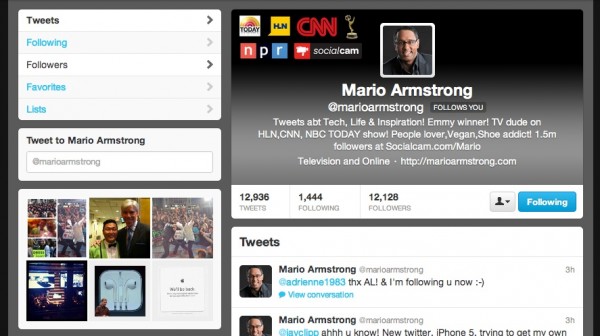
 When Twitter rolled out the new header images yesterday with an announcement on the TODAY show, I quickly realized that a lot of people were going to take the
 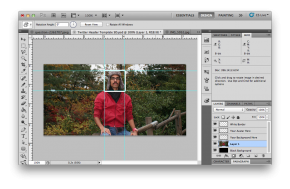 These Photoshop templates have four layers: a black background, a place for you to drop your own background image, a simulation of the white outline that Twitter will automatically place around your image, and a layer for you to drop your header image.
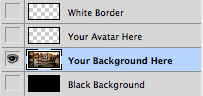 Finally, set up the document so that the white lines around your profile pic and the black background are hidden, showing only your new header image.
 To upload your new header, log into your Twitter account, click on the gear icon in the upper right hand corner, and then click on “Settings.” In the menu that appears on the left side of your screen, click on “Design” to see your design settings. The option to upload your new header image can be found here.


 Tim Cook and his team at Apple is on stage now to announce the iPhone 5 and who knows what else! Tune into the liveblog below for all the latest updates!