Ready for the new iPhone? Sell your old tech for cash or credit

Apple iPhone buyback offer
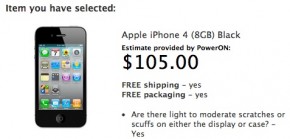
My iPhone buyback offer from Apple

Between last week’s new Kindle announcement, the new Nokia Lumia announcement, and this week’s new iPhone 5 announcement, you may be itching for some new tech. And if you’re upgrading old gadgets, you might want to sell your old tech to raise a little cash for a new purchase.

If you decide to sell your device, definitely do some comparison shopping! There’s a lot of competition in the used gadget buyback market, and some pros and cons to each competitor. But the idea is the same across the board: sell your old gadgets, get cash or credit. The basics about each site below, plus what they offered my for my 8GB iPhone 4. For each site I said that it was in fair to good condition, with no water damage or screen cracks, but that I wouldn’t be including the charger.

Gazelle.com
Classic. Gazelle is one of the originals in the gadget buyback game, and they still have one of the easiest consumer experiences. They buy all kinds of smartphones and cell phones, but as far as computers and tablets go they’re only interested in Mac products. Shipping your phone to Gazelle doesn’t cost anything, so you get to keep 100% of your payments (check, Amazon gift card or PayPal). My offer: $116.


Read More

A Quick Social Media Q & A with HootSuite CEO Ryan Holmes

Ryan Holmes, CEO of Hootsuite

I predict companies who don’t have social media management platforms will be like companies today who don’t have a telephone system.

Yesterday we talked about how HootSuite has acquired Seesmic to reach even more business customers. We also got a chance to talk with Ryan Holmes, CEO of HootSuite, about his thoughts about where social media is going, how its going to impact businesses, and what small business owners can do to be prepared.

1. What tips can you give small business owners looking to build their social following?

Dave Olson, HootSuite’s VP of Community, put together the following social media tips for small business users looking to build their social following:

·  When it comes to social media strategy, amplification is key. Make sure you tap the right channels during an optimal time of day. For example, restaurants may benefit from Tweeting daily specials at lunch time. Timing is crucial! The best time to send messages is on Tuesday, Wednesday and Thursday. Monday is a catch up day and Friday is too close to the weekend, so try your best to avoid those days. Also, you will get the most traffic by scheduling your messaging according to Eastern Standard Time.

·  Social messaging should be tailored to each audience: short, succinct and catchy messages are appropriate for Twitter, longer, more detailed posts work for Facebook and Google+.

Read More

HootSuite acquires Seesmic, a competitor in social media management for business

HootSuite acquires SeesmicManaging social media has become a huge part of every business’s marketing plan, and helping companies manage those social accounts has become a big business in itself. Case in point: HootSuite announced today that it has acquired Seesmic to grow its customer base of business users.

In case you’ve never used either, both HootSuite and Seesmic were competitors in the same space: providing social media tools to businesses, from the very to small to the Fortune 500. Both allow companies to manage all of their social networks from one centralized dashboard, and control and schedule content flow and updates. They also provide real-time tracking measurements to business customers, so that customers can see which messages work best with their audiences. Both services seek to streamline the process for companies with many social accounts and lots of folks using them.

The business model for HootSuite is its paying clients: $9.99 a month for “pro” accounts and a whitelabel enterprise solution for the big guys. In acquiring Seesmic, they’ve taken a customer acquisition shortcut: Seesmic has its own base of paying business customers that HootSuite is hoping will come on over and join their 5 million users.

But Seesmic also had lots of non-business customers, and HootSuite doesn’t necessarily want those folks.  Those consumers will be directed back to using the native Twitter experience, including Tweetdeck, which Twitter purchased over a year ago. This is pretty squarely inline with Twitter’s recently-announced policy that they don’t want third parties creating applications for consumers. Twitter wants to own the consumer experience, but is OK with organizations like HootSuite creating tools for businesses to leverage Twitter further.

Curious how Twitter’s moves may affect your small business, or about how an application like HootSuite can help your small business? Stay tuned for our interview with HootSuite CEO Ryan Holmes!

Stop waiting on hold for customer service with Fast Customer

Stop Waiting on Hold with Fast CustomerHow many hours of your life have you spent on hold, waiting for customer service? Or pushing 1 for this or 2 for that? Stop waiting on hold, and get those minutes back, thanks to the website and app Fast Customer.

The idea is simple: get a computer to do the “holding” for you, that way you don’t have to bother. After all, computers don’t get irritated (yet).

You tell Fast Customer who you need to speak with, like Comcast, United Airlines, or Bank of America. Fast Customer’s computers get in touch with the company. Then when there’s an agent available, your phone will ring, with a human from Bank of America on the other end of line. There are thousands of companies signed up for the service, so odds are you deal with at least one or two.

The best part may be the apps. It seems like we rarely need customer service when we’re at home relaxing, so being able to save time while mobile is incredibly useful. Fast Customer offers the usual Android and iPhone apps, but also has apps for the Kindle Fire and Chrome Browser.

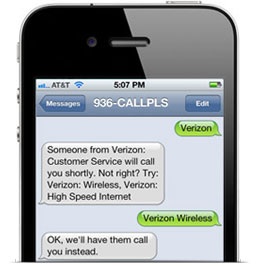
You don’t even need a smartphone to use Fast Customer, because you can also text your request. You text the name of the company you need to talk to (936) CALL-PLS. Fast Customer will confirm and then have an agent call you. It’s also a great alternative to an app if you’d rather use SMS than pay for mobile data.

Other than your data, SMS or minutes charges, the whole thing is free. Fast Customer doesn’t charge anything to help you stop waiting on hold…or to get those minutes of your life back.

Genius: Sales Lessons from Apple’s Employee Training Manual

A page from Apple's training manual
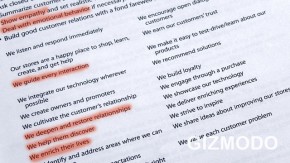
A page from Apple’s training manual

Last week Gizmodo got its hands on an Apple training manual for retail store employees, and they ripped it to shreds. Writer Sam Biddle seems generally freaked out by how specific the manual is, and took issue with the retail giant’s emphasis on catering to customers’ feelings, saying “Sales, it turns out, take a backseat to good vibes—almost the entire volume is dedicated to empathizing, consoling, cheering up, and correcting various Genius Bar confrontations.”

He’s wrong, and Apple’s right: sales is good vibes.

Apple has figured out that customers want to feel good about their purchases, and while that’s partly a consequence of the product itself, it’s also a result of the buying process. When customers have a positive experience at an Apple Store, they come away feeling good about their new computer, Apple as a company, and about themselves. And happy customers are repeat customers.

But what really sets Apple apart in the retail space is making it easy for all their employees to give customers that “good vibes” experience, knowing that that’s what sells. Read More

New iPhone 5 event officially confirmed for September 12

Mario's iPhone 5 official invite

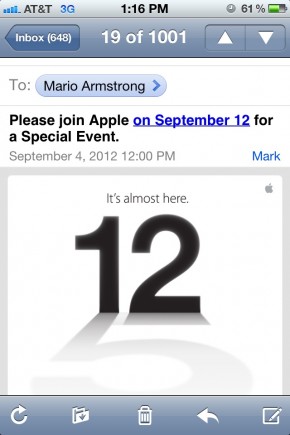
Today Apple confirmed what we’ve all been thinking (and assuming): they will hold their big press event to introduce the new iPhone 5 on Wednesday, September 12.  Journalists and press outlets received the official invite today, which said “It’s almost here.”  The event is being held in San Francisco, California, and will kick off at 10AM Pacific/1PM Eastern.

Not to worry: we will have in-depth coverage of the iPhone 5 announcement as it happens, as well as hands-on testing ASAP.

It’s likely this event will only talk about the iPhone 5. According to rumors, Apple is planning a second event in October to announce updates to the iPad. That’s also where we’ll probably see the rumored 7″ Apple tablet (aka “iPad mini”) designed to compete with the Google Nexus and Kindle Fire. As a point of comparison, last year’s iPhone 4S announcement was held in early October.

It’s likely that the 4S will also see a price reduction similar to the way the iPhone 4 has been marked down now that the 4S is available. For example, AT&T currently has the 8GB iPhone 4 available for $99 with a 2 year contract.

additional info via MacRumors

Basic computer cleanup tips for Mac and PC users

Ok, it’s Labour Day Weekend, and you’re probably ready to get out of the office and get to the barbeque! But if you take a little bit of time to clean up your computer today, you could be working on a faster, nicer computer Tuesday morning. That’s why we have some basic cleanup tips for both PC and Mac users.Clean Genius Mac cleanup utility

PC Users
PC users, the good news is that cleaning up your machine is easier than it used to be. A few easy things you can do:
– Make sure Windows is up to date. Download driver updates and service packs.
– Make sure your Anti-Virus software is up to date.
– Uninstall any applications you’re not using (be honest).
– Try WinDirStat to free up some hard drive space. This free program searches your files to see what’s taking up all the room so you can easily delete the worst offenders.
– Use the free program CCleaner to delete temporary files, cookies and web browsing history.
– Advanced users may want to do a complete reinstall of Windows, but if you’re planning to upgrade to Windows 8 next month it’s probably not worth your time.

Mac Users
Honestly, Mac users have it easier. It still makes sense to delete app and files you’re not using, especially big ones, like videos and other media. But instead of going through the files manually, you can use a cleanup program to make it easier. MacRumours has a good list, and we particularly like CleanGenius.


5 Ways to Upgrade Your Home Office

Upgrade Your Home Office Chair with the Amia
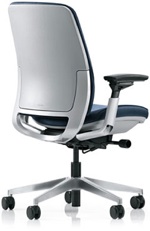
Amia Chair from Steelcase

If you work from home, you’re in a great position to make it the best environment for productivity for you. The long Labor Day Weekend will be over before you know it, and wouldn’t it be nice to start fresh with an upgraded home office? Here’s our checklist for making your home office space work for you.

1. Buy a better chair
It sounds silly, right? But when you’re sitting down for hours a time it’s important to do it right. Look for a chair that’s as adjustable as possible. Make sure it has lumbar support, and that the armrest height can be adjusted. When it comes to spending money on your home office setup, your computer is first, but your chair should be second.

2. Prevent Carpal Tunnel, and Neck Pain, and Back Pain…
It’s not just about the chair: take some time to make sure your whole setup in ergonomically correct. Is your laptop or monitor at eye-level? It should be, otherwise your neck and shoulders will hurt from staring down at your computer all day. Make sure you can sit up straight, and that your arms and wrists are straight out in front of you: use a wrist rest if you can. Read more on how to prevent carpal tunnel and other repetitive stress injuries from the NYTimes.

Read More

Back to the Office: 5 Gadgets to Make Work More Fun This Fall

Who says kids should get all the cool new stuff? We’ve found some great gadgets  for the office that will make fall a little more fun for adults too.

gadgets for the office: laser cube keyboardCube Laser Virtual Keyboard
It’s a keyboard, but it’s also a laser! The tiny cube projects your keyboard anywhere, anytime, so it’s mobile, space-saving and seems like it’s from the future.

The cube projects a full-size QWERTY keyboard on any flat surface for up to 150 minutes of typing. It’s easily recharged via USB. It work via Bluetooth and is compatible with Android 2.0+, iPhone 3Gs+, iPad, and basically any Mac or PC made in the last ten years.

$179.99 from ThinkGeek


Office Gadget: Portable Monitor GeChic On-Lap 1302GeChic 1302 Portable Monitor
More portability! The GeChic On-Lap 1302 (say that 10 times fast) is portable monitor you can plug right into your smartphone. It’s a good idea, even if it has a terrible name. It’s a 13.3 inch screen, powered either by your laptop or an external battery, that can be plugged into just about any smartphone, ultrabook, laptop or tablet. The only drag is the need for lots of extra cables: you will need the right adapters for your tech set-up, so do your reading before you buy.

$199.99 at NewEgg

Read More

Reduce Small Business Stress: 3 Tips for Managing Your Work-Life Balance

Nigel Marsh Giving His TED Talk "How to Make Work-Life Work

Check out Nigel Marsh’s TED Talk “How to Make Work-Life Work”

Running a small business is hard, and it can be stressful when it seems like everything is on you. Even when you’re on vacation it’s hard to ignore what needs to get done. But if you don’t try for work-life balance, you run a serious risk of burning out and losing the motivation to succeed. It’s all about managing your stress, while making sure you’re doing your best to keep up with your family and your business. Here are three work-life balance tips you can put into action to reduce stress

Be Smart With Tech
Nobody loves mobile tech more than us. But it’s here to make life easier, not to stress us 24/7. Start by looking at your own habits: is constant connectivity actually stressing you, or getting in the way of time with family or friends?  Be honest, even if it’s tough.  Use that info to make “tech rules” that actually work for you. You might need to set a rule that says no email after 8pm, or maybe you need to leave your laptop at the office and only use a tablet at home. Whatever you do, talk to your family about your plans and get their feedback – they’ll have good suggestions and they’ll appreciate too.

Track Your Time
Take a week or two and write down everything you do all day – both work and non-work. Use your log as a roadmap to greater efficiency. What are you doing that you can skip? Skip it! What aren’t you doing that would make you happier or more successful, because you think you just don’t have the time? Build those things into your schedule, and make sure you include plenty of fun and satisfying personal stuff too. Make sure it’s what you really enjoy, not just what you think you should be doing. Remember, it’s all about the balance. Try the Hours Tracker app for iDevices or Time Recording for Android.

Stay Inspired
What motivates you? What’s important to you? How are you getting where you want to be? Professional motivation isn’t just about the money (though that part’s important). It’s also about trying to create the life you want to have. Find sources of inspiration to keep you going both at work and at home, like your family, a social cause, or even a mentor. Don’t be afraid to write it down, come back to it often and reevaluate frequently.

Want more work-life balance tips? Check out this TedX talk from Nigel Marsh called “How to Make Work-Life Balance Work.” Careful though, it’s not for the faint of heart!