Webinar w/ Mario: Top Tips for the Mobile Entrepreneur

Mario Armstrong's Webinar for Entrepreneurs Today at 1PM Eastern Mario’s hosting a webinar for entrepreneurs talking about how they can use mobile technology to improve their business. He’ll focus on how mobile is letting us get more done from more places, thanks to our phones, tablets, and more. Plus he’ll get deep on topics entrepreneurs need to know about, like cloud storage, Evernote, mobile video, and mobile payments. Plus he’ll cover some great ways to save time as well as some apps to help you better connect with customers via social media.

Click here to register AND to watch today LIVE at 1PM Eastern.

After you’ve watched, Mario will also host a Twitter Q & A session. He’ll be using the @ATTSmallBiz handle (go follow them!) or you can look for the hashtag #ATTWebinar to keep up on everything going on.

Our Top 5 Must-Have WordPress Plugins

wordpress plugins
WordPress hoodie, for the ultimate WordPress fan-person.

WordPress is the most popular blogging platform on the Internet: as of this time last year, it powered 22% of all new websites. There’s a good reason too: it’s structure is designed to make it easier to get a site up and running (and keep it running) than if you had to build your own website completely from scratch. Part of that power comes from the plugin system, which extends the WordPress framework to include features programmed by outside developers – kind of like Apple’s App store. There are thousands of plugins, most designed for very narrow purposes, and it can be hard to figure out which ones may help your blog. Our top five favorite suggestions for WordPress plugins to help keep your site running smoothly and securely:

Vaultpress
For only $15 a month, the Vaultpress plugin promises continual backup of your entire site, plus a simple one-click site restore if something ever goes terribly wrong. It was created by the team at Automattic…the parent company of WordPress itself.

SEO by Yoast
Wordpress’ design makes it fairly search engine-friendly, but it never hurts to give your rankings a boost. This plugin helps search engines find your content, with a foolproof checklist of steps for each post, including optimizing your post titles, meta descriptions, keyword frequency and url length.

Redirection
It’s bad for your site if people are running into pages that don’t work (404 errors). Redirection lets you check a log of where users encountered 404 errors so you can fix them, and makes it easy to set up page redirects even if you don’t have the technical knowledge.

WP-Optimize
Wordpress stores all of the data you put into your website in a database, but it doesn’t necessarily do a great job of keeping that database clean. But cleaner databases are faster databases. WP-Optimize lets you clean up your database (by deleting things like post revisions and spam comments) without any technical knowledge.

Mobile Pack
There’s a lot of pressure to make sure your site looks good on mobile devices, but it can be a confusing and expensive endeavor – and probably deserves its own blog post! But it’s better to do something then nothing, so try Mobile Pack. It will let you set up your site with a theme designed for mobile devices, and takes are the guesswork out of trying to plan for all the different devices out there. It may not be your dream site, but it’s functional and that’s important.

Do you use WordPress? Are there any WordPress Plugins we missed you love? Let us know!

Carbonite Mobile Brings Wireless Backup to Android Phones

Carbonite Mobile Backup for Android Devices
Infographic, Data from Carbonite’s survey with Wakefield Research

We’ve talked before about how important it is to back up your data (see here, here, and here). But what’s interesting is that so many of us don’t back up our mobile devices: according to a survey from Carbonite and Wakefield Research, 62% of people with camera phones don’t back those photos up anywhere. And that’s just the photos! iCloud backup may help iPhone owners, but for Android users the choices are less straightforward, unless there’s specific backup software associate with your device.

Carbonite has just released a solution for Android (and iOS) users that can take the pain out of backing up video and photos. Just configure the app once to automatically back up photos and videos, and you can access them remotely anytime from any Android or iOS device, plus your computer.

Carbonite is also the maker of a respected backup system for computers, and offers both individual and enterprise solutions. Makers of a respected backup system for individual and enterprise users, subscribers to the primary Carbonite service also receive 24/7 access to all the files they have backed up with Carbonite.

Carbonite mobile also offers Android users some of the same features as iCloud’s “find my phone.” First off, there’s the ability to locate the phone on a map and force it to ring, even if it’s on vibrate or silent. For security, you can use the app the remotely lock the device with a pin number, or to just go all-out and wipe the contents of your phone. It’s worth it if your device is stolen, and less of a big deal if you’ve been backing up your data.

Right now, Carbonite’s mobile solution is free, presumably as a loss leader to get you interested in their home and business backup services. But given that you should be backing up anyway (remember all those articles we just linked to?) it’s not a bad idea to investigate whether Carbonite could be a good comprehensive backup solution for your needs.

Vimeo Offers Content Creators a New Way to Get Paid for Their Videos

Sam Collins Media' Ball of Light from Vimeo
Ball of Light by Sam Collins Media (now eligible for tipping)

Earlier this week, Vimeo announced that they would be launching a virtual “tip jar.” The idea is that if you’re watching a video, you may want to thank the creator for his or her time and hard work with some real, non-virtual cash, payable via PayPal. Vimeo will take a 15% cut for the privilege.

It’s an interesting move by Vimeo, the video site that has built a reputation for “creative” filmmaking and video creation, stressing quality over quantity, and making a commitment to content creators and artists. It sits in a very different video site niche than the YouTube, the dominant player in the field, which is primarily geared quantity, and has actually been playing catch-up in courting more sophisticated video creation.

Their approaches are reflected in the ways creators make money, too. On YouTube creators can sign up to become partners, meaning their videos will have advertising on top. This advertising is secured by YouTube, and they take a cut. There are nuances to this model of course, but primarily it’s driven by the number of views a creator and his or her videos receive, and it relies on a third-party advertiser. That means that if you’re a creator, you need to be getting tons of eyeballs to a video that matches up easily with the kinds of folks an advertiser wants to reach. It’s very much the same model as television.

Vimeo’s virtual tip jar cuts out that 3rd party advertiser, and lets creators appeal directly to fans. That means it’s not just about the number of eyeballs on your videos: it’s about whether those viewers are willing to support you and your work. Think of the Kickstarter model: 2 donors at $100 each are worth the same as 10 donors at $20.  And in that environment, success means making yourself accessible to your audience, creating a community, and cultivating the kinds of folks who can and will support you.

iPhone Accessories: Now’s the Time to Shop

If you own an iPhone 4S and don’t plan to upgrade, don’t fear! Now’s actually a good time to go shopping for accessories. Several of our favorites will work even if you decide to upgrade later. For the rest, we wouldn’t be surprised if we start seeing sales any second. So now’s the time to start looking to see what’s out there – and get prepared for sale action.

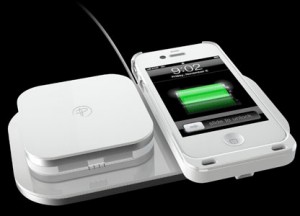
Duracell Powermat
Duracell Powermat Charging System, 20% Off

Duracell Powermat 24 Hour Charging System

You know we love this one! After all we don’t throw huge parties with just anybody. The Powermat gives you wireless charging for your iPhone 4 or 4S, plus a backup battery so you’ll #neverbepowerless.

And we’ve still got a discount for you! MarioArmstrong.com readers can get 20% off  by entering the code #powerhouse4040 at checkout. Hurry, this deal ends tomorrow September 21st!


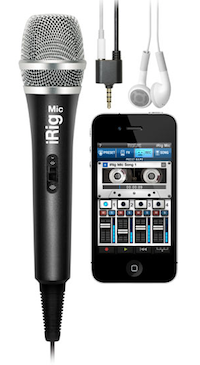
iRig iPhone accessory
iRig handheld microphone


iRig Handheld Microphone

Mario’s talked about how much he likes the iRig before, but it’s great for anyone looking to do mobile video, interviews and more. The iRig has impressively good sound, even when you use it “in the wild.” It’s only $59.99, and it works with a wide variety of devices, including the iPhone 4, iPhone 4S, iPod touch and all generations of the iPad.

For more about creating video for your brand, check our Mario’s post on how he launched a web video series in 48 hours.

iRig handheld microphone for iPhone, iPad & iPod Touch.


Read More

How to Upgrade Your iPhone to iOS6: What You Need to Know

iphone 5 and new ipad running iOS6iOS6 is coming tomorrow September 19th! If you have an eligible device, it’s important to do some crucial prep work to make sure you’ll be able to update with minimal hassle. Even if you don’t care too much about feature updates, it’s a good idea to download the new iOS just for the security and bug fixes alone. Plus the upgrade is free, so why not?

So first, what’s eligible?

The short answer is all the recent iDevices. That includes:

– iPhone 3GS, iPhone 4, iPhone4S
– iPad 2 and the iPad3 (also known as the “New iPad”)
– iPod Touch 4

It’s important to note that not all devices will have the capability to take advantage of all of the features of iOS6. Lots of the small tweaks of iOS6 will be available to everyone, but many of the key features will only be rolled out to the newest devices. Check out our chart:

How to Upgrade

1. Tidy Up a Little
Take this opportunity to get rid of stuff you’re not using. It’s just taking up memory space. Go through your photos, notes, and videos: if you have them in another place, do you really need it on your device? Delete apps you’re not using. Think of it like cleaning out your closet: if you haven’t used it in 3-6 months you don’t need it!

2. Back up your iDevice
Make sure you back up.  It’s a two part process, so hang on tight. To start, make sure your device is connected to a power source and you have stable WiFi. On your phone, go to Settings > iCloud > Backup and Storage > Backup Now.  iCloud backup is free for all iTunes purchases of music, movies, TV shows, apps, and books. For everything else (including camera roll photos), Apple gives you 5GB of storage for free and lets you pay for more. If you don’t want to pay for more storage it’s not a big deal: you probably still need to plug your device into a computer running iTunes. Here’s why:

iCloud will not back up media you didn’t purchase from iTunes (music, movies, etc), podcasts and audiobooks, and photos transfered from your computer. So you probably need to sync with iTunes by connecting your device to a machine running iTunes, either via USB or wireless. If you haven’t set up wireless syncing with iTunes then don’t start now: go the old fashioned way and plug into your computer.

3. Get the most recent version of iTunes (10.7)

If you already have iTunes on your computer, you can update by going to iTunes > Check for Updates. If you are having trouble with the auto update, you can also download it at http://www.apple.com/itunes/.

That should do it! You’ll be all set to bask in the glow of iOS6. If you have questions feel free to leave a comment or get in touch on Twitter @smbizgomobile.
How Small Businesses Can Use the New Twitter Profiles, Twitter for iPad

This morning on the Today Show, Twitter rolled out a couple of big changes: updated profiles and a huge update of their iPad app. These new Twitter changes are bigger than they sound, and it’s important businesses react quickly to these and future changes to a key messaging and marketing platform. Not only is there a slight first mover advantage, but you’ll never be caught trying to play catchup on new technology. It’s especially important if being a tech-savvy company is important to you brand. As always, it’s a branding opportunity.

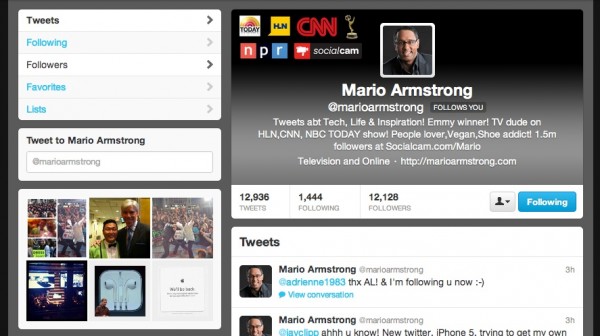
Mario's new Twitter profile page

Updated Profile Image
Goodbye tiny Twitter avatar, hello giant banner. Does Matt Lauer’s Twitter profile page remind you of anything? If you answered Facebook, we’re on the same page here. That giant image is great for quickly and immediately introducing people to your brand, and makes your Twitter page feel more “branded” in general. Take advantage of it, and make sure you’re presenting a page that fits in with the rest of your identity, digital and otherwise.

Updated Profile Photo Stream
Over in the left sidebar, you can see the redesigned Twitter profile page puts a lot more emphasis on photos that you’ve posted. As a small business, it’s important to remember to take those photos, and that only 6 will show at a time. While taking photos, try to balance subject matter, colors, and close-ups between photos, so that you have different kinds of photos showing on your profile that look good even at a glance.

The big trend here is an emphasis on media, and users creating and sharing it. Again, that should remind you of Facebook, and it makes sense. Getting users to interact with your service means they spend more time on your site, and it makes sense to bring the media inside your site, rather than push users elsewhere to bring pageviews to other people.

We see that same trend pushed even farther in the new Twitter iPad app. The big news here, beyond the redesign, is that users can experience media from Tweets within the stream. The company told the Today Show that the idea was to create an experience more like Twitter.com, but also to let users “view photos in fullscreen and swipe through them really easily.” So again, it’s all about photos. Are you good with a camera? It’s good for Twitter, Facebook, and your business’s image if you are.

iOS6 vs iPhone 5: Should You Buy the New iPhone?

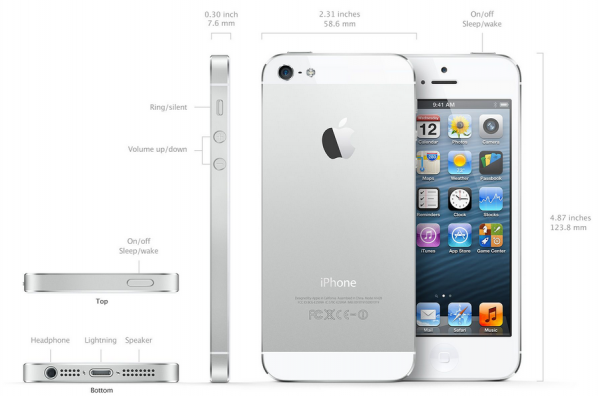
Last week Mario talked about the iPhone 5’s new docking port that’s going to have some people frustrated in the coming weeks, and advised iPhone 4S owners to hold off on buying the new iPhone. It’s a smart move for a lot of folks, especially since many of the iPhone 5’s new features are actually a result of the new operating system, iOS6. Current iPhone 3GS, iPhone4 and iPhone 4S users will get a free upgrade to iOS6, so they’ll get many of the cool new iPhone 5 features without having spend a single dime. So before you decide whether you need the new iPhone 5, think about whether you’re in it for the hardware or the software. If you’re in it for the hardware, go for the upgrade. If it’s about the software, you may want to wait. We break down the biggest features of each for you below:

Hardware

– LTE compatibility
– Thinner & lighter
– Better battery life
– 4″ Retina Display screen

iphone 5 running passbook
The iPhone 5 running Passbook

– A6 processor chip for faster performance
– Improved sound quality for voice calls
– Aluminum back for more sturdy product
– Dual-band 802.11n wireless  connectivity
– Improved 8MP camera, including better low-light sensitivity, panorama mode and 40% faster photo capture
– 1080p HD video with main camera, 720p HD video with front-facing camera
– Nano SIM card
– New 9 pin dock connector

Software (iOS6)

– Maps application, with turn-by-turn directions and 3D mapping
– Enhancements to Siri
– iCloud sync to Mountain Lion
– Send Tweets & update Facebook from the notification center
– Passbook, the digital card and coupon storing app
– Facebook integrated in Photos, Safari, Maps, iTunes, and more
– Do Not Disturb feature lets you receive incoming calls and texts, but won’t alert you during the times you specify
– FaceTime over cellular (instead of just WiFi)
– Shared Photo Streams with friends or family
– VIP email lets you mark certain senders and messages as priority and makes those emails for prominent
– Game Center sync to OSX

There are a lot more hardware and software features, but this covers the big ones for most users. iPhone 5 pre-orders are happening now at AT&T and through Apple stores and online.

Exclusive Offer: 20% Off #neverbepowerless Duracell Powermat System

powerhouse4040 panelists
A big thanks to all our #powerhouse4040 panelists!

In case you missed it, last night was Mario Armstrong Media’s giant #Powerhouse4040 party in NYC at Jay-Z’s 40/40 Club. We were there with SocialCam, Duracell Powermat, and yes, Jay-Z himself. It was a blast, but if you missed it, don’t worry. We have a special offer for MarioArmstrong.com and SmallBizGoMobile readers!

We get to offer our readers the first-ever discount code on the Duracell Powermat 24-hour Power System! Save 20% just by entering the promo code “powerhouse4040” at checkout when you buy the system directly from Duracell.

We’ve talked about how much we love this system before, because it’s great for anyone with an iPhone that’s always on the go. It includes a wireless charging case for your iPhone, the Duracell Powermat you use to charge it on, and a backup battery to get an extra charge while you’re on the go. Your days of running out of battery are over!

Click here for our special 20% discount offer on the Duracell 24-Hour Power System so you’ll #neverbepowerless!

New iPhone5 Launch: Liveblogging Starts Here at 1PM Eastern!

iPhone 5 leaked imageWe’re sure you haven’t forgotten, but the official Apple press conference (aka iPhone5 launch) starts today at 1PM Eastern. We’ll have live coverage of the entire event here on Small Biz Go Mobile, plus we’ll be tweeting highlights, so follow us on Twitter for our must-have info. If you want to extra-double-sure you won’t miss anything, sign up for Mario Armstrong’s newsletter, and we’ll send you a reminder as the event gets started and we start liveblogging.

If there’s anything you’re curious about the new phone, let us know in the comments. We’ll do our best to answer…and we’ve heard a LOT of rumors!