Gift Guide: Great Tech Gifts for Bloggers

Lots of people blog, of course, but some of them take it more seriously than others. So here’s our gift guide for anyone who wants to blog professionally, or at least seriously, and for bloggers already out there creating posts.
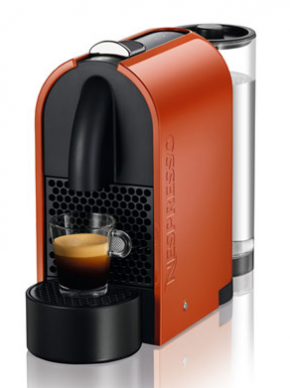
 

Nespresso maker
Nespresso U

Nespresso Coffee Maker: $199 & up

You’ve probably seen those single-cup coffee makers. This is the same idea, but for espresso. And it’s delicious. And bloggers love coffee (maybe even more than normal people).

Nespresso’s currently running a promotion, so you get $100 credit toward the disposable cups of espresso. They come in many different styles, so there are many to pick from starting at $199.

More from the Nespresso website here.



Moo Cards Sample of Gifts for Bloggers
Woodmoore Photography Moo Cards

Moo Cards Gift Certificate

If you’d like to get a gift for someone aspiring to take their blog to the next level, try a gift certificate to Moo Cards. Moo Cards are affordable business cards that look like they cost way more than they actually do. The paper’s nice, you can do rounded edges, and you can use your own photos or their design. My favorite business card source out there. 50 double-sided cards in full color starts at $19.99.
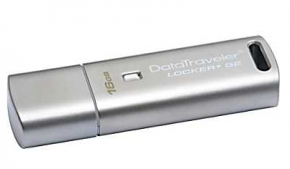
 

16GB flash drive from Staples
16GB Flash Drive

Flash Drive: $28.99

Another thing you can’t have too many of, especially when there are photos or videos involved. Usually you see flash drives in smaller amounts, like 4GB or 8GB. And those are useful, but not nearly as useful as gigantic one, like this 16GB model from Staples. They make prettier models, but when you choose function over form you get a lot more bang for your buck.
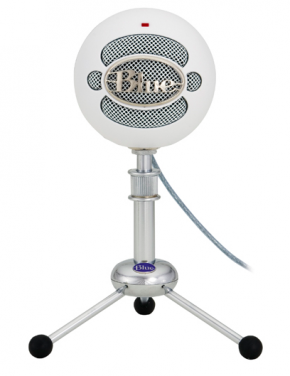
 

Blue Snowball Microphone Blogger Gift
Blue Snowball with Tripod

Blue Snowball USB Mic: $60.88

Podcasts and interviews are a great way for bloggers to create interesting material to engage readers. This Blue Snowball mic will let just about anyone create professional-sounding audio with just a mic and their computer. The mic works just by plugging it in via USB, with no extra setup or software.

You can read more about the Blue Snowball on their website, or it’s available for purchase for Amazon for $60.88.


Gift for Bloggers: Roll-Up Bluetooth Keyboard
Roll-Up Keyboard from Brookstone

Roll-Up Bluetooth Keyboard: $60

Yes, the idea that bloggers work at coffeeshops is a stereotype. But there’s some truth to it. If nothing else, bloggers need the flexibility to work whenever and wherever. This keyboard is great for anyone doing a lot of traveling and/or mobile typing, since it rolls right up to save space, but still gives you a full keypad so you can actually write. It pairs via Bluetooth, recharges via USB, and is especially great for tablet users. $60 from Brookstone.
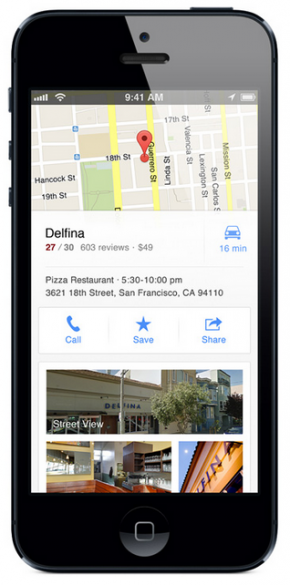
Google Launches Maps App for iPhone

new google maps app for iPhoneIf you’ve put off upgrading your iPhone or iPod touch to iOS6 because of Apple’s maps fiasco, procrastinate no more! Last night Google announced they’ve got a new Google Maps app specifically for iPhone and iPod touch. You can read the official Google blog post here, or if you’re like me, go directly to the Apps store to download. Funnily enough, when I searched for Google Maps in the app store it was actually the 5th result, so make sure you grab the right thing.

This is a big deal, because in case you missed it, Google Maps used to come pre-installed on iPhones. With the release of iOS6, Apple pulled Google Maps in favor of their own mapping application, and it’s just not very good. So all the folks who upgraded to iOS6 were stuck without a Google Maps app while Google got theirs ready.

The new app will sync to your Google profile to let you save “your maps,” and remembers previous searches and directions. If you don’t want the service, simply don’t sign in with your Google ID. You should also decide whether you want Google to collect location data from your phone. Much like your browsing history, Google defaults to collecting your data and anonymizing it by throwing it into a big pool of data about all their users. To turn it off, simply click the little person at the top right of the map screen. That will take you to a “My Profile” page. Click the gear at the top right and go to About, terms, & privacy, and then Terms & Privacy again. From that screen you can turn the location data collection off (and read their privacy policy too if you’re interested).

The new app has some cool updates, like improved design, better incorporation with Google’s Street View and easier inputs for getting directions. All in all, it’s a great app that looks modern and has a much easier user experience then we’ve been treated to in the past. Definitely download it, and definitely upgrade to iOS6 if you haven’t already! Here’s our guide on how to upgrade safely to make sure you don’t lose any data.

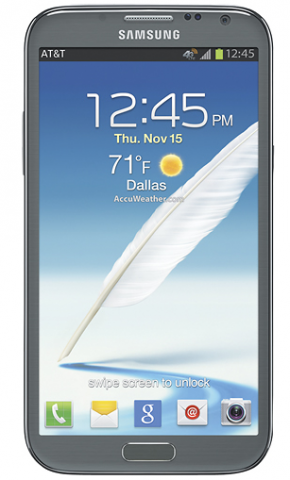
Enter to Win a Free Smartphone from AT&T’s #HappyGiveaways Contest

AT&T Smartphone GiveawayOur sponsor AT&T is offering a great holiday treat this week: each day between today and December 17 they’re giving away one smartphone from their holiday lineup. They’re calling it #HappyGiveaways, and the entire contest will take place on Twitter. Each day at 2PM Eastern, @ATTPremier will announce a question they want you to answer on Twitter. You’ll have till midnight to answer, and even if you don’t win it’ll start all over the next day! All you have to do is follow their account (@ATTPremier) and answer the question, and include the hashtags #HappyGiveaways #spon.

For more info on how to enter, follow AT&T Premier’s Twitter account.

Comparing the New HTC One X+ and HTC One VX Phones

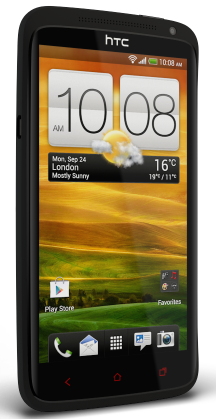
HTC One X+ for AT&T
HTC One X+

HTC has released 2 new Android phones in time for end of the year tech upgrades and holiday shopping, the One X+ and the One VX. The naming is a little confusing, but they’re similar phones, with the One X+ sitting at the top end of the range in both price and features, and the VX sitting somewhere closer to the middle.

The HTC One X+ may be familiar to you as an upgrade of the old One X. The form is basically the same, but HTC has gone ahead and upgraded the specs to put the One X+ out ahead as the flagship model. Like the original, the One X+ features a large 4.7 inch screen, molded black plastic exterior and Beat Audio tech. The weight of the phone stays almost the same too at 4.76 ounces.

One huge upgrade is the insane 64 GB of built-in storage, though there’s no SD card slot. Given that most phones feature 16GB of storage, and the iPhone has never had an SD card option, it shouldn’t be a problem for the vast majority of users. There’s also an upgrade to a quad-core processor, and a battery upgrade to go with it. A lot of the improvements in the experience of the One X+ come from the upgraded OS: the One X+ ships with the latest Android OS, Jellybean 4.1. It also has HTC’s proprietary user interface called Sense on top of the plain Android, and that gets an upgrade here too.

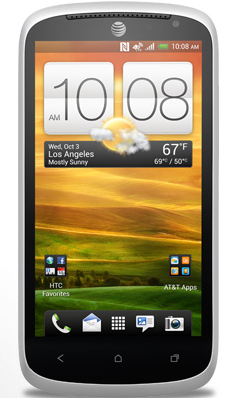
HTC One VX for AT&T
HTC One VX

The One VX may look very similar to the One X+, but under the hood it’s just not quite as fast or strong. The screen size is slightly smaller, at 4.5 inches instead of 4.7, and the camera is only 5MP, instead of the One X+’s 8MP. The VX is noticeably thicker than the One X+, but actually weighs slightly less (though the difference is barely noticeable). It still features a dual core processor, 8 GB of internal storage, and the previous version of Android, 4.0 Ice Cream Sandwich.

What about the difference in price though? The X+ sells for a contract price of $199 from AT&T. The VX is way cheaper, at $50 with an AT&T contract. At that price difference, the VX may be worth it to folks who value saving money over the latest specs: after all, the VX is still a solid phone with good specs. On the other hand, the One X+ is one of the top Android phones on the market right now. Both could be a great device for the right user.

More information on the One VX here, and more information on the One X+ here.

Giveway: Enter to Win a Kobo eReader

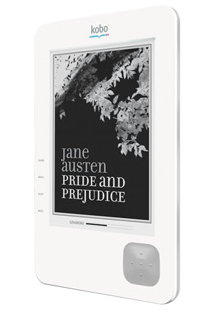
Kobo eReader giveway
Kobo eReader!

Tis the season for giveaways around here! This week we already gave away a laptop thanks to Staples. Now we’re giving away an eReader from Kobo.

The Kobo uses eInk to provide high-contrast text specifically designed for reading, and uses WiFi to access their library of millions of eBooks. You can read all about them here on the Kobo website.

We’ll be running this contest till Friday December 14th. That means we’ll be able to get the reader to one lucky winner in time for Christmas!

Entering is easy: just follow @smbizgomobile on Twitter. You can also get extra bonus entries by tweeting about the giveaway! Just follow the instructions below:

a Rafflecopter giveaway

Productivity Tip: Find & Archive Photos From Your Email Using the Lost Photos App

Lost Photos App for Finding Photos in EmailAt some point a few years ago, I basically stopped deleting email. Not the spam, obviously, or the marketing emails. But everything of actual substance, I basically still keep. That’s years of emails, with lots with attachments and important (at least to me) pictures. Enter Lost Photos, a great app that helps your retrieve all the photos from your inbox, even the ones you may have forgotten about completely.

Basically, Lost Photos is an app that finds all the photos you’ve sent or received from an email account. Then it gives you the option of how to use them. Facebook or Twitter is an option, but I like the “archiving” feature that lets you import to iPhoto, so you can keep and organize all those photos in one place. (For more info on backing up photos from across your social networks, check out Picturelife.)

The app will work on lots of different email service providers, including Gmail, Yahoo, mac.com, att.net, aol.com, any account routed through Google Apps and more. To check whether your email account is compatible, visit their website.

Lost Photos is available for both Mac and PC. PC users should download directly from the Lost Photos website, while Mac users can pay $2.99 to download it from the Mac App store. Considering how many hours it would take to find and archive those photos manually, a measly $3 seems totally worth it.

#GivingTuesday and Your Last Chance to Win a Sony Xperia Tablet

Giving Tuesday and Sony XperiaIt’s been a long week of deals, deals, deals.  And that’s fine: we all need some level of tech in our lives, and there’s definitely nothing wrong with saving a few dollars. But traditionally the holidays are also a time to give back, which is why it’s great that someone has added one more day to the Thanksgiving/Black Friday/Cyber Monday calendar: Giving Tuesday. The idea is that while we’re out spending money on gifts, we can also give a a gift to a worthwhile cause. There are a lot of great organizations behind it, like Donors Choose, the United Way and the United Nations Foundation. Plus lots of retail outlets are chipping in with matching donations and special offers. The best way to find out how to participate and what other organizations are doing is to visit their website, http://www.givingtuesday.org and check the #givingtuesday hashtag on Twitter. If there’s an organization you’d like others to consider donating to, definitely let us know in the comments!

Speaking of giving, we’re actually giving a little something away, ending today: a Sony Xperia Tablet.  Enter below by using the widget; we’ll be choosing a winner tonight at midnight.

a Rafflecopter giveaway

3 Ways Small Businesses Can Take Advantage of Great Tech Deals This Holiday Season

Black Friday circular from StaplesWith all the talk of gift-buying, we forget that the holiday season is also a great time to take stock on tech for your business. Getting the right tech as an entrepreneur or small business is tough. Since you can’t take advantage of the bulk discounts that larger companies get, you have to be a little more creative when it comes to getting the right tech for your business. Thankfully, the holiday shopping season is a perfect time to score some great tech at a discount if you know how to find it.

Keep reading this post at AT&T Networking Exchange –>

How my little brother pissed off @deadmau5 & how changes to YouTube and Socialcam affect you

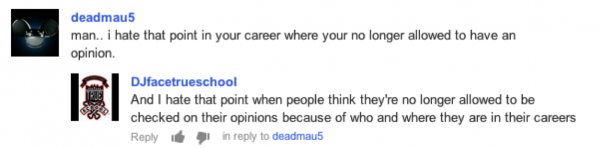
My little brother recently got into a fight with the world-famous electronic musician deadmau5 (pronounced “dead mouse”) in the comment section on a YouTube video. That’s just like little brothers right? Here’s the story. deadmau5 is pretty opinionated when it comes to music, and even has a whole section of his Wikipedia article devoted to disparaging comments he’s made about DJ’s. Basically, his argument is that DJ’s often do little more than get up on stage and hit “play.”

My little brother is a DJ, so needless to say he took offense, and posted a 3-minute rant video directed at Deadmau5 on YouTube. You can watch it yourself, or simply check out their back and forth in the comment section:

That deadmau5 came out to leave a comment is a pretty big deal, but obviously my little brother is still upset. So what’s this fight really about?

Content Creation vs. Curation

Let me define some terms: content creation is when you make an original work. Whether that’s a song, a video, a painting, a blog post, anything that is an original work that you or a team make. Even if you’re not a world famous artist, and even if you don’t have a YouTube channel, you probably still create your own work from time to time. Your tweets, for instance, are your own creations.

But not your retweets. When you share content online, you’re curating it. Finding other great sources of original content online and sharing it. Whether you’re doing it on Tumblr, Facebook or Twitter, today there are tons of great avenues to curate content online and become known for sharing it.

Read More