If you use a domain host for your website (or your client’s site), you need a FTP client to access and manage your website’s files. There are tons of FTP clients for desktops/laptops that give you access when you’re sitting at your desk. FTP On The Go is a FTP client that can gives you access no matter where you are, or what device you have handy.
Let’s face it, there is ALWAYS something you can fix, adjust, tweak, fix, or improve on your site. Either that or you have that insistent client who wants something changed yesterday. If you fit either of those descriptions, why wait until you get back to your office to make those quick website changes? With FTP On The Go, you can use your iPhone, iPod Touch, or iPad to make that change that would otherwise KILL you if you had to wait until you can login from your desktop/laptop.
Once you login using your credentials, you will have the same access via your iOS device that you would if you were sitting behind your desk. You can browse, download files to edit with the built-in text editor, then upload them back to your server, and see the changes in real-time with the built-in browser…all without leaving FTP On The Go. Here is quick list of just some of features:
– Wirelessly share access to the stored files; connect from a computer (or another iPhone) using either just a web browser, or an FTP client.
– With iPhone OS 3 installed, you have the ability to email any saved file.
– View documents and files right within the app. Word/Excel/Powerpoint/Numbers/Pages/PDF documents; log files; image; watch videos; play sounds/music.
– Upload pictures from your photo library, or take a picture with the camera right within FTP On The Go. Images can be resized when you upload too.
– Upload videos filmed with an iPhone 3GS.
If you are worried about security, FTP On The Go automatically uses FTPS for safe logins if supported by the server and a master password can be set to protect your valuable server login information.
Check out the video on how to browse files with FTP On The Go
If your site is broken or, if you’re like me, and see that small detail you absolutely MUST fix, and can’t get to your computer, why not download FTP On The Go ($6.99 for iPhone/iPod Touch, $9.99 for Pro version for iPad) and have access anytime, anywhere!
Instead of “guestimating” time spent on projects for clients to record on invoices, you can manage your time accurately and with less work – the same way you manage your contacts, emails, appointments, and other facets of your business – with your smartphone. ClockIn is a simple and efficient iPhone app that allows you to monitor the time you spend on a project and among multiple clients.
With ClockIn, you can clock in and out of projects the same way you used to “punch the clock” back in the day. Total time on each shift is shown on the main screen and automatically updates live when you clock in or out. You don’t have to leave the app open on your phone to record your time either – ClockIn remembers that you’re punched in even if you close the app to tackle other tasks on your phone. You can also manage multiple clients at one time by saving clients/shifts info (name, website, email, etc.) to quickly refer to them at any time. Export reports in HTML and CSV formats (WiFi only) and email reports directly from ClockIn.
Sure, there are other sophisticated applications that allow you to track time and do all sorts of things, but they can come at a cost and may not be the best way to go if your schedule has you on the road meeting clients, attending conferences, and other business meetings. If you do find the time to work on a client’s project, the ability to whip out your iPhone, open up ClockIn and track your time quickly is worth its $2.99 price tag (OS 3.0 and up).
Tired of playing phone/email tag with potential clients, customers, colleagues…anybody? With the MeetMe iPhone app, you can select a point A and point B, and it will find and lists possible locations in the middle. You select the best location and MeetMe sends an email with directions to your recipient.
There are many ways to find locations with MeetMe. You can use your current location, an address from your contacts, or enter in a location by address, airport code, city name and more. You can also define the type of place you want to meet and let MeetMe suggest locations. Save your locations as favorites and get more information about the location, reviews and more. If you want to be nice, MeetMe also lets you select locations closer to point A or B…if you REALLY want to close the deal.
Regardless of why you want to meet, the MeetMe iPhone app for $.99 in the iTunes App Store makes it easier to find a great meeting spot that’s fair for all parties involved.
With my Square credit card reader now in my possession, I can now accept credit cards from customers on site without a merchant account via my iPad. But, there are some customers who are still holding on to writing checks. I hate going to the bank, so the idea of electronically depositing checks into my business account via my smartphone would be the ultimate business tool for me.
Well another heavily used business tool of mine is PayPal, and it has just released a new version its iPhone app to do just that. By taking a picture of the front and back of the check, I can send the images to my PayPal account (which is linked to my business account) and wait for the money to be deposited.
Until now, Chase and USAA were the only two financial institutions with iPhone apps to process checks electronically. Now that PayPal has stepped into the arena (with its MILLIONS of users) to ease folk’s minds about electronic check deposits, look for more institutions to jump on the bandwagon.
*Your move Bank of America*
I will make sure to keep you posted on if and/or when PayPal will release this functionality to rest of us without iPhones *sad face*
I manage a couple of WordPress sites and write for a couple of others, but I hardly use the WordPress apps for my mobile devices. BUT when I need to use it to adjust something real quick like a typo, or a broken link in a post and I am NOT sitting around a computer, BOY do the WordPress mobile apps come in handy.
So I’m pretty geeked to tell you that WordPress has added some additional features for iOS devices (Apple) that just may get me to use the mobile apps more often.
The “set up” (leading up to the grand finale) features include:
– Autosave feature and improved Local Draft Support so you’re mobile posts don’t get completely trashed if your phone or the app freezes up…and it does happen.
*Drumroll please*
– The WordPress 2.6 for iOS devices now includes enhanced video support. Now you can capture and post videos directly to your WP site without any converting, or uploading to additional video sharing sites, then embedding the video to your WP site. So for all you Vloggers with an iPhone and a WP blog, you can now shoot and post vlogs on the fly.
There are a bunch of other bugs that they worked on, so check out the improved WordPress 2.6 for iOS app – it’s free, but requires iOS 3.0.2 or later.
(No word on any improvements to Android or BlackBerry versions…doh!)
I’ve been waiting for this mobile technology to take off here in the U.S. So far the reaction/adaptation of this technology has been a steady “meh”.
If you’re not familiar with QR Code (Quick-Response Code), I’ll give you the background. It’s essentially a mobile barcode that you can encrypt with any type of information. Contact info, calendar appointments, even URL’s can be encoded via QR code for mobile devices to “scan” and decrypt the information. It’s a very quick way to pass along information to anybody using a mobile device.
Business owners can create codes to quickly get their contact info into a client’s mobile address book. Companies can create codes that will send mobile users to online coupons they can use in-store without downloading the image and figuring out how to print them to hand to the cashier. There is even a real estate company out in Wisconsin that is using QR Code as yard signs to drive home shoppers to their mobile site to find out more about the property for sale. Or just create a code to get users to your mobile site (If you are using WordPress, I certainly hope you are using a plug-in that creates a “mobile-friendly” version of your website).
Once you create the code encrypted with information like your business info. (name, address, phone number and website) you can put that code…anywhere! On the back of a business card, on flyers, on a t-shirt, as an image on your website, etc. Anybody with a QR code reader app on their mobile device can scan the code using their device’s camera and instantly, users can opt to add your information to their mobile device’s contact list.
There are tons of apps available that will enable you to create the code and most (if not all) mobile devices offer mobile apps that will scan the code to access the information. And they are not expensive at all (most are free).
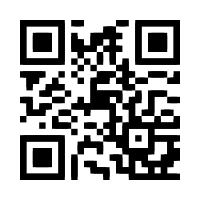
Now i’m pretty sure you’ve seen these things out in the wild, but my question is why haven’t they taken over as the de facto way to access information via a mobile device? They are easy to make (The image in the article when scanned will take you to…you have to scan it to find out). And easy to scan – it’s just as simple as taking a pic of an image with your smart phone’s camera. So what’s the hold up?
Do U.S. companies fail to realize that a large number of people accessing the internet are doing so via their mobile devices? Some companies get it, and are using QR Codes to welcome their mobile device users:
Or is it education? Do people really know enough about QR Codes to create the demand for more entities to adopt the technology? If that’s the case then do me a favor, share this article with everybody you know so we can get the ball rolling! SmallBizGoMobile has done it’s job, now it’s time to do yours!
Some of the reasons behind starting a small business (besides making money) is to get out of the day-to-day grind, and to have more control over your schedule and your life. Fact of the matter is, most people end up working HARDER at their own business than they ever did punching a clock at ACME, Incorporated. Working harder at a small business, especially in the beginning can be due to wearing all the hats of the business. From secretary administrative assistant to IT, to customer service, to marketing, to finance – You do it all!
Sometimes trying to juggle all of your business tasks can leave you a little stressed. Well, if you’re a fan of mobile apps and your day-to-day business tasks get the best of you from time to time…there’s an app for that too! The app is called Office Harmony and its purpose is to help you understand and lower your stress.
From stress assessment questions that help you recognize and understand where your stress is specifically coming from, to office yoga videos that give you quick and easy yoga techniques that can be done at your desk, to soothing meditation exercises that help your relax your mind, to weekly stress tips that help you remember to cool out; this app has it all!
The app includes images of desk yoga exercises, and other exercises you can do without exerting any sweat (because nobody likes yellow arm pits on your nice shirt/blouse during your presentation), and also actual videos of exercises, all without being connected to the internet. That means you don’t have to worry about your mobile network messing with zen-like focus.
So relax, take and deep breath, and just step away for a second if your small business tasks get to be too overwhelming. If that doesn’t work, download the Office Harmony app for $1.99 for your iPod Touch, iPhone, and iPad.
The one thing that defines my life is the constant and overwhelming assault of demands on my time. So for me, productivity is not a nice thing to have, it’s an essential skill to master.
Add to that the fact that I have a naturally curious personality prone to distractions (INTJ in Myers Briggs) and what you have is a recipe for disaster.
So to stay on top of things and be effective I use a suite of software programs that help me be hyper-productive: very focused on the most important tasks for me, on top of the information that I need to get my work done and with a list of things that my colleagues owe me.
I have honed this system over time so that it stays with me, whether I’m working in the office, working at Starbucks, travelling, or even when I’m hanging out and all I have access to is my iPhone or my Android.
Here’s what my productivity software list is made of:
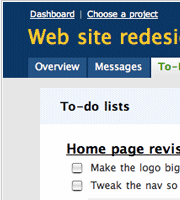
I mentioned this app in my previous blog post. In a nutshell, OmniFocus helps me implement David Allen’s Getting Things Done system. It is a sophisticated app for managing to-do lists. What’s special about it is that it has many criteria to help you bubble up to the top whatever is important to you.
OmniFocus has desktop software client and a mobile client. I sync between them using a service called Spootnik, which has the added benefit of syncing between my organizer system and the rest of the company’s system, which resides in Basecamp.
Other alternatives to Omnifocus are: Things and TaskPaper (which I really like for its simplicity). Remember the Milk does similar things but is web-based.
It’s not enough for me to keep track of my tasks, I need to be able to keep track of other people’s tasks, and as a group we need to stay organized and seamlessly communicate about each other’s projects. Since Ringio collaborates with a lot of vendors and people outside the organization, we use 37 Signal’s excellent, lightweight project management tool called Basecamp.
If you’re using Basecamp right you will have increased the awareness about the status of projects, and the chances that something will catch you by surprise will be drastically reduced.
It’s amazing how complicated it was to share files two years ago… if you had a Windows network and had a file server you could set up local file sharing… but it turns out that most of the files you want to share is with people outside of your network :-) The alternative is FTP, but many people don’t know how to use it, and it’s insecure anyways. What you really need is a way to create shared network folders without the network or without the file server… enter Dropbox.
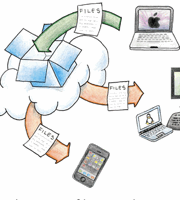
Dropbox is an elegant service that integrates right into your desktop (Finder, Windows Explorer, etc) and mobile, and allows you to share folders with other people. When you update a file on your computer, it updates on theirs, and vice versa. Even when you’re not at your computer, you can log in to the Dropbox website and it gives you access to your files, and shows you recent activity. It even helps you recover accidentally deleted files.
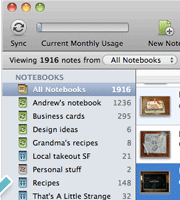
Evernote is a lightweight note taking system that helps you keep all your text, screenshot and video notes organized. I use it to jot down ideas, meeting notes, feedback from customers, transcripts of phone calls, reference how-to-do-this things….. anything that is for my eyes only.
Evernote does a great job of staying out of the way until you need to recall something, then it’s super search and tagging system come to the rescue.
With their iPhone and Android clients, Evernote helps me capture notes (even voice dictation or pics I take with my camera) while I’m on the road.
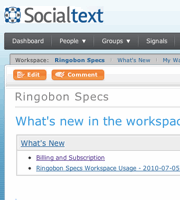
A wiki is collaboration software that helps you keep documents organized and hyperlinked, much like a website that anybody in your team can edit. The ultimate example of a wiki is Wikipedia. We use wikis at Ringio to create things such as product specifications, software release plans, to create customer proposals, to keep track of our competitors, and to store instructions for different kinds of activities that our teams do.
A wiki is a system that acts as “company memory”. If you’re using it right you will be avoiding duplication in the long term, because you will be able to more easily recall when somebody had been working on an idea that you’re revisiting.
There are alternatives to Socialtext, such as Clearspace, or Google Sites.
I spend a good chunk of my time on the phone, making calls to prospective customers, bloggers and the press, investors and partners.
It’s essential for me to spend as little time as possible looking up contacts and dialing, and I need the flexibility to call from any old phone and know that the receiving person is seeing always the same caller ID.
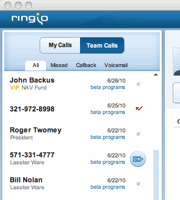
The Ringio software does exactly that for me.
There alternatives to Ringio, such as Google Voice, Toktumi or Ringcentral. I’m biased, of course, so I encourage you to try the different solutions.
Other productivity boosters:
Searchable email: I heavily rely on Gmail’s search capabilities and labels
Delicious bookmarking, Chrome’s bookmark sync
1Password or LastPass for password management and form-filling
Tungle for meeting schedule management
What software do you use to increase your productivity?
Curious to check up on your site on the go? If you have Google Analytics loaded on your site (If not, you need to get on the ball), you can most definitely use your iPhone or Android smartphone to access many of the same stats and reports from your site you are used to if you were sitting at your desk.
The Analytics App I found for the Apple iPhone, iPod Touch & iPad mobile devices is called (you guessed it) Analytics App. Clever names aside, this is indeed a robust app that gives you access to over 55 reports broken down into categories like:
side note: I chucked when I read the Analytics App site description of the app, so I just thought I would quote it here:
“Finally you can get to all of your reports and data with Analytics App for the iPhone and iPod Touch. Whether you’re on the road, in a meeting, or sitting on the throne, Analytics App gives you quick and easy access to your analytics data.”
Moving right along, the Analytics App supports multiple accounts/sites and gives you the ability to dig deep into your reports up to 100 rows of data. The Analytics App goes for $6 bucks and can be found in the Apple App Store
Conversely, the Mobile GA (I am assuming stands for Google Analytics, another clever name) app for Android devices stresses quick, easy, and simple stats and reports on your smartphone in order to just get the ‘big picture’ and keep it moving.
“Mobile GA only requests and processes necessary data. Whereas other mobile applications use variations of screen scraping and consume more processor cycles, Mobile GA minimizes bandwidth, processor, and battery use.”
But Mobile GA is packed with enough firepower to make this a very appealing app to view the necessary site stats. Below are some of the features:
– Date range comparison
– Graphs and charts for each report
– Custom date ranges
– Favorites
– Geolocation reports
– Regex-enabled searches
In other words, the Mobile GA app is not a slacker either. Additionally, since this app runs on the Open-Source Android mobile Platform, you can customize the API via the app’s Parent site ActualMetrics to meet your specific needs. So if you are like me and just need the top level info, Mobile GA is right up your alley. If you don’t already know, a Brotha loves free, so it should be noted that the Mobile GA app is free to download from the Android Marketplace on your smartphone.
Some would say I’ve been waxing lyrical about Android in the last few weeks as I compared iphone vs android, I am a fan, no doubt, but –lest you think that I’ve lost my sense of objectivity– here are some worrying trends that have recently emerged about Android phones:
Some new Android models have been getting so-called JunkWare: gratuitous apps that are shoved into the standard distribution of the OS whether the user likes them or not. Mark Milian highlights some of the abuse in a recent LA Times article.
There are unconfirmed reports that the new Motorola Droid X (a very cool phone by technical standards), contains hardware preventing users from installing their own homebrew version of the Android Operating System. While most users won’t be doing any of this kind of hacking, it’s just bad style on the hands of a manufacturer.
So just because the Android platform has been making a lot of progress in competing with iPhones, it doesn’t mean that it’s devoid of its own dubious practices… remember, use your best judgement when picking a phone for your business.






 The Analytics App I found for the
  Conversely, the