Ad-Free Social Network App.net Exceeds its Fundraising Goal of a Half-Million Dollars

What if there were a social network that promised not to sell your personal data to advertisers? Would you join, even if you had to pay for it? That’s the premise of app.net, a very bright idea from developer Dalton Caldwell, who felt that Facebook didn’t respect his contribution to their social ecosystem — or that of their users. App.net logo

We all rely on the big platforms like Facebook and Twitter, either as small businesses reaching customers, or as developers looking to create the products that help businesses leverage those platforms. Generally, it’s a one-sided relationship, where the big platforms do what they think is best for them – and the rest of us struggle to keep up. App.net was conceived as a way for those integral to the social process – the users and developers – to have some control over the process.

So, what is App.net offering to set it apart from the other social networks? Read More

Protect Your Data, Part 2: Cloud Backup Recommendations


Cloud Backup for iPhone
Earlier this week we talked about how to back up your data using an external hard drive, so that your data will be safe even if your devices meet an untimely fate (like those of Wired writer Mat Honan). But cloud backup is important too, and as the major industry players push services like iCloud, Google Drive and Amazon Backup, it becomes more important than ever to make sure that remote data is secure.

It’s important to note that hackers got into Honan’s computer through what’s called “social engineering,” which describes exploiting the people involved in security rather than hardware or software. Specifically, they were able to find out the last four digits of his credit card from Amazon, and were able to use that, combined with his billing address retrieved from an online lookup, to have his Apple ID reset by Apple tech support. So, while password security is essential, it’s not enough. Read More

Microsoft Office on the iPad & Android Tablet

Tablets have revolutionized our leisure computing. We can browse the web on our laps while we watch TV. Food magazines become full-color digital spreads right in our kitchens. And the email, of course. There’s always more email. But tablets haven’t been great work devices, not least because there’s no Microsoft Office on the iPad.

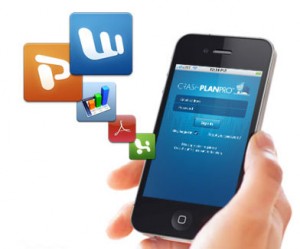
Now tablets have taken another step toward being all-around machines that can handle work too, thanks to CloudOn. Available on both the iPad and Android devices, CloudOn brings you the full Microsoft Office Suite using you guessed it, the power of the cloud. That means Powerpoint on the plane or tracking Word changes wherever.

Since it’s in the cloud, CloudOn links to both DropBox and Google Drive to make it easy to access, write and save files. Plus CloudOn automatically saves as you work, just in case.

We don’t advocate working on vacation, but if you’re planning to get away and worried something may come up, this could be the perfect strategy for coping without having to bring your fully decked-out work computer.

RockMelt Review: Better Social Media in Your Browser

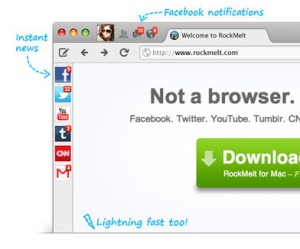
Attention news junkies and Facebook superfans! Are you using the RockMelt browser? It brings all your social media and news inside the browser, so you can constantly monitor all your feeds without skipping a beat or navigating away from what you were doing.Rockmelt Browser Sample

Instead of opening lots of tabs, each with its own social or news site, RockMelt brings the sites you choose into the browser window. Think Chrome, but running apps on the side. So for example, Facebook notifications and chat are easily accessed from an icon on the side of the browser. Sharing is built into browser too, so it’s not just a one-way communication stream.

If you’re not a Facebook obsessive, that’s fine too. RockMelt has chat built into the browser, plus Twitter, YouTube, Tumblr, CNN and even Gmail. When there are new events, you’ll see a number over the icon in the browser to tell you how many updates there are to see. No need to open Gmail just to find you haven’t heard back yet!

Particularly useful is the customizability. Any RSS feed can be added as a custom tab, so Rockmelt can be a completely streamlined browsing machine bringing you what you need to know. Ditto for the iPhone app, though it lacks the complete browser experience, and sadly there’s no app for Android just yet. Here’s hoping it’s coming soon though. Overall, the RockMelt experience is fast, useful, and a time-saver for the news and social obsessed.

Samsung Galaxy Note & Intuit GoPayment Bring Mobile Payments Everywhere

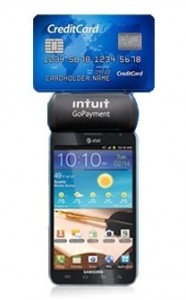
Mobile payments are about to be everywhere, and small business owners should do their research now about how best to incorporate this new technology into their business practices.Galaxy Note with Intuit GoPayment

AT&T is now targeting small businesses with a combined solution in the Intuit GoPayment Card Reader plus Samsung Galaxy Note running on 4G LTE. The  GoPayment reader comes with the Samsung device to swipe cards anywhere, anytime.

Intuit, Inc. is also the parent company of QuickBooks, so it’s easy to integrate your “everywhere” sales with one merchant account and all your standard business record keeping. And you may actually pay less for the privilege of accepting credit cards than you would with a traditional merchant services provider.

With the GoPayment reader there’s no set-up fee, no monthly charge minimum, and no transaction fee.  In the pay-per-transaction model swipes cost only 2.7% and manual transactions cost 3.7%. Businesses that anticipate more than $130 of swipes per month should go with the subscription plan, which charges $12.95 a month, but charges 1% less per transaction (1.7% per swiped transaction and 2.7% for manual entries).

AT&T Premier customers can get the whole (4G LTE!) package for a discount through their website. (Full disclosure: AT&T helps sponsor SmallBizGoMobile.) Previous SmallBizGoMobile coverage of Intuit’s GoPayment and its integration with QuickBooks POS can be found here.

Total Recall: Back Up Your Data to Protect Yourself

Last week, former Gizmodo writer Mat Honan had everything stolen and wiped by hackers. Everything. They wiped all his devices (Macbook Air, iPad, iPhone) and had access to all his online accounts, including his Gmail and Twitter. You can read the entire story on Mat’s blog, but the key takeaway is that hackers used Apple tech support to gain access to his iCloud and take over his entire digital life.time machine backup utility icon

So how do you keep yourself from being the victim of a hacking? To start, one method of backup is not enough, especially when that one method is in the cloud: it’s best to use an old-fashioned external hard drive backup too.

Mac users have it relatively easy, with the Time Machine backup utility designed by Apple for this exact purpose. Time Machine makes a copy of your hard drive, and then updates it as you make changes to your hard drive. Time Machine can be used with an external hard drive, or paired with Time Capsule, Apple’s external hard drive that doubles as a wireless device. Time Capsule comes with either 2 or 3 TB of storage, which should be enough storage for most users.

PC users will need to buy an external hard drive as well as one of the many backup softwares on the market. The good news is that a 2TB hard drive will only run you between $100-$200, and the backup utility Easeus-Todo is free as well as highly rated. Once you’ve downloaded and extracted Easeus, it’s simple to backup either all or part of your data, as well as schedule future backups so you’re always protected.

Once you have your data backed up on an external hard drive, it’s time to also make a copy in the cloud. From iCloud and Google Drive to Dropbox and Nexus, there are tons of backup options, which we will talk about in more detail later this week. For now, it’s enough to know that backing up — without the cloud — is still a must for the foreseeable future.

Productivity Tip: Avoid Distractions By Timing Yourself

Distractions are everywhere. But what if you only challenged yourself to pay attention for short, manageable bursts of time? Would you be more productive?Pomodoro Technique Logo
That’s the theory behind the Pomodoro Technique, which prescribes 25 minute burst of attention. That means you set a timer, and for 25 minutes you concentrate on just one activity, and don’t check email, Twitter, your eBay auctions, nothing. Just one task. And if you’re interrupted, you start the timer over. Just the threat of being forced to start over (and going an extra few minutes without Twitter) should be enough to scare some people into 25 minutes of attention.

After 25 minutes, you take a break of five minutes, give or take. Then after four Pomodoros, it’s time for a longer break. The idea is that consistent breaks in your attention saves your brain from burnout, and that setting small, manageable goals helps ward off the anxiety of the overwhelmingly long to-do list.

Frencesco Cirillo, Pomodoro creator, has made a basic introduction to the technique available as a free pdf on the website www.pomodorotechnique.com. There are also testimonials from other Pomodoro users, program updates, meetups for practitioners and even t-shirts for the true believers.

Cirillo recommends using a standard kitchen timer, but for the connected professional there are also digital and mobile alternatives. Pomodairo is a free Adobe Air app that lets you make intuitive to-do lists, a timer for pomodoros, and helps you keep track of your work (and any unanticipated interruptions). For just a timer, try www.tomato-timer.com, which works in the browser and doesn’t require a download, even on iPhone and Android.

For an app proper, iDevice users can try Pomodoro Time Management Light for free to see if they’re ready for the full version. The full version is only $1.99, so if you decide to upgrade it won’t be a huge pain point. Android users can try Pomodoro Tasks, available for free in the Google Play store.

If you’ve tried the Pomodoro technique before, fill us in on your experiences in the comments. We’re all looking for ways to be more productive – help us out!

Connect America Fund Bringing Broadband to 400,000 Americans

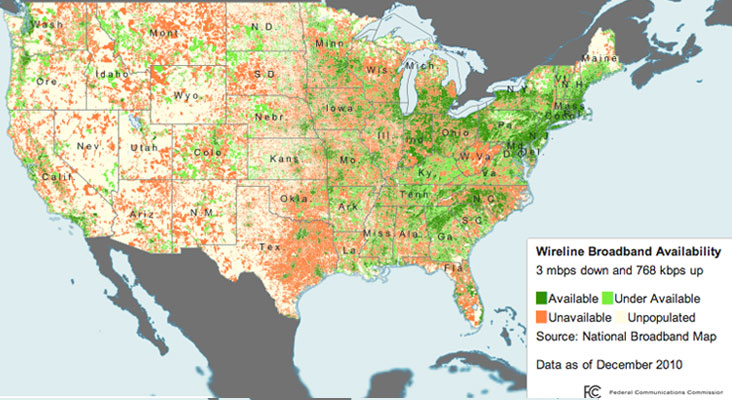
Broadband Availability Map
Map of US Broadband Access, from the FCC

For those of used to downloading apps in seconds or streaming video, it’s hard to imagine going back to the days of dial-up. But according to the FCC, nearly 19 million Americans currently lack access to broadband, meaning those people have access only to dial-up — or nothing at all.

Enter the FCC’s “Connect America Fund,” which announced last week that they will bring highspeed to nearly 400,000 residents within the next three years. This is part of a larger initiative to bring broadband to 7 million Americans in the next six years, an aggressive target set by the Obama administration as part of its commitment to universal broadband service.

The Connect America Fund is essentially a revamped version of something called the Universal Service Fund, which was tasked with bringing affordable nationwide telephone service to rural and high-cost areas. The USF will be phased out by 2018, as the FCC concentrates resources on broadband access through Connect America.

Given that more and more of purchasing, both of goods (Amazon) and services (Netflix) is moving online, broadband access has the potential to deliver new customers to thousands of businesses. And it also opens up the innovation economy, both in terms of education and entrepreneurship, to people previously excluded from our evolution to a connected, digital society.

Google Acquires Wildfire, Plus an Inside Look at Their Biggest Competitors

Google’s acquisition of social media marketing firm Wildfire gives Google inside access to the analytics of some of their biggest competitors, most notably Facebook.Google Acquires Wildfire

Wildfire is social media marketing company with 16,000 customers across a wide variety of brands. Companies use Wildfire to create social assets, like customized Facebook apps, and drive user engagement through social media marketing campaigns. As part of their suite of tools they offer engagement metrics and analytics designed to let marketers optimize their messaging for the best results.

Given that Wildfire has said they will continue to operate just as they always have, that means Google now has access to an unprecedented amount of data about how users engage with brands across social platforms, including LinkedIn, Twitter, Pinterest and especially Facebook.

To be able to see how consumers use these services is an inside look at how these services work, and a unique vantage point for Google to predict new product developments based on current reactions, success, and feedback. After all, imagine if Facebook could see inside the social graph of Google+: they’d be able to copy what works there, while avoiding obvious pitfalls.

Perhaps this is Google’s strategy to try to beat Facebook at their own game by replicating what works at Facebook within Google+. Or maybe this is a vote of no-confidence in Google+ as executives realize they need to own social and their own network just isn’t going to cut it.  Either way, Google just learned even more about you – and your potential customers.

Microsoft Surface (Running Windows 8) Coming October 26th

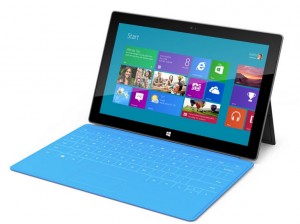
Microsoft Surface
Microsoft Surface, image courtesy Microsoft

It’s finally confirmed: Microsoft Surface, Microsoft’s groundbreaking entry to the personal computer/tablet market, will be available to users starting October 26, 2012, along with Windows 8, the latest incarnation of the Windows OS .

A long time in the making, Microsoft first debuted the Surface to the world just last month, but without a firm release date or a price tag attached. And while we still don’t know much a Surface will set you back, we do know a little of what you’ll get.

The most prominent (and innovative) feature of Microsoft Surface is its built-in keyboard that doubles as a cover to protect the machine’s screen, a clever innovation. Even with the cover, Surface is only 9.3mm thick (for comparison, that’s .2mm thinner than the latest iPad) but still manages to incorporate a full-size USB port and a Micro SD card. And while journalists haven’t been given Surfaces to review yet, we do know that they will be running Windows 8, which gives us a sense of the device’s interaction experience.

Why is Surface so noteworthy?

Well, if you’ve bought a PC lately, it was likely from Sony, HP, Dell, Acer or another manufacturer. It certainly wasn’t from Microsoft, and that’s because until now Microsoft has limited its forays into the hardware business to peripherals like keyboards and mice. The Surface tablet changes that, putting Microsoft into direct competition with its pals: the PC manufacturers.

Given its incredible portability, keyboard, and the fact that Windows is still the preferred OS for many business applications, Surface has the potential to be the first device to truly bridge the tablet/laptop divide. But only if the device — and Windows 8 — live up to their potential.