Step your Team Collaboration up With Flowr

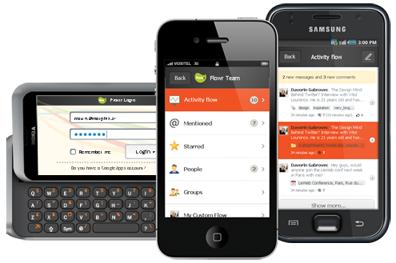
If your business involves working with a group of people remotely in different locations/parts of the world on a regular basis, collaboration may be the one aspect that gives you the most issues. The back-and-forth emails are simply not “cutting the mustard”. So if you’re looking for a more uniform way to work with your group, the Flowr web-based collaboration service may give you the tools you need to effectively communicate with your team and keep everyone in sync.

Flowr is indeed web-based, so there is no need for you or your team to worry about system requirements (have network access, will travel). With Flowr, you can share files, exchange ideas, ask questions, post tasks and collaborate with your team in a private and secure network that you and up to four colleagues can use for free with 100mb of space. to work with.

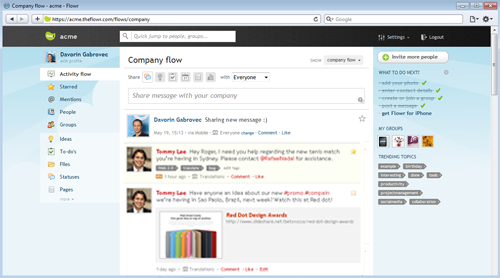
Communications between team members show up in the main screen like wall posts on Facebook. Adding links, sharing files, and addressing message to particular members is reminiscent of how you handle these same tasks on other popular social networking sites. In other word

s, the learning curve is shallow if not non-existent. The updates are real-time, and you can add tags to updates for easy reference later. Additional features include:

  • Team profiles/group directory
  • Upcoming event tracking
  • Custom Flowr themes
  • Sharing rights to specify recipients
  • Bookmarklet for easy sharing web content
  • Built- in analytics

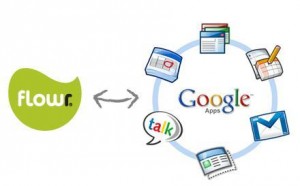
If you already depend on Google Apps for a huge chunk of your teams communications/organization, Flowr can integrate with your account the popular Google Calendar/Google Docs services so you can keep your scheduling and documents at home while using Flowr to organize it all.

Finally, Flowr offers an iOS and Android app, in addition to a mobile-friendly HTML5 site for access from all other mobile platforms to get your “collab on” while on the go.

Flowr is free for up to five members and 100mb of storage space, while the Premium plan is $60/month but adds up to 15 users, additional features, and priority support. So stop the uber-long and hard to search email threads and check out Flowr for your team collaboration needs.

The Good News Is That Most Small Businesses are Hiring!

If you’ve never heard of Manta before, then allow me to bring you up to speed. Manta provides a site for small business owners to ‘claim’ their business listing online and establish a basic online presence for free. For business owners unable to produce or fund a full-fledged website, Manta provides an easy way to get online. It’s no fly-by-night operation either: according to comScore, Manta is the 3rd largest small business info site. An additional service, Manta Connect, allows business owners to network, and ask each other questions in an active forum of like-minded professionals. With almost half a million business owners already on Manta, the site is quickly making a name for itself as a destination for small business owners.

Because Manta has an active community of small business owners, they have a unique ability to be able to survey their users about trends within the industry. Their March survey, the results of which we recently released, asked 1,016 small business owners—892 of whom have fewer than 10 employees—about hiring trends and practices. The good news? Small businesses are hiring! Read More

Meetings suck! Use these 2 tools to help your meetings be productive!

Meetings when done poorly are a total waste of time, non-productive and can be demoralizing to employees.  I can’t fix how you run your meetings BUT I can share with you 2 technology tools that I think can help you be more productive in meetings and make it easier to schedule them.

#1. Make scheduling meetings painless & stop herding cows!
If you are like me I can’t stand when people send emails back and forth trying to tie down an agreed upon meeting time. This becomes incredibly non-productive when you have multiple parties that you are trying to schedule. People are way too busy for this and YOU don’t have time for this back and forth non-sense and neither does your admin staff. So, I use TimeBridge-it’s a free service that enables you to send 1 email with multiple times for people to choose and the software finds a time everyone can make! That’s it done! 1 email and your golden! And the mobile app is pretty awesome too with features like agenda review and the ability to notify the organizer right through the app if you may be a few minutes late. Not to mention this cuts down on the tremendous amount of email waste we all are consistently fighting.

#2. Visualize the meeting using Mind Mapping!

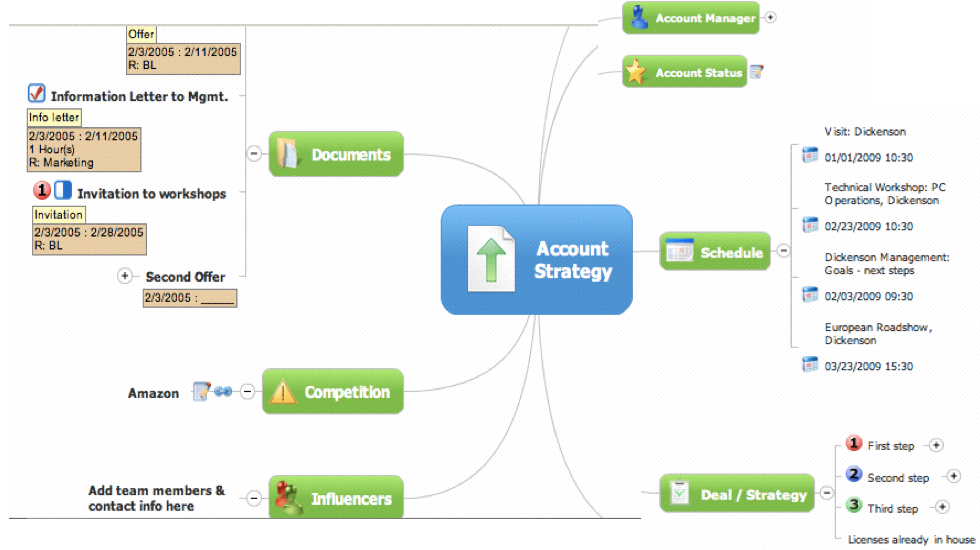
Once you have the meeting set, now is the time to figure out how you can get the most productivity out of it! Have you established clear objectives, did you send out the description and agenda in advance and have you asked people to bring any specific elements with them etc…?  Now that everyone is gathered the main challenge is capturing what transpires in the meeting and capturing it in a way that’s productive! I’m sorry but using a flip chart isn’t productive, using a whiteboard not better either, using Word is ok but flat and for these reasons that’s why I like to use Mind Manager. Now, maybe it’s because I’m a visual learner but this software enables you to capture meeting notes as it happens in a visual manner, this way it is very clear what took place, what the action items are and what’s more is that you can easily import your mind map into Word if you really want that doc. My favorite feature is that you can export the mind map into your presentation software Keynote (Mac) or Powerpoint (Windows) and it instantly begins to build out all of your slides in the proper order that the meeting happened – it’s unbelievable and a major time-saver. Literally moments after your meeting you can have a presentation ready to present – trying doing that on a whiteboard. FYI–Mac users there is a new release coming out June 23rd take a look at the new iPhone and iPad features they are releasing and here’s a video demo of how it works:

This is a community, so YOU tell US what you use to make meetings more productive. I’d love to see your tips and ideas in the comments!

Real-Time Professional Networking with Yammer

Twitter answers the question “what’s happening?” in 140 characters or less, Facebook asks us “what’s on your mind?”, and Tumblr provides a variety of blog post templates.  All of these apps answer interesting questions, but aren’t specifically productivity-oriented.  Enter Yammer, which you can tell means business by the question it asks:  “What are you working on?”

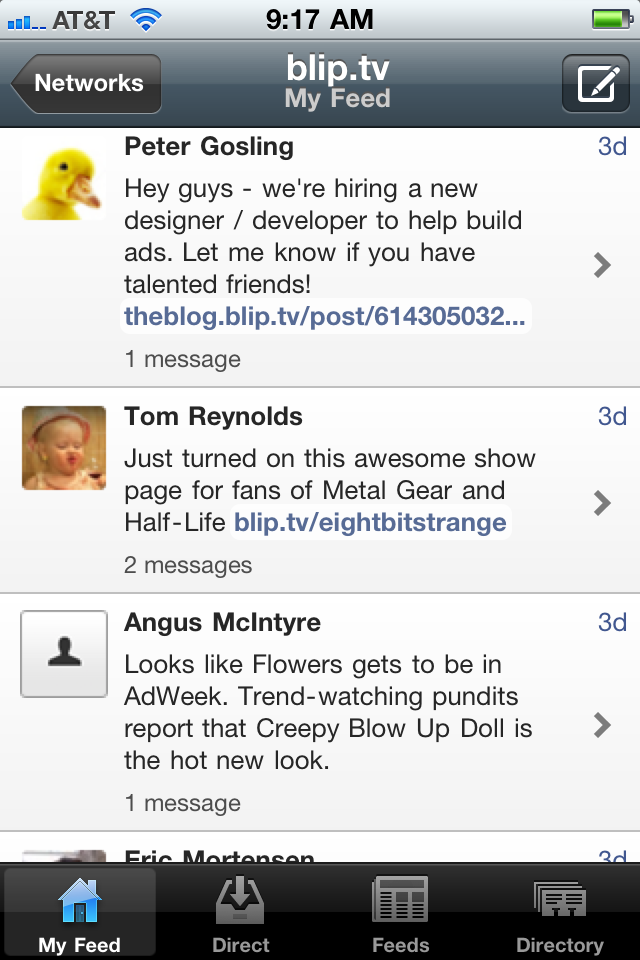
I mostly use this application on the desktop.  However, I have found when working remotely this is a great way to keep from feeling disconnected from the office.  After setting up a basic profile, Yammer becomes a feed of updates that are posted by people that you are following (a very common networking paradigm).  It’s different from other applications in that the feeds are broken up by companies or projects rather than social distinctions.  This allows you to quickly get a view into what various project teams have been chatting about.

We use Yammer at blip.tv and it has been really useful.  First, we have several satellite offices around the country.  When people working in New York, LA, San Fran, Detroit and elsewhere are all on the same project, the ability to have real time threaded conversations gives people the feeling that they are working together in the same room.  Chats are more conversational than omnibus emails, which aren’t always timely and often are out of order. “Yams” are more natural and follow the pattern of verbal speech.

Yammer can be as serious as it needs to be.  Unlike other platforms where there is a stricter protocol of use, Yammer can be both work and play as needed.  My business uses it for everything: from the support team contacting development about an urgent bug, to announcing where we are getting a pint after hours.  Yammer is our water cooler… we make jokes, talk about sports and cut up, but important information is passed through Yammer as well.

The app itself is clean and simple to use, with a view of your feed, direct messages, a list of alternate feeds, and a company directory.  It is available for both iOS and Android, and works great on smartphones and tablets.

BlackBerry Launches Mobile Conferencing App

A couple of weeks ago, I posted a story on making conference calls with a BlackBerry. Well the folks over at Research In Motion (RIM) must have read my article (Boom!) and pushed the BlackBerry Mobile Conferencing App out of Beta and into the BlackBerry App World.

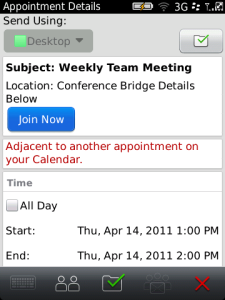
The app is designed to work with your existing conferencing system to make scheduling, joining and rejoining conference calls from your BlackBerry quick and easy from almost anywhere. Instead of trying to remember conference call codes, and multiple button sequences, the app offers up a single ‘Join Now’ button to make joining calls a breeze.

Additional feature include:

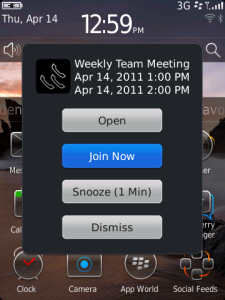
One-Click Join – Before a conference call starts, a pop-up reminder displays a “Join Now” button that, with a single click, dials the conference bridge and enters the appropriate codes to connect the user to the conference. If the call gets disconnected or the user needs to drop off, the app will present a “Reconnect” button, which dials the user back into the call with one click.

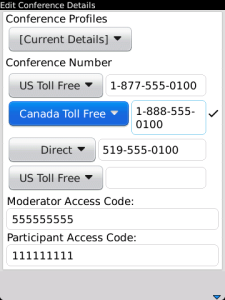
Easy Conference Scheduling – A user can schedule a conference call complete with conference bridge details directly from the BlackBerry Calendar in an easy two-step process. To enable this capability, the user sets their conference call profile once in the BlackBerry Mobile Conferencing app, including dial-in numbers and access codes, then simply adds the profile as part of the calendar invitation. (The moderator code is kept hidden from participants in the calendar invitation.)

Optimal Conference Call Number Selection – If multiple dial-in numbers are provided to accommodate participants in different regions, the application can automatically choose an optimal number to use (for calls within North America), such as using the local number if the user is within the local calling area rather than a toll-free number; or a toll- free number if the dial-in number would otherwise be long distance. Users can also select or modify a specific dial-in number manually.

The app supports many of the leading audio conferencing systems, so no matter if you are trying to join or schedule a call, the BlackBerry Conferencing app has got you covered. The app is a free download from the BlackBerry App World (OS 5.0 or higher).

Google Wallet and Google Offers Bring Huge Opportunities to Small Business Owners and Consumers

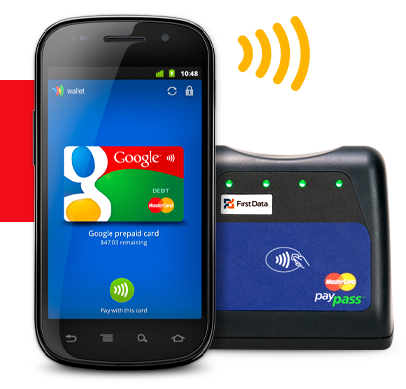
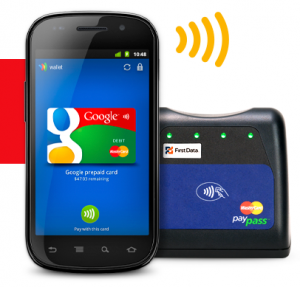
Today we were at Google’s press conference in NYC, it just concluded, and we have to say, the implications could be huge for small business owners, with Google announcing two key new Android apps that will potentially enable your customers to pay you faster by using their mobile phone. The primary app, Google Wallet, will securely store and communicate financial information from users’ phones to merchants’ NFC terminals. NFC (near field communication) is a wireless technology that has been around but is becoming more popular.  The other app announced was Google Offers, which serves as a complement to Wallet, integrating coupons and loyalty programs to the transaction experience.  Let’s take a look at the features offered by each app, and then consider the implications for small business owners.

Wallet will roll out this summer, though it will initially provide NFC services only with Citi Mastercard and/or a pre-paid Google account.  Google promises that more account types (Visa, American Express, non-Citi Mastercards, etc.) will be added in the future, but they didn’t name any specific partners, nor did they offer up any sort of timetable.  Despite the limited number of launch-time partnerships, the potential for Wallet is huge, as it’s the first NFC system that allows users to maintain multiple credit accounts within the same NFC client.  As Wallet gains wider adoption, more banks and credit agencies will likely jump aboard, which will provide users with an NFC commerce experience as flexible and robust as the current, leather wallet-based transaction process.

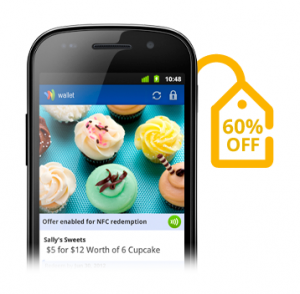
For small business owners, Google Offers promises to be a real game-changer.  Google demonstrated how seamlessly Offers integrates with both Wallet and users’ desktop browsing experience; a desktop Google search for “denim shorts” might yield a digital coupon, which can be added into the user’s Offers account through a single click, and then redeemed in person, via Wallet, at the local point-of-sale.  Even more exciting is the integration of location-specific coupons and offers into the Android ecosystem; a phone-based search for “sandwiches” could yield offers from nearby restaurants, generating greater first-time customers for local businesses and international franchises alike.  Offers will also manage and track customer loyalty programs, which could definitely help transform occasional customers into regular patrons.  Google is selectively launching Offers in Portland, San Francisco, and New York this summer, though once the initial bugs have been worked out, the program will likely quickly spread to other cities.

Google also outlined some features that will likely be added to Wallet/Offers over the next several years; digital receipts, transaction-based prizes and games, and eventually the ability to integrate drivers’ licenses, health insurance cards, concert tickets, and hotel keys.  What remains unknown, though, is who will be responsible for securing the data of these para-transactional experiences.  For the financial information of the transaction itself, Google has partnered with FirstData to provide secure transmission and storage of relevant data, but it’s unclear if FirstData would also be responsible for managing loyalty card information and the like.

There’s a lot of potential here, but what can small businesses expect in the short-term?
To be honest, not much.  Currently, the only Android phone sporting an NFC chip is the Nexus S, and it’s hard to build an entirely new commerce ecosystem around a single phone.  More NFC-enabled Android phones will likely arrive later this year, but it will take at least several years before a significant number of consumers have Google NFC technology in their pockets.  And, with rumors circulating that Apple has an NFC platform of its own in the works, it’s unlikely that Google’s initiative will move forward without some competition from its rivals.  The short-term potential of Wallet/Offers is also tempered by the aforementioned lack of launch-time financial partners; how many people have both a Citi Mastercard AND a Nexus S, and how many consumers look forward to regularly refilling a bespoke Google debit account?

Sure, the immediate potential of Google’s announcement is pretty limited, but with NFC terminal readers costing less than $10, merchants won’t be staking a significant financial investment in the technology, should it fail to find widespread consumer adoption.  And the long-term potential for small businesses is absolutely huge; if Wallet and Offers become widely adopted by consumers, smaller merchants and local retailers will be able to engage in the type of targeted advertising and sophisticated customer loyalty programs (with their accompanying analytics…) that are today affordable only for medium-to-large companies.  If you’re a small business owner in one Google’s trial cities, becoming an early adopter of Wallet/Offers could pay considerable dividends down the road, as your familiarity and expertise with the infrastructure could provide a key competitive advantage, should Google’s NFC become the transactional experience of the future.
The World is Going Mobile: Amazon Kindle E-Books Outselling Print Books

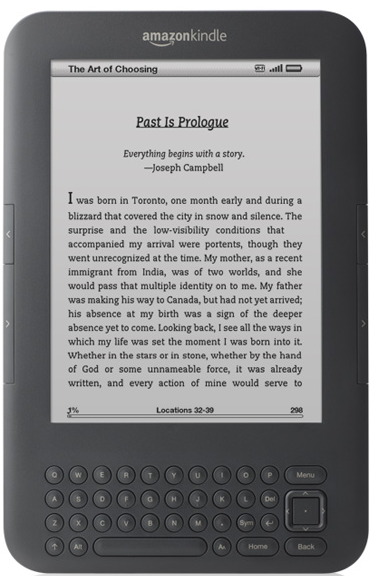
At first, I didn’t see the Small Biz Go Mobile angle in the news from Amazon today that Kindle e-books are outselling print books. Sure, the Kindle is a mobile device, but compared to an iPad or an Android-based smartphone it’s a relatively dumb device. On a smartphone you tweet out advice to your followers, reply to urgent email, and locate a decent restaurant at the last minute for a business meeting. On a Kindle you can… read e-books. And take notes. And buy e-books. And… you get the picture.

The fact is, the world isn’t simply going digital, it already has. Amazon, founded back in 1995, made it’s name and it’s business by selling books better than not just the “Mom & Pop” stores, but the Barnes and Nobles of the world. That the e-book is now a better selling product for them than the physical book says a lot—the majority of Amazon customers have now gone digital.

So too must your business. Whether you’re accepting credit card payments with an iPhone, taking your meeting notes with a web app, or finding ways to become more productive while on the go, you need to take advantage of the benefits of digital technologies in order to stay competitive in today’s market.

Record and Share Meeting Minutes Online with Minutes.io

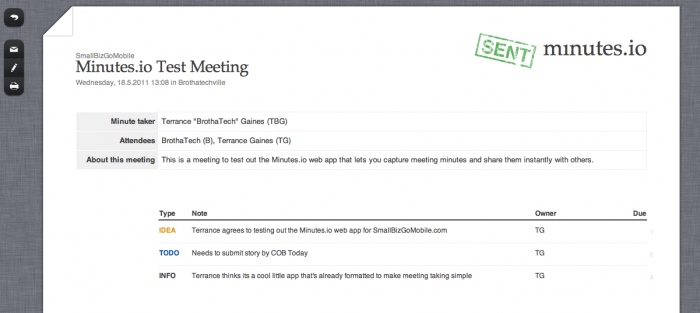
Me, Myself, and I all in a meeting togetherWho REALLY likes taking meeting minutes? No one (present company included) but it is one of those necessary evils that needs to get done to give meeting attendees a reference as to what were the key meeting points. Now, there are a bajillion ways you could take meeting minutes. It doesn’t have to be pretty, it just has to get done. With the Minutes.io web app, you can make recording minutes painless and sharing minutes instant.

There is no need to set up an account, verify an email address, or subscribe to anything to take advantage of this free little web app. Simply visit Minutes.io, enter the meeting information (meeting name, date, place, attendees, and minute taker) and you’re ready to start. Recording minutes is list-based, and the web interface gives you a couple of options to categorize your minutes:

  • To Do
  • Okay
  • Info
  • Idea

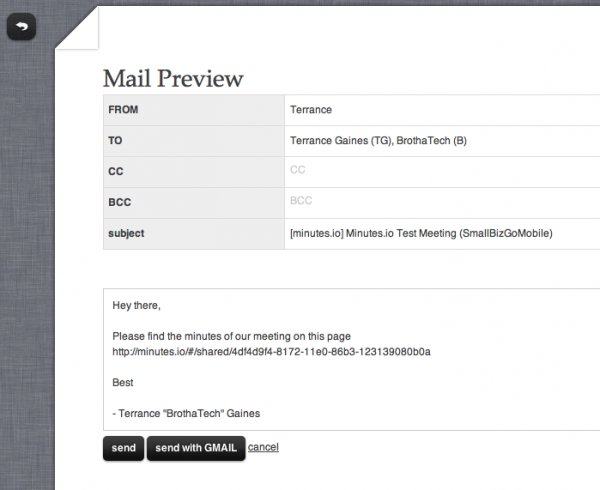
You can then describe the minute, designate a owner or responsible party of the minute recorded, and add a due date. Once you’re done adding minutes, you have the option of printing or sharing the minutes via email. If you choose to email, Minutes.io will populate an email message complete with your name, email address, addresses of other attendees an a nice little message in the body of the email.

The cool thing about Minutes.io is the fact that since it’s a clean and straightforward web app, any device with a web browser can create meetings minutes. So if you are out and about and remembered that you are the designated minutes taker for the meeting you totally forgot about, you can get the job done via your smartphone or tablet device.

Minutes.io is free and ready for you to try out now. So check it out and see how easy it is to record meeting minutes. It just may make recording meeting minutes fun [/sarcasm]

How My Wife Replaced Her Computer with an iPad

My wife was probably the first Apple fangirl I’ve met.   Years ago, when we lived on college-kid budgets, she scrimped and saved over $1300 to get her first 12-inch G4 Powerbook.  It was the start of a love affair.  With the laptop she read blogs, participated in comment forums, did research and schoolwork, wrote, did our family finances, designed magazines, edited videos, kept organized, and even made our wedding menus and programs.  She had it open more often than not!

Years later, her cousin absent-mindedly knocked it from a high table and it broke beyond repair.  She was heartbroken, and so we replaced it with a newer Intel model immediately (again, another thousand dollars).  This seems expensive even now, but we really felt like she needed it.  We couldn’t think of any other machine that would enable her to get as much done.  We were also the earliest of our friends and family to adopt the smart phone; we had Treos and Blackberries to play with when most people were just figuring out this “texting” thing.  We loved our mobile devices very much, but they were strictly for entertainment and communication (not business or school).

One day, everything changed.  I got a Blackberry Torch, new in the box, free as swag.  Since my wife and I both had the iPhone 4, we were set for phones. So, we found an interested party on Craigslist, went down to Kew Gardens and sold the device for about $450.  The same day she took that money to the refurb iPad section of the apple store and bought the most basic iPad, 16 gigs and WiFI only. At checkout the total cost was only a bit more than the $450 we had gotten for the Blackberry.

Here’s the thing; she hasn’t touched her Macbook since.  I love this, as I’ve now hooked it up to the TV for use as a media center. But, I have to admit that I was surprised.  I knew that she would love the iPad, since we had always liked Apple’s mobile devices, but the iPad is so much more than a big iPod. She easily consumes and creates content for her tumblr, using tumblr’s iPad app.  She is able to get into it with the folks in the forums over at the hairpin using Safari.  She makes videos like this one with ReelDirector. She quickly does research to find deals or make plans, and she writes at least 750 words a day.  She uses Art Studio to add text to images, Photoshop Express for cropping and adding effects, and Adobe Ideas for sketching.  Calendar apps keep her organized and the alarm function of the clock app start her day.  She even banks and pays bills, all without touching the laptop.  It’s all done with iPad, a device that cost less than half as much as her last machine, weighs less than half as much, and lasts almost twice as long on a single charge.  We truly live in the future.

Android™ Phones for All Budgets

It’s Android Mania at AT&T Premier! We have buzzed-about smartphones for every budget, including LG Phoenix™, MOTOROLA ATRIX™ 4G, and HTC Inspire™ 4G. Experience the apps and features people are talking about—for business and entertainment. Find your Android.

(This message brought to you by our sponsor, AT&T. Elig. voice & data plans req’d. 4G in ltd. areas. Add’l restr. apply.)