Vimeo for iPhone

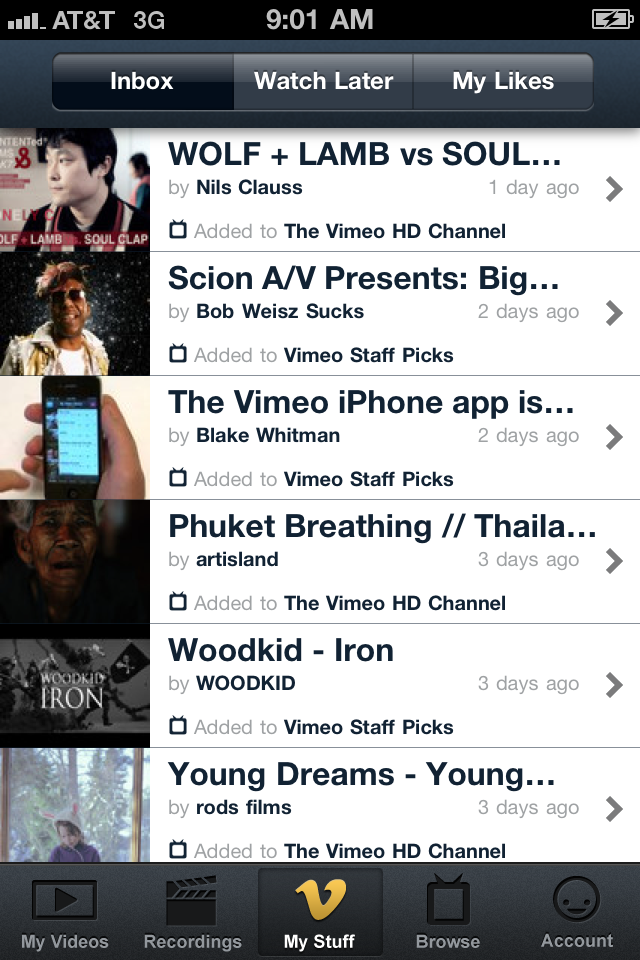
Yesterday, Vimeo announced the launch of their official iPhone app. Preliminary tests indicate that it’s not shabby, and its especially impressive considering that this release is the first iteration of this product.  The app is all things video; watching, recording, editing and even delivering video to Vimeo’s site. Although the app isn’t perfect, Vimeo for iPhone is a solid offering.

The Vimeo for iPhone app is portrait-oriented; unless you’re shooting or viewing video, it wants to be vertical. When I first logged into the app, the default category presented is ‘My Stuff’, which is essentially a list of videos made by folks that I follow on Vimeo.  Across the top of the screen we find buttons allowing me to quickly check my video inbox (default view), buttons for things that I like and other buttons for things I’ve saved to watch later.  Across the bottom of the screen, there are additional buttons for the other functions of the app including options to “like” your own videos/recordings, browsing and account maintenance features. The videos you’ve uploaded to Vimeo can be viewed as a  list or as thumbnails, and sorted by date or by number of views. The search function returns real-time results, which is a search feature that we’ve all come to know and love.

Video-sharing is key to any modern social marketing campaign, and the Vimeo community is one of the most vibrant on the modern web.  If you make or share online video for your business, or even just for fun, this app is a must-have.

http://www.youtube.com/watch?v=Q7kUx0sbug0

Jailbreakers Beware of Your Tethering Activity-Don’t lose your unlimited data plan

Word is that time will soon be up for those of you who are using the popular MyWi app to turn your iPhone into a hotspot for other devices.

If you are one of the those type of users, you may have seen a letter to you suggesting that you opt-in to one of their data tethering plans. Failure to do so just may prompt AT&T to do it for you. Below is the partial letter with instructions on how to bring your plan up to snuff:

Dear [Name of Account Holder],

We’ve noticed your service plan may need updating.

Many AT&T customers use their smartphones as a broadband connection for other devices, like laptops, netbooks or other smartphones– a practice commonly known as tethering. Tethering can be an efficient way for our customers to enjoy the benefits of AT&T’s mobile broadband network and use more than one device to stay in touch with important people and information. To take advantage of this feature, we require that in addition to a data plan, you also have a tethering plan.
Our records show that you use this capability, but are not subscribed to our tethering plan…

…If we don’t hear from you, we’ll plan to automatically enroll you into DataPro 4GB after March 27, 2011. The new plan – whether you sign up on your own or we automatically enroll you – will replace your current smartphone data plan, including if you are on an unlimited data plan.

If you discontinue tethering, no changes to your current plan will be required.

The letter also outlines AT&T’s current pricing structure for tethering plans and offers key advantages to using the plans.

In the end, Federal regulators have said that jailbreaking is not illegal, it can however, according to Apple, void your warranty. And be advised, you are at risk if you decide to jailbreak your phone, and the companies reserve the right to treat you differently if you choose to do so. So opting into one of AT&T’s data plans for small business can keep you on its “nice list”.

Girl Scouts Can Now Swipe Credit Cards with GoPayment

If it’s good enough for the Girl Scouts’, smartphone credit card processing is good enough for your business too.

The Girl Scouts’ of NorthEast Ohio have been equipped with Intuit’s GoPayment mobile payment app and credit card reader for iPhone and Android devices that will allow them to take credit card payments for those addicting little cookies. The promotion is in celebration of the Girl Scouts 99th anniversary in March, and Intuit gladly handed the equipment over to the Girls in order to increase awareness of the GoPayment service. (who hasn’t heard of the Girl Scouts)

From the Press Release:

“We’re glad to put the latest mobile technology in the hands of America’s future business leaders to help them increase cookie sales,” said Chris Hylen, vice president and general manager of Intuit’s Payment Solutions division. “For this generation of girls in particular, running a business and being able to take payments anywhere with mobile apps like GoPayment will become second nature. We’re eager to see how sales will increase now that they take credit cards with GoPayment.

For a limited time, Intuit is extending this same offer to all Girl Scout councils across the country so they can maximize their cookie sales. Councils and troop leaders can get more information by calling Intuit’s GoPayment Girl Scout hotline at: 800-871-3334.”

You can run, but you can’t hide…your wallet as The Girl Scouts can now overcome your lame ol’ “I don’t carry cash” excuse when they roll up on you outside of your local grocery store slanging their product graciously ask your support of their program.

[via: 9to5Mac]

Mobilize SharePoint with Moprise for iPhone

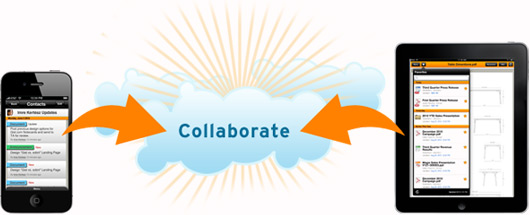
Moprise Cloud Collaboration

Microsoft SharePoint is one of the giants in intranet file/content sharing, collaboration, and management. Moprise wants to get you from behind your desk and give you access to your SharePoint content no matter where you are.

Moprise, which I am assuming is a mash-up of “mobile” and “enterprise” (which would make perfect sense) is a mobile collaboration cloud-based solution that enables workgroups and enterprise users to securely access, share, and collaborate on any SharePoint business content from their mobile device.

Moprise can take what your company or group already does:

– social networking
– group content creation and management
– presentation sharing, project management
– integrated voice and video
– calendaring, scheduling

…and adds value by giving it that “cloud” flavor that frees users from feeling left out if they are not at their desks. Speaking of freedom, Moprise also offers an iPad version, with Android currently in the works.

Moprise offers a free (‘Lite’ is what cool kids are calling it these days) version where you can just access content. Beefed up paid versions with more options and more users start at $5 bucks a month. The iPhone and iPad apps are a free download from the iTunes App Store.

The ability for users to access, edit, and share QUICKLY in order to make fast and confident business decisions while on the go is what Moprise wants to capitalize on. Try it out and let us know what you think in the comments section.

Pay For That Latte With Your Smartphone and the Starbucks App

This one goes out to all my small biz owners who constantly set up small satellite offices at their local Starbucks (in addition to being on a first name basis with all the staff).

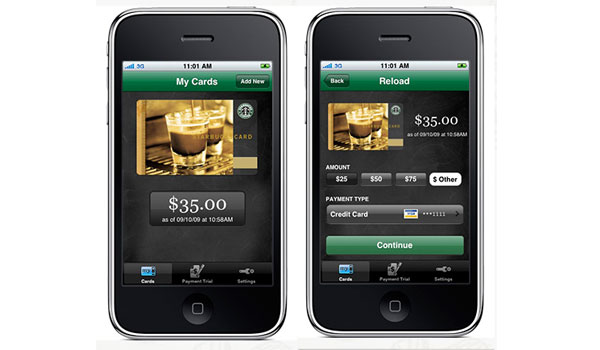
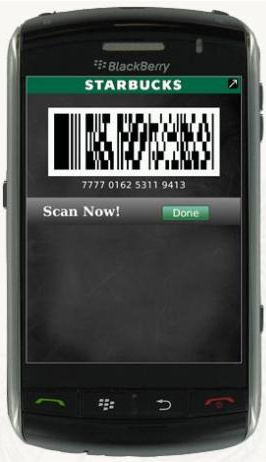
The Starbucks app for BlackBerry and iPhone now lets you pay for your premium coffee using your smartphone (I drink hot chocolate in the winter and smoothies in the summer…but this is not about me). After you’ve created a Starbucks account, downloaded the Starbucks app, and linked your account; you can simply show a 2D bar code for the cashier Java Specialist to scan to pay for your moca something-or-the-other. The payment doesn’t pull directly from a credit card, but the app itself acts as a Starbucks Card that you add monies to in order to use…Which shouldn’t be a problem for the Starbucks faithful. If you’re cool with it, you can even save your credit card info to make it easier to reload your virtual card.

This feature of the app started off as a trial in local (you guessed it) Seattle Starbucks stores, but now is ready for a nationwide shine. In addition to paying for merchandise, the Starbucks app lets you check your card balance, monitor your Starbucks reward points and see nearby Starbucks locations on a map or list. If you get a physical Starbucks card as a gift you can still pay by smartphone by adding the gift card’s number and security code to your account.

To download for iPhone, visit the Starbucks Card Mobile app in iTunes. To get it for BlackBerry, visit the Starbucks Card Mobile App for BlackBerry site or text “GO” to 70845 from your smartphone.

Remember the People You Meet with NameCatcher Biz App

With all the seminar’s, conferences and networking events you feel compelled to attend as a small business owner, remembering names can be a task in and of itself. Yeah, you could collect business cards from people to add to the mountain of business cards you already have (and never look at).

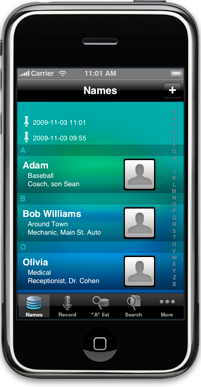
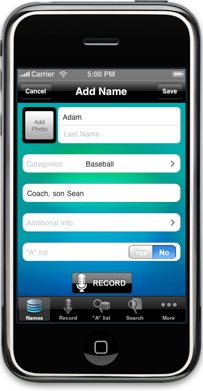
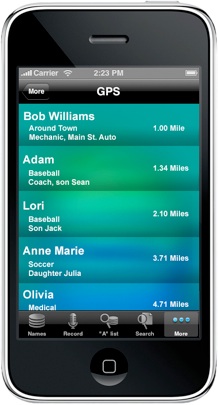
OR you could use the NameCatcher Biz iPhone App that allows you to not only quickly jot down a name, but assign names to categories and add little facts/details about the person. NameCatcher Biz displays those categories and hints about people you meet so you are constantly reminded. Glancing at your master list of names can help you make that visual connection about each person.

Additional features include:

Photo tool – snap an image and assign it to your names
GPS feature – shake your phone to pull up a list of people you’ve met at a particular location
Contact List Sync – Sync your names, categories, and details about a name with your phone’s contact list.

Every person has their own unique way of using memory tools. NameCatcher Biz was built to allow you to search how you want. If you want more details about a person, NameCatcher Biz has “additional info” fields to allow you to add more. Some of us want the bare bones…others want more visuals, more hints and even location reminders. The app can find the name you need in a blink, using it in whatever way works best for you.

NameCatcher Biz is $0.99 in the iTunes App Store (OS 3.0 and up)

AT&T Gets Aggressive and Offers iPhone for $49

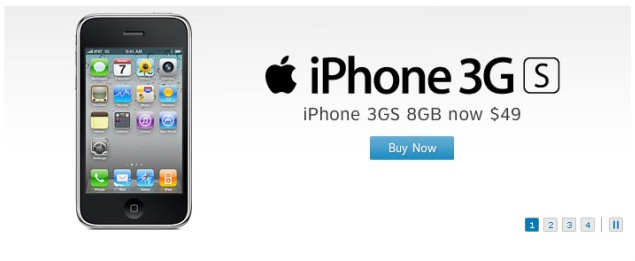
“Money Talks” is what I would presume AT&T is thinking by aggressively reducing the cost of an 8GB Apple iPhone 3GS down to just $49 online and at more than 2,200 U.S. retail stores.

“We want to deliver the best, most complete package for our customers – from price, to speed, to worldwide access and more…” explained the chief marketing officer at AT&T.

The offer is available for current and new customers, and you will have to sign a two-year agreement, but $49 bucks for a 3G smartphone, specifically an iPhone…designed by Apple; is a good deal. Time will tell if this new offer is good enough to divert just some of the attention that existing and potential customers might be giving AT&T’s major U.S. carriers in the next couple of weeks.

myPhoneDesktop links your Desktop to Your iDevice

As good as mobile technology is getting these days, it’s still quicker and more efficient to access the web, data, files and other content via a laptop or desktop. The faster processor, full keyboard, the WAN or WiFi connection and the larger screen make it the best way to get what you need.

But what do you do when you actually need to send something from your computer to your mobile device. Surprisingly, items like pictures, website addresses, and other information is still being sent via email to be opened up on a mobile device. Sure with online services like Dropbox and Evernote, and Instapaper, you can synchronize these items across your devices. But you still need to mess with your mobile device to make a call, or send a text message.

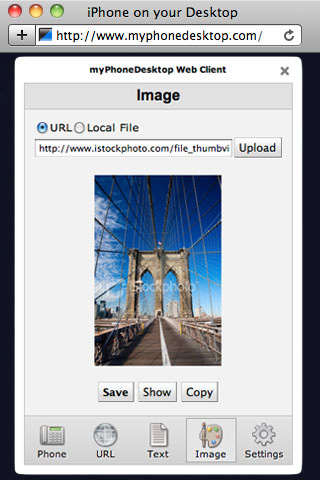
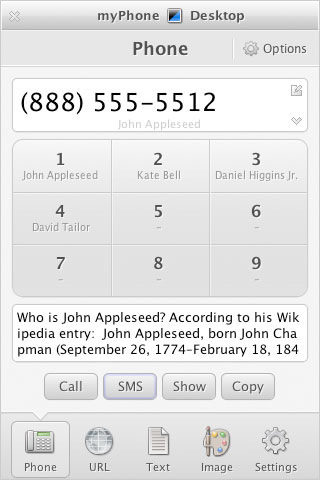
That’s where myPhoneDesktop fills the gap and offers a way to quickly send data from your computer to your iDevice (iPhone, iPod Touch or iPad) and handle other tasks that would otherwise keep you tied to your phone. With myPhoneDesktop, you can:

– Call any telephone number from any application or web browser…

– Send complicated url with Map’s location or route to your iPad or iPhone in seconds…

– Simplify sending a long SMS to your friend, colleague or a client…

– Bring your notes or large amount of text with you in seconds…

– Send Images or Photos to your iPad, iPhone or iPod touch from any application or web browser…

By downloading the myPhoneDesktop app to your iDevice and the desktop client to your computer, you can link your devices together to quickly send content to your device and increase work flow. If you are on-the-go or not at your own computer (Hotel, Internet Cafe or Local Library), you can use convenient and full-featured myPhoneDesktop Web Client that works in numerous browsers.

I do a great deal of app reviews, and there are times when I come across an app on my laptop that I want to download to my iPad, but don’t have a way to connect my iPad to my computer to sync the app in iTunes. With myPhoneDesktop, I can send the iTunes link to my iPad and go directly to the app in the App store without a bunch of fuss.

So quit emailing stuff to yourself and download myPhoneDesktop ($4.99 in iTunes App Store, OS 3.0 and up)

Track Trip Mileage with Trip Cubby

As a business owner, tracking mileage can be one of those tasks that pays you back if you do it right; but, finding a good way to do it right is the hardest part. I have heard (and done) some of the weird ways to track mileage – spreadsheets, Google maps printouts, voice memos, you name it. With the Trip Cubby iPhone app, creating a mileage log is as easy entering a start and end point, Trip Cubby does the rest.

With predictive input, auto-entry, auto-calculation, and quick access to frequent trips, Trip Cubby does the hard work for you. A few quick taps will create useful data ready to search, sort, and generate email reports. Other features include:

– IRS compliance
– Multiple drives and vehicles
– Customizable reimbursement rates
– Excel-compatible email reports
– Online sync/backup
– Stored data retrieved on next launch if interrupted by phone call

Simply put, Trip Cubby gives you the ability to use your iPhone for tracking trip mileage. There is an app for everything, and since a great deal of us use our smartphones in many areas of our businesses, why not use it to help manage your mileage? Trip Cubby is $4.99 in the iTunes App Store (OS. 2.0 and up).

Lock-Down Your Info with My Eyes Only

Good for you if you actually use your device password to lock/access your smartphone. The My Eyes Only (MEO) iPhone password app takes securing your personal and business information a step further with “Government Approved” encrypted information management.

MEO doesn’t just secure your data, it also organizes it in easy-to-manage formats for easy access when you need it. I mean, you take your smartphone everywhere right? Why not use it to access important notes, website passwords, banking/financial and other types of personal data. MEO’s pre-defined screens makes it easy to add and retrieve information the way you see it in real life. MEO’s screens are based upon the actual card images and the important information that is presented on the cards. Based on the type of information you are storing, MEO has a screen that will display it in an easy and customizable screens. Here are the categories with MEO:

– Credit Cards
– Logins, Computer and Web Site
– Financial Accounts
– Identity Cards: Medical, Social Security, Drivers Licenses
– Notes
– Generic “Other” Category

If you’re concerned about security, MEO stores its access password, hint and password recovery and answer in the iPhone OS Key Chain. All that information is encrypted in the Key Chain and can only be accessed by MEO. No other iPhone application can access that information. MEO also encrypts your data via 256 bit AES encryption for the Notes field in Logins, Financial and Other categories and 512 bit AES encryption for small entry fields, like passwords, credit card numbers and Social Security numbers. So if your phone is ever lost or stolen, your information is protected. Backing up your data is as easy as using your WiFi network and Apple’s Bonjour to quickly backup, restore and transfer data to multiple devices.

So if you have all of that information “in your head”, but constantly have to reset your password because you can’t remember, or need one place to organize, manage, and secure, and backup your personal information, check out My Eyes Only iPhone Password Manager. It is attractively priced at $5.99 in the iTunes App Store (iOS 3.0 and up).