NeoMedia Releases Barcode Marketing Best Practices White Paper

Mobile barcodes (the most common of which are QR Codes) are an easy way for small businesses to market to the ever-growing mobile consumer. They have their smartphones on them at all times and their ability to digest and react to content via their mobile device is growing at a staggering rate here in the U.S. So it makes sense for a small business to adopt some sort of mobile marketing campaign.

To use barcodes to reach out to the mobile consumer by just sticking a bunch of them on your flyers and business cards may not be the best way to gain the increased attention your business is looking for. In short, mobile barcode placement has to make sense, the code’s destination has to be optimized, and it should invoke a reaction or engagement from the person who scanned the code.

Now that’s just what I think mobile barcodes should do for your mobile marketing campaign. NeoMedia Technologies has released a June 2011 edition of its Mobile Barcode Best Practices that “offers detailed insight on how to create and manage your mobile barcode campaign to achieve maximum success.”

In the White Paper (that you have to scan the barcode in this post to access…clever) NeoMedia offers 11 useful tips that anybody looking to tap into the mobile marketing industry should adopt. And it’s not just for QR Codes either, whether you are using Microsoft Tags, Data Matrix or QR Codes, the NeoMedia barcode white paper does a nice job of giving an overview of how best to implement a solid barcode strategy to supplement your mobile marketing campaign regardless of what code you use.

Like I mentioned earlier, the clever folks over at NeoMedia have restricted access to the white paper to those who scan their QR Code to reveal the pin needed to view/download the document…And I’m not about to give it to you either, so you’re going to have to do some work for yourself:

1. Scan the barcode in this post using your favorite QR code reader, or download NeoMedia’s free NeoReader application here to reveal the pin number.

2. Visit the NeoMedia’s Mobile Barcode Best Practices website and scroll to the bottom to enter the pin from the code.

3. Download, enjoy, and make sure your business implements some of these tips to ensure you are getting the most out of your mobile marketing campaign.

    BlackBerry Launches Mobile Conferencing App

    A couple of weeks ago, I posted a story on making conference calls with a BlackBerry. Well the folks over at Research In Motion (RIM) must have read my article (Boom!) and pushed the BlackBerry Mobile Conferencing App out of Beta and into the BlackBerry App World.

    The app is designed to work with your existing conferencing system to make scheduling, joining and rejoining conference calls from your BlackBerry quick and easy from almost anywhere. Instead of trying to remember conference call codes, and multiple button sequences, the app offers up a single ‘Join Now’ button to make joining calls a breeze.

    Additional feature include:

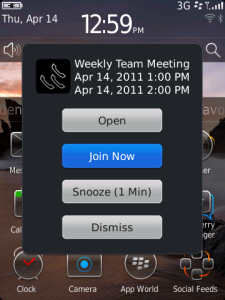
    One-Click Join – Before a conference call starts, a pop-up reminder displays a “Join Now” button that, with a single click, dials the conference bridge and enters the appropriate codes to connect the user to the conference. If the call gets disconnected or the user needs to drop off, the app will present a “Reconnect” button, which dials the user back into the call with one click.

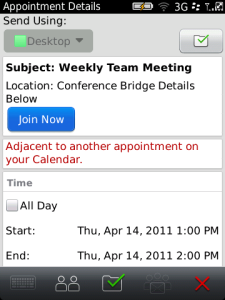
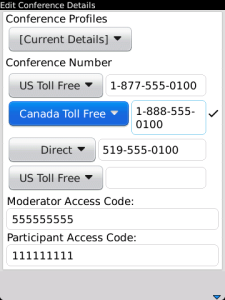
    Easy Conference Scheduling – A user can schedule a conference call complete with conference bridge details directly from the BlackBerry Calendar in an easy two-step process. To enable this capability, the user sets their conference call profile once in the BlackBerry Mobile Conferencing app, including dial-in numbers and access codes, then simply adds the profile as part of the calendar invitation. (The moderator code is kept hidden from participants in the calendar invitation.)

    Optimal Conference Call Number Selection – If multiple dial-in numbers are provided to accommodate participants in different regions, the application can automatically choose an optimal number to use (for calls within North America), such as using the local number if the user is within the local calling area rather than a toll-free number; or a toll- free number if the dial-in number would otherwise be long distance. Users can also select or modify a specific dial-in number manually.

    The app supports many of the leading audio conferencing systems, so no matter if you are trying to join or schedule a call, the BlackBerry Conferencing app has got you covered. The app is a free download from the BlackBerry App World (OS 5.0 or higher).

    3 Simple Mobile Productivity Tips to Get Things Done on the Go

    I Googled “mobile productivity” and I couldn’t find an actual definition. So if you asked me what I think it means, I would say “the ability to conduct/maintain operations outside of a normal business/working environment”. That could mean conducting a business meeting from a taxi cab or in an airport terminal. Forwarding documents and other important information to all of the necessary parties. Even creating/editing time-sensitive documents. Of course, the one tool the most, if not all professionals use nowadays to stay connected and stay productive out of the office is a smartphone/tablet device.

    But how do you use these devices to make sure you are getting things done no matter where your are? I have come up with a couple of tips that should help you use your mobile device(s) keep your productivity up, even if you are away from your desk.

    1. Stay Organized and Synchronized

    Make sure all of your files are in one location and synchronized with other services/devices as much as possible. Nothing will drive you crazy more than trying to figure out if that spreadsheet or invoice that you are about to send with your smartphone is the most up to date version. Take some time to coral all of the different versions of a file from all your devices and devise a plan keep everything the same. Cloud computing/storage solutions do a great job of offering one location that you can access, no matter what device you use, in order to view documents and share with others.

    2. Create Shortcuts

    Try to reduce the number of steps it takes to access information, upload/share/email a file, image, url link, etc. For example, if you know you’re going to a networking event, plan ahead and draft up an “It was a pleasure to meet you…”email with all of your contact information, so when you link up, all you have to do is insert an email address, formal name, and you can send the email off right at the event while the conversation is still fresh. You may have to tweak the message depending on the conversation, but it will save you time trying to figure out what you talked about when trying to send that same email days later.

    3. Remain Flexible

    The key to being productive on a mobile device is recognizing there are may ways to send/receive documents, emails, contact information, via a mobile device. So if you have taken the time to set up your exchange accounts on your smartphone (email, contacts, calendars) and for whatever reason, your accounts are acting up, you can rest assured that as long as you have a network connection, you can access you accounts via their “mobile-friendly” versions. Gmail, Hotmail, Yahoo, etc. all have mobile sites that will let you access your calendar, draft/forward an important email, and find a phone number from your address book. Always helps to have a plan-B.

    Of course all of the above is my opinion since there is no one sure-fire method of staying productive. So let us know what are some ways you get things done while on the go? Be sure to list any of your go-to apps, services to share as well.

    Google Wallet and Google Offers Bring Huge Opportunities to Small Business Owners and Consumers

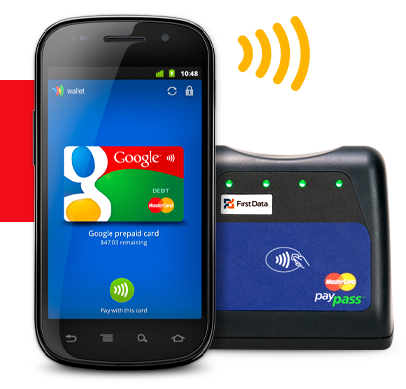
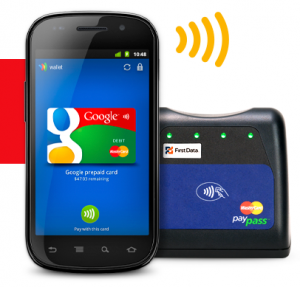
    Today we were at Google’s press conference in NYC, it just concluded, and we have to say, the implications could be huge for small business owners, with Google announcing two key new Android apps that will potentially enable your customers to pay you faster by using their mobile phone. The primary app, Google Wallet, will securely store and communicate financial information from users’ phones to merchants’ NFC terminals. NFC (near field communication) is a wireless technology that has been around but is becoming more popular.  The other app announced was Google Offers, which serves as a complement to Wallet, integrating coupons and loyalty programs to the transaction experience.  Let’s take a look at the features offered by each app, and then consider the implications for small business owners.

    Wallet will roll out this summer, though it will initially provide NFC services only with Citi Mastercard and/or a pre-paid Google account.  Google promises that more account types (Visa, American Express, non-Citi Mastercards, etc.) will be added in the future, but they didn’t name any specific partners, nor did they offer up any sort of timetable.  Despite the limited number of launch-time partnerships, the potential for Wallet is huge, as it’s the first NFC system that allows users to maintain multiple credit accounts within the same NFC client.  As Wallet gains wider adoption, more banks and credit agencies will likely jump aboard, which will provide users with an NFC commerce experience as flexible and robust as the current, leather wallet-based transaction process.

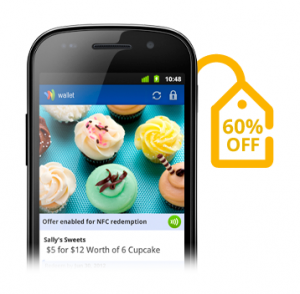
    For small business owners, Google Offers promises to be a real game-changer.  Google demonstrated how seamlessly Offers integrates with both Wallet and users’ desktop browsing experience; a desktop Google search for “denim shorts” might yield a digital coupon, which can be added into the user’s Offers account through a single click, and then redeemed in person, via Wallet, at the local point-of-sale.  Even more exciting is the integration of location-specific coupons and offers into the Android ecosystem; a phone-based search for “sandwiches” could yield offers from nearby restaurants, generating greater first-time customers for local businesses and international franchises alike.  Offers will also manage and track customer loyalty programs, which could definitely help transform occasional customers into regular patrons.  Google is selectively launching Offers in Portland, San Francisco, and New York this summer, though once the initial bugs have been worked out, the program will likely quickly spread to other cities.

    Google also outlined some features that will likely be added to Wallet/Offers over the next several years; digital receipts, transaction-based prizes and games, and eventually the ability to integrate drivers’ licenses, health insurance cards, concert tickets, and hotel keys.  What remains unknown, though, is who will be responsible for securing the data of these para-transactional experiences.  For the financial information of the transaction itself, Google has partnered with FirstData to provide secure transmission and storage of relevant data, but it’s unclear if FirstData would also be responsible for managing loyalty card information and the like.

    There’s a lot of potential here, but what can small businesses expect in the short-term?
    To be honest, not much.  Currently, the only Android phone sporting an NFC chip is the Nexus S, and it’s hard to build an entirely new commerce ecosystem around a single phone.  More NFC-enabled Android phones will likely arrive later this year, but it will take at least several years before a significant number of consumers have Google NFC technology in their pockets.  And, with rumors circulating that Apple has an NFC platform of its own in the works, it’s unlikely that Google’s initiative will move forward without some competition from its rivals.  The short-term potential of Wallet/Offers is also tempered by the aforementioned lack of launch-time financial partners; how many people have both a Citi Mastercard AND a Nexus S, and how many consumers look forward to regularly refilling a bespoke Google debit account?

    Sure, the immediate potential of Google’s announcement is pretty limited, but with NFC terminal readers costing less than $10, merchants won’t be staking a significant financial investment in the technology, should it fail to find widespread consumer adoption.  And the long-term potential for small businesses is absolutely huge; if Wallet and Offers become widely adopted by consumers, smaller merchants and local retailers will be able to engage in the type of targeted advertising and sophisticated customer loyalty programs (with their accompanying analytics…) that are today affordable only for medium-to-large companies.  If you’re a small business owner in one Google’s trial cities, becoming an early adopter of Wallet/Offers could pay considerable dividends down the road, as your familiarity and expertise with the infrastructure could provide a key competitive advantage, should Google’s NFC become the transactional experience of the future.
    ShopSavvy Teams with ShareSquare for Easy QR Code Campaigns

    It looks as if the past couple of weeks have been good for ShopSavvy, the mobile app that lets you scan product barcodes and see if a cheaper deal can be found locally or online. Just last week I did a story about ShopSavvy and Dropbox teaming up to save and sync your barcode scans to the cloud. Now ShopSavvy has announced a collaboration with ShareSquare to make QR Code campaigns simple for your average small business owner looking to market to the always connected, mobile consumer.

    Backstory: Last year, ShopSavvy announced its ability to scan QR Codes in addition to just product UPC barcodes with its “Scan with ShopSavvy” program. The program was directed towards small business owners, retailers, and advertisers looking to take advantage of QR Code technology in marketing and advertising campaigns. Any business/organization that signed up for the program, received special QR codes that when scanned, would direct users to the businesses special mobile landing page for more information about the product…and of course, encourage users to download the ShopSavvy reader (if they were using another scanner),

    Fast-forward to today: ShopSavvy has tapped ShareSquare, a pretty big deal when it comes to QR Coded mobile marketing campaigns, to give its mobile landing pages more “oomph”. What does all of this mean to you? As a small business owner, retailer, or marketer, if you decide to sign use the “Scan with ShopSavvy” Program, your QR codes will have even greater functionality, as ShareSquare offers an intuitive self-serve CMS that empowers the marketer to craft an effective QR code campaign in minutes.

    “Many marketers have experimented with QR codes only to make mistakes that have undermined or crippled their campaigns,” said Alexander Muse, co-founder and CEO of ShopSavvy. “ShareSquare removes the guesswork and enables agencies and brands to deploy a mobile-optimized experience tailored to their campaign objectives.”

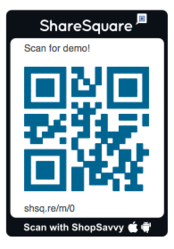
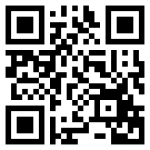
    Check out a demo of ShareSquare’s mobile capabilities by scanning the QR code in the pic above, or watching the video:

    Let’s face it, seems as if everybody is browsing the web via a mobile device. If you want to drive some of that traffic to your business, website…whatever, you need to adopt some sort of mobile marketing campaign or at the very least, make your website “mobile friendly”. QR Codes make it stupid-easy for mobile consumers to find out more information about your business. With apps/services like ShopSavvy, your entire marketing budget doesn’t have to be wrapped up in hiring a brand-name agency just to reach out to those potential clients/customers/consumers who just so happen to have a smartphone handy.

    [via: PRWeb]

    Square Moves Towards Mobile Wallet Reality with Card Case

    Square was one of the first companies to make mobile credit card payment processing simple and easy for small business owners via its credit card readers and complimentary mobile app. If you’re not familiar with Square, it’s a free device that turns your tablet computer or smartphone into a point-of-sale (POS) device. Just plug in the small, square reader into the headphone jack of your iPhone, iPad, Android phone or tablet and you’re taking credit card transactions at the low, flat fee of 2.75% per transaction.

    Today, the Square team is making it easier for small businesses to accept payments via a mobile wallet that customers use to start a tab, receive their goods and pay without ever touching a credit card or wallet.

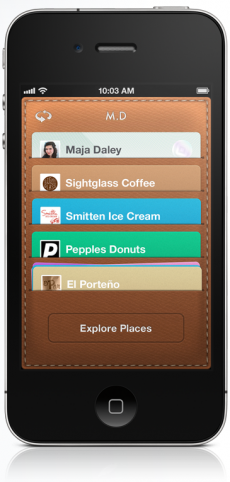
    Card Case is a new venture by Square that essentially puts a mobile wallet on a consumer’s iPhone or Android smartphone that they can use at any Square-enabled business. Users can store credit card information for each business they frequent. Upon entering the business, users can enter their name, select their virtual card from the Card Case app, order their stuff, and Card Case takes care of the rest.

    In addition to the mobile wallet app, Card Case also doubles as a directory that will help users find “Squared up” businesses and help small biz owners reach a larger, more technology-aware customer base. Once businesses and customers find each other, Card Case can also provide customers with a product list, food/product menu, or deals/promotions the business might be offering.

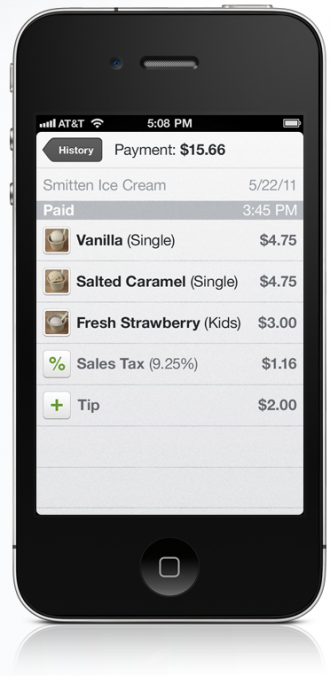
    Finally, with Square functionality built into Card Case, receipts are automatically sent to the customer per the email address they added to Card Case. This means businesses that use Card Case can stop fumbling around with those receipt rolls in that POS device that always seem to get jammed at the height of “rush hour” business traffic.

    Like it? Love it? Hate it? The fact of the matter is that the future of financial transactions my look something like the Card Case service that Square has devised. It’s only a matter of time before Card Case, NFC technology, and QR Codes make your smartphone the most important tool in your everyday life.

    To find participating locations and more information on how to start using Card Case as a consumer or a business, get Squared Up and visit the Card Case website.

    Record and Share Meeting Minutes Online with Minutes.io

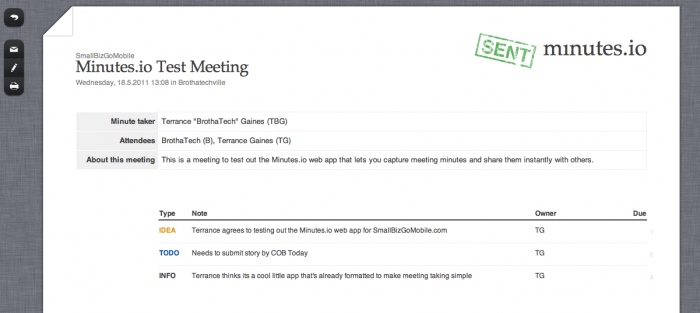
    Me, Myself, and I all in a meeting togetherWho REALLY likes taking meeting minutes? No one (present company included) but it is one of those necessary evils that needs to get done to give meeting attendees a reference as to what were the key meeting points. Now, there are a bajillion ways you could take meeting minutes. It doesn’t have to be pretty, it just has to get done. With the Minutes.io web app, you can make recording minutes painless and sharing minutes instant.

    There is no need to set up an account, verify an email address, or subscribe to anything to take advantage of this free little web app. Simply visit Minutes.io, enter the meeting information (meeting name, date, place, attendees, and minute taker) and you’re ready to start. Recording minutes is list-based, and the web interface gives you a couple of options to categorize your minutes:

    • To Do
    • Okay
    • Info
    • Idea

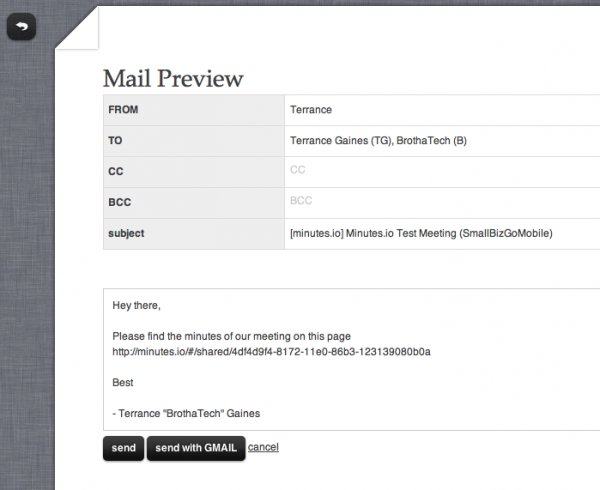
    You can then describe the minute, designate a owner or responsible party of the minute recorded, and add a due date. Once you’re done adding minutes, you have the option of printing or sharing the minutes via email. If you choose to email, Minutes.io will populate an email message complete with your name, email address, addresses of other attendees an a nice little message in the body of the email.

    The cool thing about Minutes.io is the fact that since it’s a clean and straightforward web app, any device with a web browser can create meetings minutes. So if you are out and about and remembered that you are the designated minutes taker for the meeting you totally forgot about, you can get the job done via your smartphone or tablet device.

    Minutes.io is free and ready for you to try out now. So check it out and see how easy it is to record meeting minutes. It just may make recording meeting minutes fun [/sarcasm]

    Zipcar App for Android takes your car reservation experience mobile

    Zipcar’s claim to fame is that you can go online and reserve a car, find its location, and use a special card to unlock the doors and go on with your business – all without speaking to anyone in person. Great for on the go entrepreneurs and business owners who may just be in town for a meeting and in need of some quick transportation.

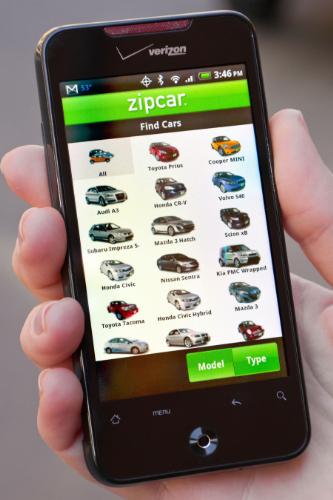
    Based on a study conducted late last year, most Zipcar customers are smartphone owners and a large number of those surveyed owned Android devices. The company put two and two together and decided to create an Android app to complement the iPhone app currently on the market. Now, the entire car reservation process is available on Android smartphones and tablet computers. In addition to managing your Zipcar accounts, making reservations, and locating your vehicle via the Google Maps app, the new Android app allows users to beep their horn remotely to further identify the car.  You can even lock and unlock your Zipcar’s doors right from your phone!

    The Zipcar app is currently in the public beta phase, but I don’t see it staying there long as functionality like this is what many people envision their smartphones being able to achieve. I predict that rental car companies will follow suit and offering their own mobile apps that can handle a number of functions that normally requite a visit to the customer service desk and a wait in line. No more being stuck without a car while the customer ahead of you makes the life changing decision between an economy, standard, or full-size car.

    RIM Reveals native PlayBook Email, Calendar, Contacts

    Close call! It looks like “essential” native apps for email, calendar, contacts, tasks, and other mobile apps will be coming to the newly launched BlackBerry PlayBook Tablet.

    Currently, PlayBook users who want to view/manage this data via their tablet are tied to their BlackBerry smartphones. In order to take advantage of those services, you have to use the new BlackBerry Bridge technology that pairs the PlayBook via Bluetooth to a BB smartphone for greater functionality.

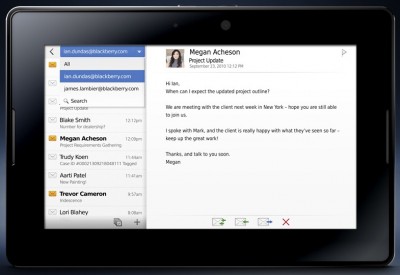
    Today during the BlackBerry World Conference, some of the former mentioned services were demoed without being paired to a BB smartphone. What does this mean? Essentially, people using the PlayBook don’t necessarily need a BB smartphone, or depend solely on web apps to access these services. I have no beef whatsoever with web apps, but native apps use the device they are designed for a little better than a web app that’s created to provide functionality for a number of devices, IMHO. All you need is a data connection (PlayBook 3G/4G model or WiFi) and you will be on the same playing field as other tablet platforms with native apps.

    Furthermore, if wireless carriers all of the sudden decided they don’t particularly like the idea of PlayBook users piggy-backing off of a BB smartphone’s data connection and pulled the plug; having native apps means that you still get your email, calendar appointments, contact lists, etc., while RIM and the wireless carriers hash it out.

    If you are a BlackBerry Tablet owner, or looking for an Apple iPad alternative, I think the BlackBerry PlayBook, once it’s retrofitted with “essential” native apps and some other OS tweaks will be a serious contender come this summer.

    But we want to hear from you. Is the lack of native email, calendar, contacts, tasks, memos, and similar apps/services stopping you from pulling the trigger on the new BlackBerry PlayBook?

    SocialCamera Allows Easy Tagging, Uploading, Sharing

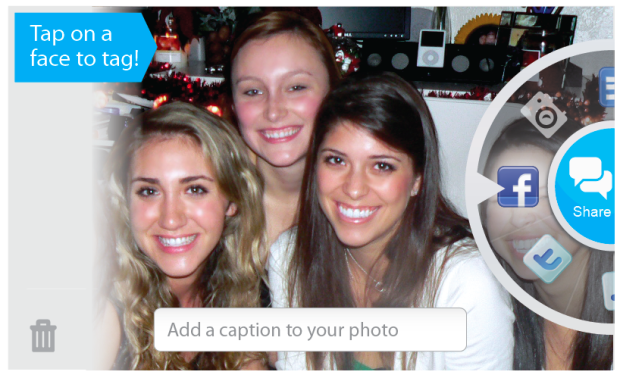
    We all know that social media plays an increasingly important role in our small businesses, yet keeping up with it can be very time consuming.  Tools that make it easy to keep engaging, fresh content rolling into your company’s social presence are a must.  Visual analysis company Viewdle launched Android app SocialCamera last Wednesday, and it fits this description well. SocialCamera allows users to tag, caption and share photos on Flickr, Facebook, email or MMS immediately after capturing the image. Jump to the demo video below for full details.

    SocialCamera is still in beta, and is not to be confused with Justin.TV’s Socialcam app. It’s free of charge, and should be available through Android Market now.

    How does it work?  Simple.  The first time you use the app, you’ll have to identify your Facebook friends. After that the app will detect and tag your friends automatically, which I think is the most endearing feature of this app.

    Protip: you’ll need a device running Android 2.x with a 1GHz or faster processor to run SocialCamera.

    Viewdle SocialCamera – Beta from Viewdle on Vimeo.