How HP Plans to Take On Apple and Microsoft By Gambling on WebOS

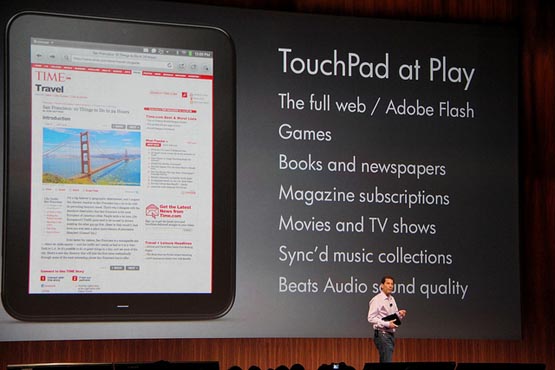
Last Friday, I wrote about HP’s massive discounts on its Touchpad tablet, and speculated about how these promotions might be the opening volley in a tablet price war.  The article sparked some discussion around the SmallBizGoMobile newsroom, with my editor arguing that the Touchpad can’t measure up to the iPad, and therefore deserves a correspondingly lower price.  It would seem that a number of consumers agree with my editor, as John Paczkowski over at AllthingsD points out that Woot sold only 612 Touchpads during its one-day promotion, while the deal-of-the-day site sold 2,288 Motorola Xooms just a few weeks ago (to be fair, though, most Wooters are pretty savvy shoppers, and since Staples was offering the Touchpad for only $300—$80 less than Woot—it’s likely that most consumers chose the Staples deal).

My enthusiasm for HP’s aggressive Touchpad promotions was rooted not in some partisan love for the Touchpad itself (full disclosure: I haven’t even touched a Touchpad yet); rather, I’m excited to see that HP is taking proactive steps to increase WebOS’s marketshare, as the company is singularly capable of breaking the iOS/Android duopoly in the smartphone and tablet markets, and that would be a good thing for everyone (except, perhaps, Apple and Google). Read More
Google Docs Gets a Major Makeover – More Than 100 New Features to Help You Be More Productive On The Go!

Good News – Google Docs recently got a great new facelift, adding dozens of new features and functionality. They’re improved absolutely everything, from searching your documents, to new uploading features. Essential features I’ve been waiting for years for them to add are finally here as well, like page breaks, extra fonts, drag-and-drop image insertion and revision history. In Speadsheets, Google’s version of Microsoft’s Excel, finally adds pivot tables, which consultants and business people on the go will love using to quickly analyze their data. Overall, this is a huge upgrade for Google’s online document suite of products, which had definitely begun to show their age. For the full list of features Google is adding and to learn how to activate the latest version of Google Docs, click on through to our full coverage. Read More

AT&T Announces 4G BlackBerry Torch 9810

AT&T have been rolling out new 4G phones and devices all summer, and today they’re announcing the next evolution in Blackberry phones, with their first 4G Blackberry offering: the Torch 9810. While there’s only an announcement today and no release date set, we do have some details to share with you about the large touchscreen + full QWERTY keyboard phone. The most exciting spec though, is that this Blackberry is going to boast amazing internet speeds with 4G connectivity. We can’t wait!

Here’s what’s new and improved:

· 4G HSPA+ capability
· 1.2 GHz processor
· High-res VGA display
· More precise touchscreen
· Updated BlackBerry® 7 OS
· Enhanced Web browser
· 720p HD video recording

If you want to be the first one in your office sporting this hot new Blackberry, AT&T Premier will notify you via email when the 4G Torch becomes available. You can sign up here.

Find the Time to Get Things done with Free Time app

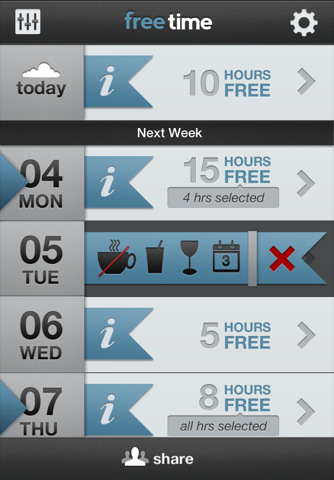
Coming off the heels of my last Small Biz Go Mobile post about the TaskRabbit service that helps people hire on-demand help to run errands and do other tasks that you may not have time for as a small business owner, is a cool little iPhone app that helps you quickly and easily identify time in between scheduled appointments…that could possibly be used to log on to TaskRabbit to find help to do stuff you don’t have time for. Read More

Google+ Wants Your Small Business

A couple of weeks ago, SmallBizGoMobile writer Nick Muntean wrote a piece outlining reasons why he thought the new social networking site Google+ is Not Yet Ready for Business. Maybe Google read his piece, because recently, the company has rolled out its plans to let businesses create Google+ profiles, similar to a LinkedIn or Facebook Page.

Google is planning to run a small beta experiment within + with a select group of businesses that will enable them to create a business profile and try out tools and features aimed at productivity and further sharing news and information about the business/brand. Google product manager Christian Oestlien announced on YouTube that the Google+ business profiles will include “things like rich analytics and the ability to connect that identity to other parts of Google that businesses might use on a daily basis like AdWords.”

So imagine if you already use Google Apps for Business. The ability to share your documents, email conversations, calendar events and other Apps data/content with individual users or all of your businesses Google+ Circles may push Google even higher up on your “One stop shop for ALL your business needs” list. Furthermore, a Google+ profile may be even more valuable than your LinkedIn or Facebook business profile due to the possibility that more than just sharing information and connecting with other users may be happening over on your businesses Google+ profile.

Currently, that’s all speculation due to the fact that the Google+ for business beta hasn’t rolled out yet. But you can’t help but wonder: Will a Google+ personal, profession or business profile be worth the trouble of adding yet another social networking site to the list of stuff you have to manage? Let us know what you think in the comments section.

AT&T Office@Hand: Your Dream Business Phone System

Don’t you hate calling a company with a simple question, only to get stuck in a phone tree and forced to leave a frustrated voicemail for who-knows-who? Don’t let customers who call your business feel the same way!

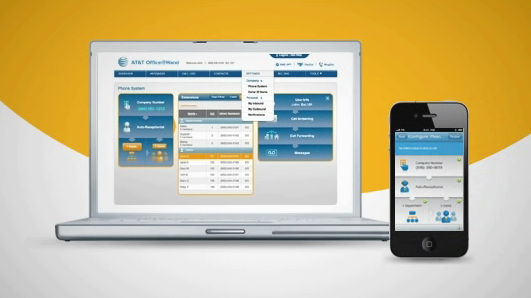
Upgrade your biz phone presence—and keep all your employees reachable—with AT&T Office@Hand. This slick but simple mobile business phone and fax system works virtually anywhere you do, with your existing phones and lines. And you can manage it, in real time, via PC or smartphone app (on select iPhone®, BlackBerry®, and Android™ models).

Office@Hand includes all the features you want: auto-receptionist, custom greetings, call routing, hold music, dial-by-name, and the list goes on. And how about Internet faxing? You can receive, view, and forward documents you’d otherwise have to be at your desk to see. That’ll help keep your field personnel productive.

But don’t take our word for it. Check out Office@Hand yourself. You can even sign up for a free 30-day trial.

This message brought to you by our sponsor, AT&T. Fine print: Must cancel free trial prior to 30th day. Available via the Web and select devices. Additional restrictions apply. View full terms.

Even Construction Workers are Doing Mobile Teleconferencing with ooVoo

Last week I attended the “DIGITAL EXPERIENCE! 2011” conference (yes, that’s the official name) in NYC.  The event was a showcase for some exciting new mobile products that either launched recently or will launch soon. There was some great stuff there, and I’m definitely looking forward to using a lot of what I saw.

One exhibitor that really caught my attention was the ooVoo booth.  You may remember from my post a few weeks ago how I have trouble with Skype for teleconferencing.  Well, the folks over at ooVoo claim they can fix this problem, and from what I’ve seen in my brief experience with it so far they might be right.  Basically, ooVoo is a cloud-based service that allows up to 6 devices to connect in a video conference.  So, you can easily meet with the guys in LA, New York, Detroit, Austin, and Chicago simultaneously –  even from your mobile device.

When I dropped by the booth, Brogan Taylor at ooVoo told me a great story that really illustrates the changing world of small-biz-gone-mobile.  Brogan’s father-in-law is a contractor who manages several building sites.  In the morning he meets with supervisors at several remote sites.  Some of his guys are on laptops, some on tablets, some on smartphones.  The owner leads the meeting from his truck cab, a couple guys have Android devices, and one guy even uses a Motorola Zoom.  In just a few minutes all the guys are on the same page about supply chain issues, changing labor needs, and even impending bad weather.  A few years ago I could never visualize a guy with a hardhat pulling a touchscreen computer out of a tool belt; now, it’s apparently a daily occurrence.

ooVoo follows the freemium model by offering some enterprise goodies with its paid offering.  If you’d like to check it out, though, the free app is all you need to get started and it works on lots of devices.  The best part?   Unlike iPhone’s Facetime feature, WiFi is’t required because ooVoo does the heavy lifting on the server side; which means it can be used at regular 3g network speeds.

Win a Business Consultation with Mario Armstrong!

Want to know how to best take advantage of your smartphone or tablet? Have questions about branding or social media? Just want someone to bounce some business ideas off of? Mario Armstrong is here to answer your pressing questions. We’re giving away three 20-minute business consultations with Mario, and entering couldn’t be easier. Just follow these simple steps and you’re good to go!

  • Send us an email to editor@smallbizgomobile.com with the subject line CONSULTATION. Explain in no more than 5 sentences what your business is and how you could benefit from a meeting with Mario. Our team of writers will be evaluating these and picking the three most-promising small businesses to meet with Mario. Let us know why you stand out but also what you need help with!
  • Like Small Biz Go Mobile on Facebook. That way you can easily stay on top of our tech tips, app and devices reviews, and more!
  • Follow SmBizGoMobile on Twitter and retweet our message to let everyone know about our contest.

Thats it! The contest is open to anyone worldwide, excluding employees and family members of employees of Mario Armstrong Media, LLC. We’ll be running this contest until 5pm on Friday, July 22nd, so get the word out and get your application in!

Google Sites Adds Automatic Mobile Rendering

Before

Using the uber-powerful Google Apps service, small business owners can manage email, contacts, calendars, documents, and add-on additional business management tools/apps/services that can essentially handle ALL of your business needs. One service that may be under-valued is the ability to create a full-blown website for your business in a matter of minutes (maybe just a tad longer) using Google Sites. Maybe the addition of automatic mobile rendering of Google Sites may entice more small biz owners to create a Google site and also knock-out your site’s ability to be visually appealing on mobile devices in one fell swoop.

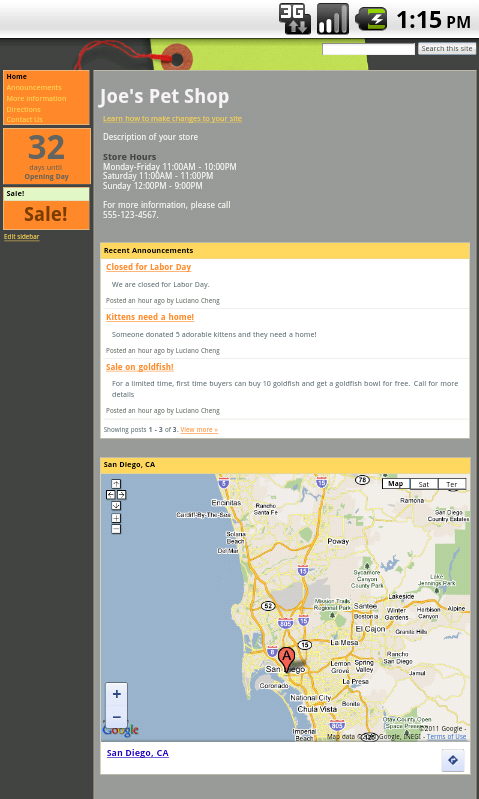
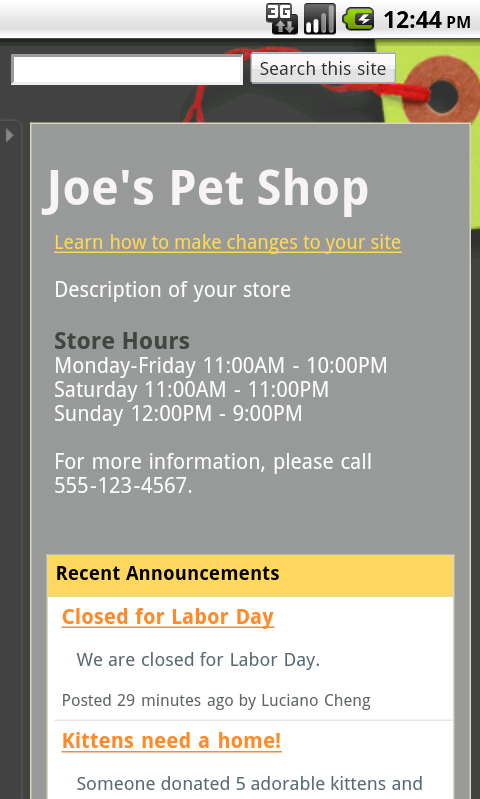
As fast as it takes users to create a Google site, it is as equally as fast to make your site mobile. A new option in the general settings named “Automatically adjust site for mobile phones” adjusts your site on the fly whenever it’s viewed by Apple  (OS 3.0+) and Android (OS 2.2+) devices.

After

Activate the above option, and several portions of your site (header, site width, sidebars, etc.) will be formatted to look all nice on iPhones and Androids. Additional modifications you can make include hiding or enabling “View Site as Desktop” option, “Sign-in” or “Print Page” link. You can view your changes and tweak them on the go as well by visiting http://sites.google.com from any iOS or Android device.

Now with the new Google Sites mobile rendering feature, there is NO EXCUSE for your business, no matter how small, to NOT have 1) A website 2) a mobile-friendly website.