More Mac Rumors: New Mac Mini, 13″ MacBook Pro with Retina Display, iMac

retina display on macbook pro
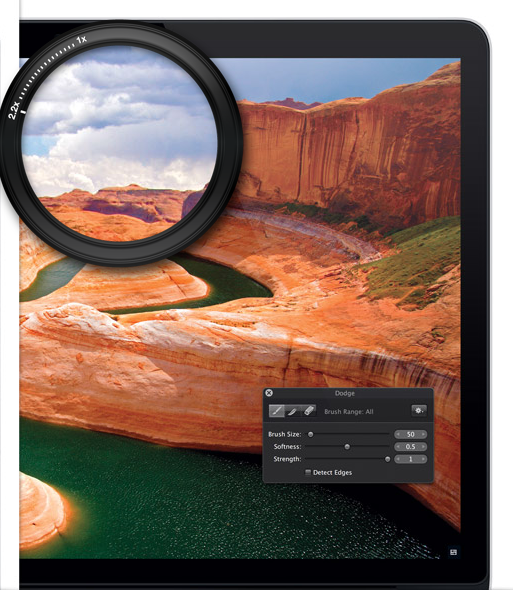
Retina display on the 15″ MacBook Pro. Will there be a 13″ model announced next week?

The rumors are still flying about next week’s Apple event in Cupertino. In true Apple fashion, “there’s more” than just the new iPad-mini to look forward to: new computers. It makes sense that Apple’s share of the business and work computer market has been on the rise. Users rely on a seamless experiences between their phones, works machines, and tablets, and Apple has developed a reputation for offering the best software for this experience. So business Apple users should be excited for Tuesday’s announcement: supposedly we’ll be getting a new Mac Mini, a 13″ MacBook Pro with Retina Display, and maybe even a new iMac as well.

Let’s start with the one I’m the most excited about, the Mac Mini. Sure, it looks the most boring – we can’t talk about how thin or light it is, or any of that glamorous stuff. But if you run a server in your home or office and are a “Mac person,” the Mac Mini may be the best  $999 you can spend on office productivity. Plus the entry-level model is only $599, is powerful, comes with 500GB of storage and can be used with any monitor (or your laptop). And while you may not think about it that often, the Mac Mini is surprisingly portable: it weighs less than 3 pounds and is only 7″ by 7″ and 1.4″ deep. Try moving any other desktop that easily. And keep in mind, that’s the old Mac Mini, released in the summer of 2011. It’s due for an upgrade that will only improve its specs.

So now on to the more glamorous release: a 13″ MacBook Pro with retina display. Read More
Microsoft Announces Surface Starting at $499, Pre-Orders Start Today

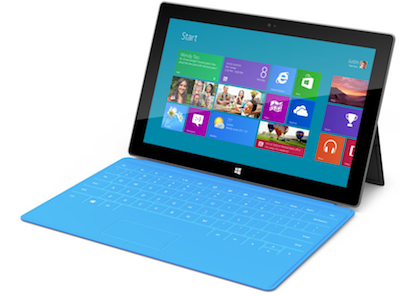
Microsoft Surface with Touch CoverWe were all set for the Microsoft Surface announcement next week (they sent us an invite and everything) and then all the sudden this morning, we have more details about the device than have leaked out over the last six months.

First off, the 32 GB Microsoft Surface RT will cost you $499. There’s also a 64GB model that will be $599. Both will come pre-loaded with Windows 8 and Windows. Microsoft is also offering 2 different kind of covers, both of which double as keyboards. The touch cover has flat keys that are pressure sensitive, and costs $120. The type cover has more traditional keys that can actually be pushed, and will set you back $130. If you know you’d like both, you can buy the Surface + cover together for $599 (32GB) or $699 (64GB).

Microsoft will be taking pre-orders at Surface.com starting today at 12pm Pacific/3PM Eastern. Devices will then start shipping October 26th. You’ll also be able to purchase the device at one of Microsoft’s new retail stores, if you happen to live near one…and they’re planning to have 44 stores open by the middle of next year, not including temporary holiday stores.

We’ll take more next week about the specs, user experience, hardware and more next week when we attend the Microsoft Windows 8 & Surface event in NYC. Anything you’re excited for? Let us know in the comments!


Pre-Order Windows 8 Devices for Small Business from Staples

Today Staples started taking Windows 8 pre-orders for a huge variety of devices. It doesn’t officially ship til October 26th, but Windows 8 pre-order will let you be one of the first to get your hands on a brand-new device with Microsoft’s redesigned operating system. There are tons of devices to choose from, from tablets and ultrabooks to high-end touchscreen laptops. Here are a couple of our favorites for mobile productivity:

Staples Windows 8 Pre-Sale Samsung Slate 5
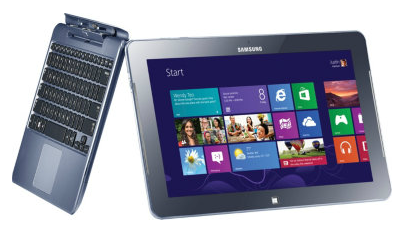
Samsung Series 5
It’s the best of both worlds: the tablet and the laptop. When you pop the tablet into the docking station you get a super-portable laptop that weighs under 2 pounds. Plus it’s designed to work together the the S-Pen stylus, which we love.

Staples Windows 8 Pre-Order Sony VAIO Ultrabook


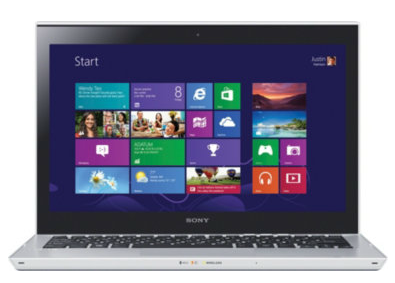
Sony VAIO Touchscreen Ultrabook
This is dedicated 13.3″ Ultrabook that doesn’t sacrifice ports and connections OR processing power to be incredibly portable, making it a good business choice. Weighs in at 3.77 pounds, with a promised 5.5 hours of battery life, making it a good all-around machine.


There’s more where that came from! See all of the Windows 8 pre-order devices available from Staples.

Staples Windows 8 Pre-Order Devices

Plus Staples has also announced their free “8 Was Easy” program to make the switch completely painless. They’ll help you set up your new machine to take advantage of Windows 8’s new features and optimize your device’s performance. They’ll also walk you through key new features like the new Windows App Store and Skydrive, Microsoft’s new cloud storage program. AND they’ll help you transfer all of your old data to your new machine or a backup device of your choice for free. That’s a lot of incentive to do your Windows 8 upgrade, especially when you throw in the free phone support!

Click here to pre-order your Windows 8 device before the official launch.

Are you planning to upgrade? What do you think of the new tile layout? What upgrades do you want from Windows 8? Let us know!

How to Send Free Text Messages Using Gmail and Google Talk

how to send free text messages with Google
In the contact window, click on the bottom right arrow to bring up the SMS option.

Maybe your phone’s dead, or you just haven’t had the heart to upgrade to the unlimited text message plan from your wireless provider. Or maybe cell service is down, and you still need to get in touch with someone asap. Google Talk has been helpful for making phone calls for years, but recently Google launched a service to let you send free text messages too.

The first thing to do is enable SMS. Once you’re logged into Gmail, go to the gear symbol at the top right and select “settings.” From there, choose the “Labs” tab toward the righthand side. The Labs apps should be displayed alphabetically, so scroll down to “SMS,” or just search for SMS in the search bar. Change the radio button to enable, and then scroll down and save your changes. Google’s design sense is a little lacking here, so the save changes button isn’t obvious, but don’t forget it!

Read More

Rumor Roundup: The New Google Nexus by LG

Google Nexus LG Optimus Photo
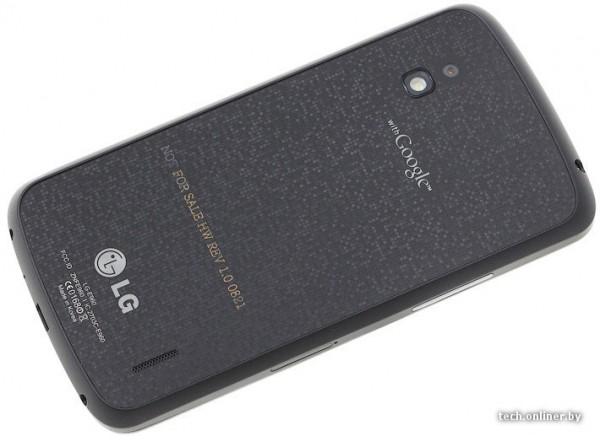
Leaked photo of the back of the new Google Nexus by LG

Rumors about Google’s new Nexus phone have really started flying in the last couple days! We’re going to round up the rumors, but remember…they’re just rumors! Even if it seems like a sure thing, it’s all still subject to change. One thing is certain though: now is the time for manufacturers to release their new products. Samsung, Apple, Microsoft, Amazon, and probably Google, everybody’s pulling out all the stops in anticipation of the holiday season, even though it seems like it’s too soon!

Lots of sources, including NBC, are reporting that the device will most likely be announced on Monday, October 29. Supposedly the device is modeled after (and fairly closely resembles) the LG Optimus G model. The Optimus G is not available yet in the United States, but it did go on sale in South Korea last month, and boasts some really impressive specs: a quad-core 1.5GHz Snapdragon S4 processor, 32GB of storage (plus MicroSD expansion), a 13MP camera and a 4.7 inch screen with 1280×720 resolution.

It’s far from certain how exactly the hardware and Android experience will compare from the Optimus G to the Nexus, but it’s definitely worth noting that this is LG’s first real big push into the high-end smartphone market, and expectations (and promises) are high. The Optimus G is LG’s first real attempt to compete with the Galaxy SIII and the iPhone, and comes with the backing of Google. Rumors are also flying that Google has plans to beef up their support staff to deal with an anticipated increase in customer inquiries, presumably from consumers buying the Nexus.

But perhaps the most fun thing to speculate about is leaked product photos, especially the side-by-side comparison with the iPhone 5. The photos are from Tech Onliner, and if you read Russian you’re welcome to go take a look at their original coverage. For the rest of us, we’ll just take a look at the photos below and hold tight till October 29th!

Read More

Tumblr Gets Social Analytics to Help Out Marketers

Union Metrics' Analytics for Tumblr
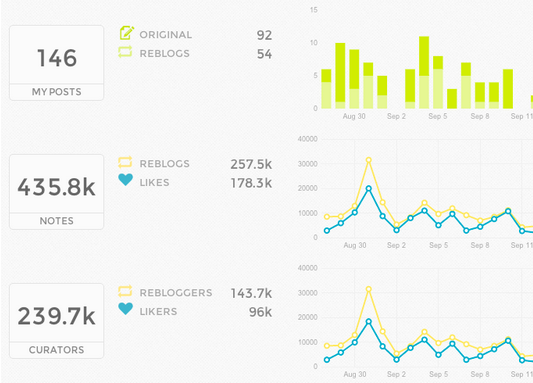
A sample of Union Metrics’ Analytics for Tumblr

Social network and microblogging platform Tumblr has recently announced a few new features that should make it even more attractive to marketers, including analytics to let brands look at how well their messages resonate on Tumblr.

By all measures, the service is incredibly popular. It hosts over almost 70 million blogs, and receives billions of views each month. Almost 50% of its users are under 25, making the service an especially appealing platform for marketers looking to reach the coveted 18 – 25 year old demographic. Plus it’s the kind of service that’s addictive: interactions with other users take place within the site’s “dashboard,” and it’s really heavy on video, visual and joke content. In other words, it’s fun.

If you haven’t used it, the big thing that sets it apart is the “Reblog.” Basically, with one push of a button you can copy the content of someone else to your own blog, and then comment on it if you want. Until now, there was no way for a brand to really measure the reach of all those reblogs or likes (the other key way of interacting with a post). That’s like not being able to measure the impact of retweets on Twitter, or shares on Facebook, and it was a real problem for marketers.

Read More

Microsoft Windows 8, Surface Coming October 25th

windows 8 and surface reception invitationMark your calendars now: we got the official invite to “celebrate” Windows 8 and the Microsoft Surface later this month in NYC! It’ll be an all-day event on October 25th as (presumably) Ballmer and team introduce us to the new Windows operating system that will also be powering a lot of the new smartphones coming for the holiday season (like the HTC 8X that we are very excited to get our hands on).

But perhaps the most interesting part of the day will be the launch of Surface, Microsoft’s long-awaited competitor to the iPad. We’ve talked before about how this is a crucial move for Microsoft as they try to catch up in the world of mobile devices, and we’ll all be waiting to see if Windows 8 seems like a real competitor to the more established mobile operating systems, iOS and Android.

There’s a lot riding on this event for Microsoft, and luckily we’ll be there to capture it all right here on the blog and of course on the smallbizgomobile twitter account.

Five Underrated Features of iOS6 & the iPhone5

Add a photo in Mail with iOS6
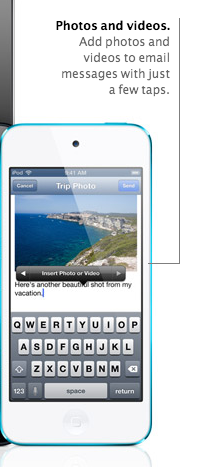
iOS6 lets you add a photo in Mail. Not exactly groundbreaking, but somehow revolutionary anyway.

They say the devil is in the details, but it for Apple it seems like the small stuff is actually the most redeeming feature of their latest software update, iOS6, which is otherwise getting killed by complaints about the new Apple Maps. You’ve seen http://theamazingios6maps.tumblr.com/, right? These small updates aren’t as obvious (or glamorous!) as Maps, but they’re way, way more useful, and not just because they seem to work.

Reminders Badges
Badges are what Apple calls those little circle notifications that show up on the top right of your apps (like when you have App updates to install, for example). If you’ve got reminders piling up, the Badges will remind you of your reminders.

Improved GPS Reminders
I love reminders, can you tell? In iOS5 we were able to set a reminder based on our current GPS location so we’d be reminded of something whenever we arrived or left that location. The problem was that the only location you could be reminded about was wherever you were. Now you can set an address and be reminded whenever your in the vicinity of that location: near the grocery store or the library for example.

Phone Calls “Reply With Message”
I have one phone for personal and work use, and no landline. That means I spend a decent amount of time on it, and in things like conference calls you’re usually not free to do any call waiting magic! The new reply with message feature lets you send a pre-written message letting the caller know you’re on the phone and you’ll call them back when you can, so they know you’re not just ignoring their call.

Add a Picture from Mail
This one is so obvious (and handy) it’s almost infuriating we didn’t have it before! How many times have you gone into mail to send a picture, only to realize you can only do it from your photos? This is finally fixed so you can email a photo from Mail. Seeing as that’s how  it works for every other email service it shouldn’t feel revolutionary, but it does.

Custom Text Message Vibrations
This is another one that doesn’t sound groundbreaking, but has already improved my life substantially. Basically, you can assign contacts a special vibration for when they text you. So for example, your S.O., boss and best friend could have a “priority” vibration, your other close friends a different one, and then everyone else is unassigned. It’s already kept me from jumping up to check a text message that’s actually just a reminder to pay my wireless bill :)

So yes, they’re small changes, but they really have made a difference in how I use my iPhone. Besides, I already have a GPS Unit in the car.

For more on how to upgrade to iOS6, check out our post from a couple weeks ago.


Facebook’s New Advertising Platforms: Exchange and Custom Audiences

Facebook's Mark Zuckerberg with Matt Lauer
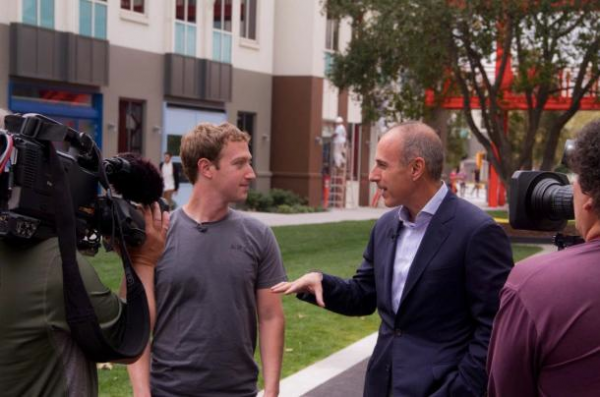
Mark Zuckerberg interview with Matt Lauer

This morning on the Today Show, Mark Zuckerburg told Matt Lauer some pretty big tech news: Facebook has reached one billion users. That’s about one in every seven people on the planet sharing updates, photos, and the meme du jour. Despite this, Facebook’s stock closed at $21.83 per share yesterday–about a 30% drop from its IPO price of $38.

Why hasn’t Facebook been able to convert its eyeballs into the sort of growth that investors want to see? Well, like so many internet businesses, it wasn’t really designed to make money. Facebook’s great promise is that they have so much data on their users (which, let’s remember, now number One Billion), they can offer highly customized advertising that advertisers will pay a premium for.

Let’s take a look at two new initiatives Facebook is rolling out to make good on this promise. First is Facebook Ad Exchange, which reconfigures their ad-sales model to something more like Google AdX, allowing for something known as re-targeting. Let’s say that I’m shopping for a comforter online (which I am), but I haven’t actually purchased anything yet. The store I was shopping at could purchase ads on Facebook encouraging me to purchase the very same comforter that I was looking at before. These ads are more valuable because they’re directed at people who probably want to buy something–and so they’re more likely to actually do just that.

The other initiative, Custom Audiences, allows businesses to find their previous customers using information the businesses already have. It’s kind of like Facebook friending someone after a good first date. Let’s say that I already purchased a comforter from the comforter store. The store has my email address and knows that 75% of people who buy a comforter will also buy pillow shams. Custom Audiences will allow the comforter store to target me with their pillow sham ads– and since I’ve already purchased something from that store, I’m way more likely to purchase something else from them. If this seems a little creepy, all the information given to Facebook is encrypted, so it’s not like some guy in the shipping department is looking at pictures from your last vacation.

These initiatives show Facebook doubling down on what sets it apart– a huge user base, and a lot of information on those users that make their ads more valuable than most. It’ll be interesting to see if this is the kind of revenue boost Zuckerburg and Co. (and investors) need. Have you seen any retargeted ads on Facebook? Would you consider using Custom Audiences? Let us know in the comments!


Scheduling Service Doodle Adds Real-Time Online Booking With BookMe

I’ve been a fan of Doodle Scheduling for years. Their service is geared toward busy people who struggle to find times for meetings when everyone who needs (or wants) to attend is actually free and can make it. If you’re trying to organize the meeting, you can send out a “poll” of different possible dates and times to all the invitees. They’ll choose which times work for them, and you’ll get a response back showing the time that’s the most convenient for the highest number of attendees.

Since it’s really just a poll, I’ve also used for slightly off-label purposes, like “Where should we go for dinner?” or “Which book should the book club read?” Users can rank their preferences, so while everyone may not get their first choice, you can at least pick an option that nobody totally hates. That kind of diplomacy seems like it’s worth a lot, but Doodle doesn’t charge for their basic level of service. Though they do have a “pro” version of the service that will let users upgrade for a more complete feature set of scheduling tools.

BookMe Online Booking for Small Business
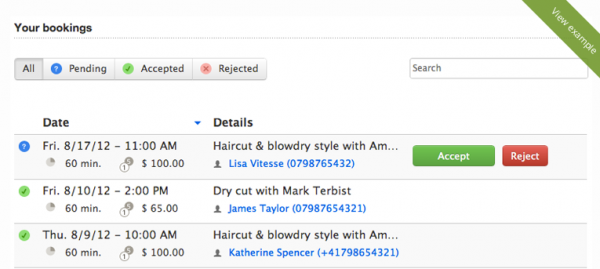
BookMe in Action

They’ve also recently announced an online booking platform for service providers that’s $60 a month (after a month free trial to see if you like it). The idea is that if you’re a small business owner or employee, you probably don’t have a dedicated person to schedule your time – and you’re probably spending tons of time doing it yourself. It’s especially tough if your business is one where people are calling you at all times to schedule. The example Doodle gives is of a hair stylist: if you’re spending all your time booking appointments, how will you actually spend any time doing actual styling?

Doodle calls the service BookMe, and the idea is pretty simple: you set your availability online, as well as time slots others can book. Then your schedule can be filled up without you ever having to answer the phone (and disrupt whatever else you were doing). Doodle recommends BookMe for service providers, but it could also be handy for consultants or bloggers whose job involves a lot of pitch meetings. When you use the service, you do have to confirm the booking for the appointment to be official, so it’s not like you have to take every single appointment others want…though you could!

More on Doodle’s new BookMe service.