3 Best Cloud Apps for Mobile Small Business Users

Cloud Apps for Small Business ProductivitySmartphone Apps That Help You Get Faster and Smarter Online

Last week I discussed the best cloud apps for managing your contacts and business cards, but what about everything else you do while on the go? Can you use the cloud to be more productive in other areas? Of course you can! There are apps that leverage the cloud to do almost everything you do online, and they can help you do it smarter (and faster!). Here are a few of my favorites:

1.   Cloud file storage

No matter what line of business you’re in, there are surely dozens, hundreds, or even thousands of files you need to manage. Wouldn’t it be great to have access to them everywhere you go? Thankfully, the prices of cloud storage are falling every year, and it’s becoming simpler than ever to point an app to your documents folder and let it sync to the cloud and across your devices.

Stop carrying around flash drives and never be caught in a meeting without access to a crucial document ever again!

If you’re a small business or entrepreneur, one great solution I like is to switch your business over to Google Drive, which provides both document storage and editing of all your docs, spreadsheets, and presentations in one place. Fully compatible with other office suites but available on every device you can think of, Drive is a great way to promote team collaboration on important documents and make sure your company has all of their important docs in one place.

But larger companies that may be more resistant to switching over to Google for all their document needs, either Dropbox  or Box.net can help. You can get several gigabytes of storage on either service for free so you can try them out, and since both offer apps for every mobile device out there, you can have your documents, pictures, and more easily synced across all your devices and never be caught without a crucial file again!

Continue Reading This Post at the AT&T Networking Exchange Blog –>


3 Apps To Help You Get More Out of AirPlay

Last week we talked a little about how to set up AirPlay so you can use it to play music or mirror your Mac. It’s great wireless tech that can work in a home or an office, but still has some limitations, especially if you’re not a full-on Mac and iOS user. Here are three apps that will extend AirPlay for Windows, Android, and even Mac users.

airbubble for airplayAirBubble

This one is for Android users. AirBubble is a free Android app that lives on your phone, but talks to AirPlay source devices so it can act as a receiver and stream music to your phone. Great if you use iTunes but are an Android user. Find AirBubble in the Google Play store.

DoubleTwist with AirSync

DoubleTwist is an Android media player, and AirSync is a $5 extension available for purchase in the Google Play store. The extension lets you you stream music or video to an Apple TV (or an XBox 360, PC or Mac). It can also double as a way to wirelessly sync your iTunes to your Android phone, so that’s a bonus. Find AirSync in the Google Play store.

airfoil app to extend Apple AirPlayAirFoil

AirFoil may be the most versatile 3rd party streaming app out there. It costs $30, but it can send audio from any music player (not just iTunes) and can even use apps running on your computer or phone, like Spotify. Multiple users can access the same network, so it’s a great way to set up a collaborative music system in an office that lets everyone take a turn playing DJ. Available for Windows and PC, AirFoil lets you stream from a computer directly to other computers, AirPort Express units, Apple TVs, iPhones and iPods Touch. Most devices will need to have software enabled to act as receivers: check out the the full list of compatible devices and software needed here. Available from Rogue Amoeba.

What is Apple AirPlay and How Does It Work

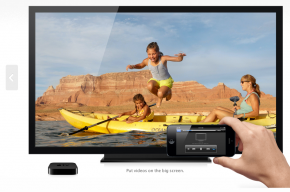
what is apple airplay and how does it workWe hear a lot about Apple AirPlay, but it’s a fairly new technology, and still fairly confusing. So what, exactly, is AirPlay? Basically, it is a way to use a home network to be able link up Apple devices to each other, so you can access media across devices, even if it’s not stored on that device locally. That means you don’t have to keep copies of everything on every device – you can stream from one device to another.

AirPlay works over your wireless, so all of your devices must be connected via the same wireless network or over Bluetooth (though this a battery drain, and wireless is probably a better choice for most uses). You can use an Apple Airport (Apple’s wireless router), but it’s not necessary. Any wireless router will work, as long as all your devices can connect to it.

AirPlay-enabled devices should be able to recognize each other, which takes the guesswork out of which devices can stream to where. AirPlay is available on devices running iOS 4.3 or later, though not all features are available on all devices. Here’s a handy chart from Apple about the minimum requirements for each device. Generally though, you can use at least some features of AirPlay with the iPhone 4, 4S and 5, the iPad 2, 3 and 4, Airport Express, and Apple TV 2nd Generation and 3rd Generation, and any computer running iTunes 10.3 or higher.

The capabilities of each device also depend on whether you’re streaming “to” or “from” that device. One key point: you can’t use AirPlay between mobile devices (your iPad to iPhone, for example). iPhones, iPads and computers are senders only. Receivers are AirPort Express and Apple TV.

Read More

Samsung Galaxy S4 Available for Pre-Order from AT&T

samsung galaxy s4
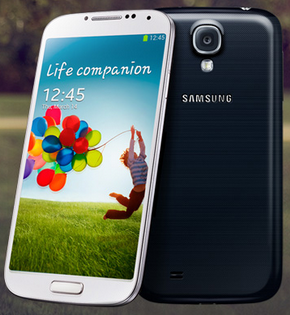
Samsung Galaxy S4

As of today AT&T is the first and only carrier taking pre-orders for the brand-new Samsung Galaxy S4. Right now pre-orders for the S4 are scheduled to start shipping on April 30th, so if you’ve been waiting for the new device you’ve only got a couple more weeks left!

The 16GB model (available in black or white) will run you $199 with a two year contract that includes data. That seems to be the price of top-of-the-line smartphones, and is the same price as the HTC One and an iPhone 5.

The Samsung Galaxy S4 is a hotly anticipated new phone: the S3 was a best-seller last year, and the S4 promises new updates to keep things interesting: the new Air View feature can tell when you’re finger is hovering over the screen, and will call up supplementary information about what you’re looking at. Think of it like a standard “mouseover” feature on your laptop or desktop.

The display is also beautiful on the S4: it’s a five inch “Super AMOLED” screen that displays 1920×1080. For the non-technical, that means the picture is sharp and crisp, and colors look really good. Samsung has also promised that the S4’s bigger battery will mean improved battery life, even with 4G LTE running.

We’ll be talking more about the Galaxy S4 in the coming weeks, but if you already know you want one you can go to AT&T to pre-order now.

Entrepreneur Tip: How to Make a Lasting Impression on People That Inspire You

Inspire Mario Armstrong on Rachael Ray Whenever you meet someone who can help you with your dreams and your goals, how do you handle it? You gotta walk the line between asking too much and not asking at all – and you know you gotta ask! It could be someone who inspires you, who you admire, or just someone you think has some solid advice to give.
One thing I recommend is leaving something behind with that person, so it’s not just about that one moment when you’re standing there in front of them. Like what? Well, I taped a segment for Rachael Ray this week, and I really felt like it was a special opportunity to get in front of somebody that’s amazing. So I took that opportunity to leave her a letter with some of my questions, and a USB flash drive with some of my video clips. It’s way better, and way more personal, than just leaving a business card. Anybody can leave a business card, but how much does that really say about you? You have to get real and personal and make your own case for yourself, because you are your own best advocate.

Rachael was a great person to reach out to, because she has built a media empire for and around herself, and she totally gets it – and I bet she would have great advice on how to achieve my own dreams like getting my own show. But you know it doesn’t have to be TV stars – there are a lot of really successful people out there that can have great advice no matter what, and it’s about looking for inspiration in everything – and everyone – you meet!

So what’s the lesson here? Think about what you can leave behind and how to really make an impression when you get the chance. You only get so many opportunities to get in front of the people that can help you take your dreams and goals to the next level!


Google Fiber Coming to Austin in 2014

google fiber coming to austinGoogle Fiber has its next destination: Austin, TX. The ultra highspeed broadband service is supposed to roll out in mid-2014, when Austin will join Kansas City as the only two places linked up to Google’s network (so far).

Customers will have a choice between Gigabit Internet or Gigabit Internet plus Fiber TV service. Gigabit Internet is Google’s term for crazy fast 1000 mb upload and download speeds. That’s the max speed our electronics, like routers, are currently built for, though in the future we may be able to get even faster speeds with Google Fiber if the “inputs” for electronics are redesigned.

Just to compare, Google’s Gigabit Internet would be somewhere around 100-140 times faster than a typical home broadband connection now.

For more on pricing and how installation will work, check out our introduction on Fiber, from when service was just being rolled out in Kansas City. For now, it looks like subscribers will still receive free 2 TB hard drive to record movies and TV, and will receive free setup.

Plus, Google has announced they will be providing completely free service to schools and hospitals to spark interest and get people familiar with the service. Though it’s hard to imagine tech hub Austin not having tons of interest in the service already! As Austin Mayor Lee Leffingwell pointed out,  “Google Fiber will change how we live and how we work in ways we don’t even know about yet.”

For the official word, check out the Google Fiber blog.

New Flagship HTC One Phone Available For Pre-Order from AT&T


HTC One
the new HTC One

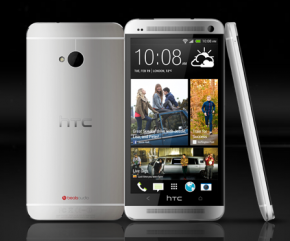
HTC is betting big with their new flagship device, the HTC One. It’s a top-of-the-line smartphone designed to compete with the new Samsung Galaxy S4, the iPhone 5, and presumably whatever device Apple launches later this year.

The most remarkable thing about the HTC One has to be the design. It’s thin and light, but still manages to have a large, almost oversize, screen at 4.7″. The phone itself measures over 5″ tall, continuing the trend of the larger and larger smartphone screens without being completely awkward. But it’s really the look and feel of the phone that sets it apart: the design manages to look different from the current crop of smartphones (no iPhone clone here) but still looks refined and well, pretty. The screen too is ultra-sharp, with great colors, and features 1,920 x 1,080 pixels. That’s full HD, with a denser pixel count than Retina Display.

HTC has totally revamped their smartphone camera: instead of just adding more pixels, they’re investing in something called “UltraPixels.” It’s a non-scientific term for larger pixels that HTC promises will capture more light than the standard pixel, hence the camera’s seemingly low 4MP spec. Initial reviews have been positive, though it remains to be seen how everyday users will feel.

The HTC One is available in sizes: 32GB for $199.99 or 64GB for $299.99, both with 2 year contract. That’s competitive pricing for this flagship device that manages to distinguish itself from an increasingly crowded field of available smartphones.

For more information or to pre-order from AT&T, visit their website.

Facebook Home Coming to the HTC First on AT&T

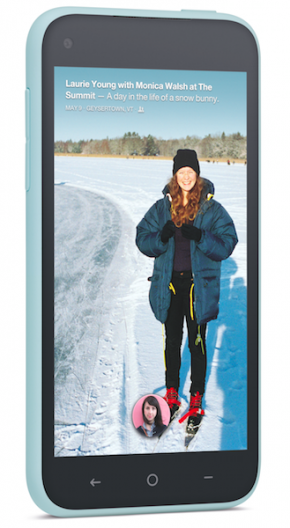
htc first with facebook home on at&t
HTC First in light blue

Yesterday Mark Zuckerberg didn’t shock the world. Instead he announced the long-awaited “Facebook phone,” which, it turns out, is not a phone at all. Instead it’s an interface for specific Android phones that makes using Facebook a top priority. It’s built on top of Android, so it’s not an operating system, but it is a more thorough experience than an app, or even some of the other proprietary “skins” we’ve seen from manufacturers like HTC in the past.

So what does the Facebook Home experience feel like? Well basically, it puts Facebook front and center for your mobile experience. Both your homescreen and lockscreen will display updates from Facebook (the feature is called Coverfeed), so you don’t even have to really be using your phone to be interacting with your friends and family.

Once you’re actually using the phone there’s deep integration with Facebook chat – on the phone it has the name “Chatheads” – that lets you see a person’s face and tap to message. It’s an attempt to streamline how we message and replace SMS with Facebook’s own utility.

And of course there are notifications. Lots of them. But it’s different from the way we use our phone now, where an app will send push notifications when something happens. Instead, you’ll get alerts that friends have done something. It’s a people-centric design, which makes sense in that Facebook is best used as a connector of individuals.

Right now the HTC First, available exclusively from AT&T, is the only phone coming pre-loaded with Facebook Home. It’s available for $99 with a two year contract, and will come in red, white, black and pale blue. It comes with a 4.3″ screen, 5 megapixel camera and 1.6 megapixel rear camera.

Go to AT&T’s website for more info.

What do you think? Would you make Facebook your top mobile priority?

New Google Nexus 7 Tablet Coming This Summer

google nexus 7
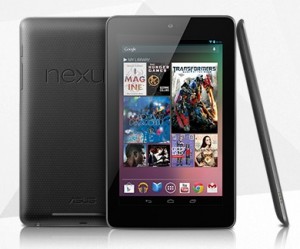
Google’s Original Nexus 7

According to Reuters, Google will launch a successor to their Nexus 7 tablet this July. It will be a further refinement to their low-priced 7″ tablet that launched last summer, and will more than likely continue to carry a starting price tag around $200, though there are rumors Google may try to drop the entry-level price to $149.

It makes sense for the search giant, still trying to gain traction in the crowded hardware market, to offer as low a price point as possible in order to pick up market share. Given Google’s ability to sell advertising on top of their products, the hardware price only needs to be one component of the revenue from the tablet. That’s the same monetization strategy around content that allows Amazon to sell their Fire tablets at a discount: they keep making money once they’ve got the device in your hands.

As far as improvements to the Nexus 7, Reuters is also reporting that the new device will come with an upgraded Qualcomm chip (a switch from the current Nvidia processor) that will supposedly prolong battery life. We should also be on the lookout for a thinner bezel and higher screen resolution.

We’ll bring you more information when we have it, but for now check out the original Reuters article on the new upcoming Nexus 7 sequel.

For more about how the Nexus 7 compare to its competitors the iPad Mini and Kindle Fire, check out our complete video review.

What is AT&T Premier?

If you follow this blog at all, you will have noticed we talk quite a bit about AT&T Premier, but you may not be familiar with what the Premier program actually is.

AT&T PremierEssentially, it’s AT&T’s program for small business. They do have services for large business, but that’s not our focus, and besides, lots of big businesses have IT departments to take care of services for them. AT&T Premier fills in the gap to help with mobile solutions for small businesses to help streamline your tech so you have one less thing to worry about.

In order to access Premier, you have to qualify first. But once you do, the service offers Premier-only discounts on phones, devices and plans. It’s basically a portal where you can shop for services and devices online, but also manage any accounts you already have, including for employees. So if you have a small business that’s providing business phones for employees, you can manage everyone’s account at a glance, and set up limited-access profiles so they can see info they need (but not info you’d rather keep private).

One great thing is to be able to see all the mobile devices offered by AT&T in one spot, with Premier-specific prices, so you can decide which mobile device is right for you. Refurbished phones are included too, if you’re looking to get a serious discount. Plus there’s $25 off any phone activation.

The AT&T Premier portal also offers tips on getting more out of your mobile devices so you can manage your business more efficiently. There’s customer support targeted to the small business user, and general knowledge and advice specifically tailored to the small business audience.

Want to know more about AT&T Premier? Want to see if you qualify? Go to the Premier site for more information.

This is a sponsored post from AT&T.