DROPitTO.me – Securely receive files from anyone to your Dropbox

You all should know by now that I am a huge Dropbox fan. So you can imagine my surprise when I discovered the ever-growing list of apps and services that utilize Dropbox.

One of the apps that stuck out was the DROPitTOme online service lets you request files from anyone that will automatically be uploaded to your Dropbox account. Now, if you’re going from Dropbox user to Dropbox user, file sharing is included in the basic account. But, if you need a file from somebody who has never heard of Dropbox (shame on them), the quickest way to receive a file I guess would be via email. Most people with a smartphone have access to their email accounts on the go, and most people know how to send an email.

But, if you’re dealing a user who doesn’t use Dropbox AND wants to send a huge file, that’s where DROPitTOme comes in. You can send your upload link to anyone and they can add files up to 75mb directly to your Dropbox account – Most other email clients only allow up to 10mb per email attachment. DITM will also create a separate folder that won’t mess with your current Dropbox structure.

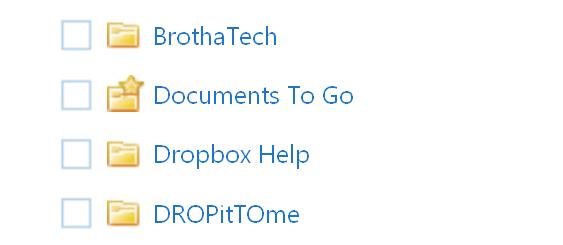
Once you’ve registered an account and linked to Dropbox, DITM will generate a special upload link (http://dropitto.me/username) that’s secured with a special upload password that you assign to. Once the link and password is accepted, users can start to upload any kind of file Dropbox currently accepts. upload/transfer is crazy fast, and you will be sent an email with the uploaded file details when the transfer is complete. Files are available immediately to access via the web, connected computers or (wait for it) any smartphone or mobile device connected to your Dropbox account.

That upload link stays the same no matter who you give it to and there is no time limit/timeout period to when a user with your link/pass can upload files. That may be a good or bad thing, so you have the ability to change the upload password at any time, or toggle upload capabilities on and off.

My only gripe is there is no bulk upload option, so you will have to upload those files one at a time. But for free (or a donation), what more can you ask for from a quick and easy way to receive files that are automatically added to your Dropbox account for instant access via a smartphone?

I thought so. So visit the DROPitTOme site and let us know what you think in the comment section.
BlackBerry PlayBook App: Track Shipments with The Big Package

Looks like we have another mobile device to write about. So we might as well get cracking on the BlackBerry Playbook tablet and find some cool and useful apps that you and your business can benefit from if you decide to spring for the gadget.

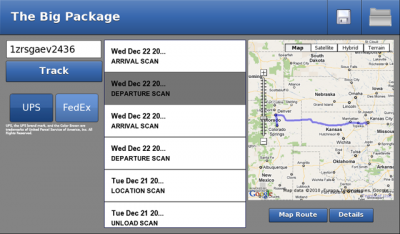
The Big Package app goes out to all of those “e-tailers”, ecommerce folks, and mom-and-pop shops who routinely ship packages to customers. The Big Package will track all of your UPS, FedEx and USPS packages in the same place. No need to go to each vendor website and type in the tracking number every time you want to see the latest update.

The main features of The Big Package are that you can save multiple tracking numbers; and add custom names to tracking numbers for quick retrieval every time you open the app. Unlike your average tracking sites that just spit out text results, The Big Package shows your shipment en route via Google Maps in addition to a details page that offers specific notes about your shipment. In other words, The Big Package doesn’t just tell you where you package is, it also shows you too!

Even if you’re not a business that ships products and just obsess over where your package is the second after you have purchased it, The Big Package is a free app to download to the BlackBerry PlayBook. So click this link to download the app and rest assured that you know exactly where your packages are.

Latest Evernote for Android Update goes BIG

Quoted from the Evernote Blog:

This is the first time that we have crammed this many great features into a single release of any Evernote product

In other words, Android folks who swear by Evernote as their go-to “put everything here” service should be in for a nice surprise the next time they check their app update status. Just a few key features include:

  • A progress bar at the top that shows you exactly what is being synced
  • A new ever-so-sexy widget bar that lets you quickly jump into the app to create text, audio and snapshot notes, as well as to perform searches
  • Maps and location. Now in addition to just tagging your notes with location information (if your phone’s GPS in enabled), you can now see all of your notes locations visually on a map.
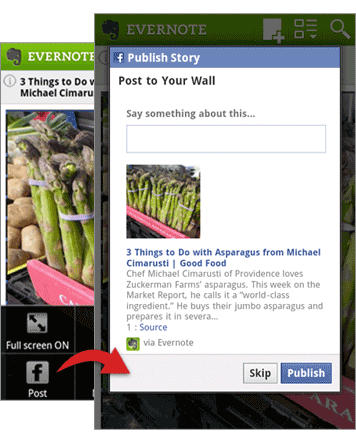
  • Posting notes directly to your Facebook wall, Gmail, and Twitter accounts in just a couple taps.
  • Browse and edit shared notebooks. If other Evernote users have shared notebooks with you, you can now search for notes within those shared notebooks and edit them if necessary.

Those are just some of the features that come with the free Evernote version. Premium subscribers have the extra functionality of a PIN lock that enables you lock your data with a pin. This comes in handy when you share a mobile device (like a tablet) with multiple users, but still need to keep them away from your data.

The Evernote Blog claims to have even more features in store for Android users. With all the current features and capabilities currently being offered for free, there is no reason why you can’t stay organized on the go. But just in case you don’t believe me, download Evernote for Android and try it for yourself.

http://www.youtube.com/watch?v=usUg-CdJEKo&feature=player_embedded

Square Reader on Sale at Apple

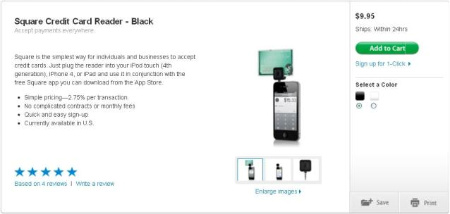
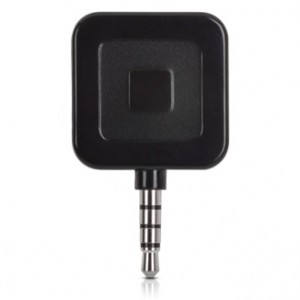
This is pretty cool. In an attempt to make even more waves in the mobile credit card processing arena, Square has teamed up with Apple to sell the Square card reader online and in Apple retail stores. Previous to this announcement, the readers were only sent via snail-mail to users who went through the Square sign up and activate process. Now Square has some help from Apple to get the popular readers into small business owner’s hands.

The Readers are $9.95 and are also available in black. If you’re an early adopter like me and signed up as soon as they were being offered, you only had a choice of white. For those with a little more patience, you will be rewarded with your choice of white or black. Those of us who MUST have a black reader to match our Apple gadgets (God only knows when the white iPhone 4 will officially surface), you can still buy it at full price, but Square is offering customers a $10.00 transaction credit when a new Square account is activated. That’s only fair since original customers who signed up were issued a free reader.

All of same features still exist for new Square users who buy the reader at Apple:

  • Quick and easy sign-up
  • No complicated contracts or monthly fees
  • Simple pricing—2.75% per transaction
  • Free Square mobile App for Apple iOS and Android devices

If you’re a small business that won’t swipe enough credit cards to require a full merchant account, but want to offer your customers more ways to pay—march into your local Apple store, pick up a Square reader, sign-up, and get to swiping.

Gmail Mobile Site upgrades to HTML5

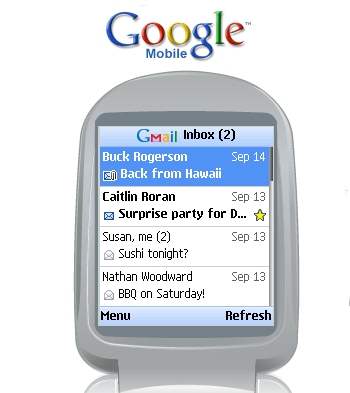
Holding on to your feature phone with web access for fear of making the smartphone jump? Or maybe your exchange email setup on your smartphone is acting janky? These obstacles shouldn’t stop you from accessing your Gmail accounts via your mobile device. Gmail has a mobile site that breaks down the full desktop version and makes it “mobile friendly”. Now with the conversion to HTML5, the improved Gmail mobile site could get you out of a “I have no email access” jam.

One of the main advantages to moving to HTML5 is that pages load faster. Unlike before when you opened a page and got a separate “loading” page letting you know what is happening; emails, labels, and even options load within the same page and with minimal delay.

Another advantage is instead of searching your actual contacts on your phone, the mobile site searches your Gmail contacts. When you compose a message and start adding recipients, Gmail will display a drop-down list of possible contact results in an attempt to guess who your are addressing.

This last advantage may just be a reason why a smartphone user may opt to only use the Gmail mobile site over setting up an account on your phone – The ability to search ALL of your emails and not just those dating a couple months back; which is the average time-frame most people select when setting up their email account(s) on their smartphone. If you are vigilant and label, file or Archive your emails like you’re supposed to (instead of deleting them), you can now dig DEEP into your account and pull out some ancient emails all via the mobile site.

If you truly claim to be a mobile professional, why not use all of the mobile tools at your disposal? The Gmail mobile site, now upgraded to HTML5 has just become one of my tools. What about you? Check out the new site by visiting www.gmail.com on your phone and let me know what you think? Do you see yourself using the mobile site more often?

Portable Power for Your Moble Devices

I don’t know about you, but I break out in hives and develop a slight twitch when my mobile device’s battery indicator drops below 15%. My symptoms really get bad when I am nowhere near a power outlet and/or don’t have my laptop bag filled to brim with cables ready to power each and every device I own.

For those times when plugging in to charge a mobile device is NOT an option, portable power is the answer. The arena is relatively new, but is a must as more and more people depend on mobile devices to get them through the day. So I am going to feature three different options that will wake you up from a mobile battery drain nightmare.

Read More

Add a Schmap to a Tweet to Get Traffic to your Business or Event

If you’re a small business, you should be on at least ONE of the many social networking sites…It’s FREE MARKETING AND PROMOTION for Pete’s sake!

My favorite site is Twitter for social media business marketing – word spreads FAST, and there’s nothing like a little word of mouth wildfire to bring attention and traffic to your business or event. Many apps/services like Foursquare, Yelp, Gowalla, etc. cater to local businesses in hopes they will actually start to pay attention to their social media patrons.

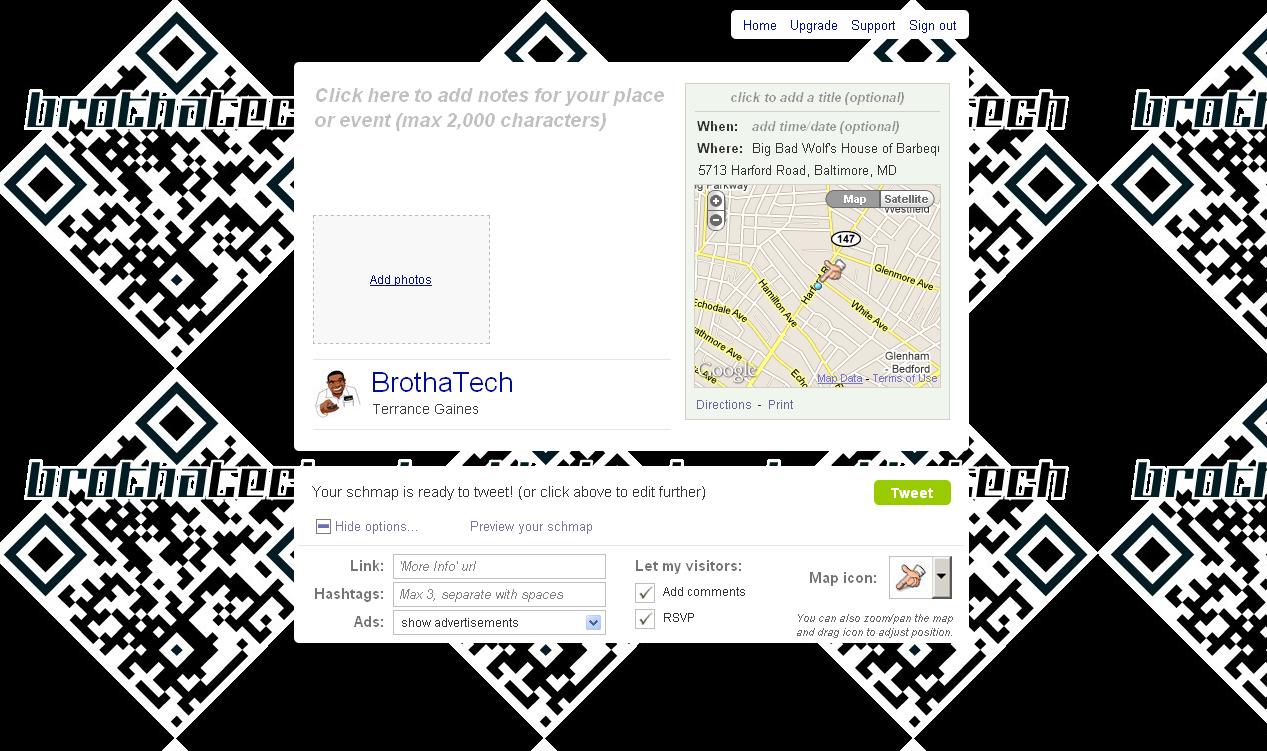
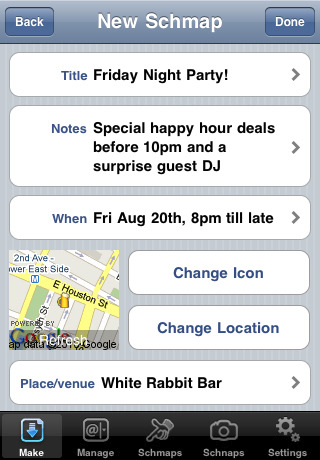
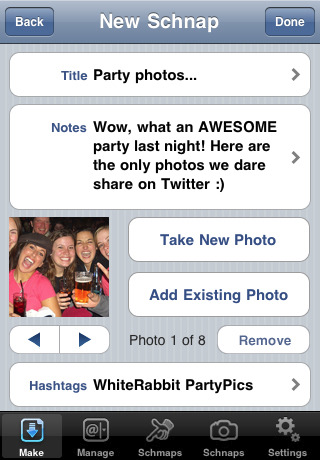
A cool service I found is schmaps/schnaps and it enables you to add maps and pictures to Tweets to drive attention/traffic to your business or event. Instead of creating yet ANOTHER social media account, schmaps integrates with Twitter and immediately gives you options to add an address or venue name and one image (schmap), or import multiple images from your computer or via Flickr to a tweet (schnap).

So instead of tweeting “Doing BIG things over @ Big Things Bar & Grill on 3rd & Pratt St.” You can actually create a schmap by adding a map complete with an image/flyer of your location or event and a map indicating exactly where it’s located to your tweet. If you want show your Twitter followers what a good time folks are having at your event, you can add up to 8 images to a tweet to create a schnap.

In both cases, a schmap.it url is created and added to your tweet, so users can click (or tap if they are mobile) to see your additional information.

Additional features include:

  • Adding additional links, Hashtags, or your own ads
  • Preview your schmap/schnap before sending
  • Allow visitors to add comments or RSVP on your schmap.it site

Schmaps also offers a free iPhone app that lets you create, edit, and manage schmaps/schnaps from your mobile device.

As far as cost, All of the above is free to use. A $9.95 monthly upgrade to Schmaps PRO will add a TON of additional features, including metrics tracking, turning off schmaps ads in tweets, permanent tweet scheduling, and more.

Don’t be afraid, social media sites are safe to use for business marketing and promoting. With FREE services like Schmaps, you’re just being silly it would behoove you to get on board and take advantage of all the additional avenues to bring business to your doorsteps.

Tablets are all about Mobile Productivity

As a techie who bought both the iPad and the iPad 2, I get this question often: “Why do I need a tablet device?” The quick answer is “you don’t.” Tablets, just like any other business tool, are merely aids to help you get things done, but not a necessity. Now a better question for a person to ask me (Certified Tablet Advocate) is “What benefit do you get from using a Tablet?”

Tablets are all about mobile productivity. Laptops and even NetBooks are pretty fast and portable these days. So to whip your laptop out of your bag, turn it on, wait for it to boot, and wait for it to connect to a WiFi signal; or whip out your own MiFi device or connect to your hotspot feature built into your phone is getting…faster? Or you can grab your tablet – chances are it’s already on and connected, and you are off to doing whatever you need to do in half the time.

Now don’t get me wrong, tablets are no where near completely replacing a laptop. There are still some tasks that need raw computing power to accomplish; but, tablets are changing the way we do business in general. The advancements in web and mobile apps/services, cloud computing/storage, and networking/communication/collaboration practices are all starting to make it very easy to handle a great deal of tasks with just an internet connection.

So if you can conduct a team/client meeting using apps like Webex, network with associates or colleagues over Yammer, create and send official documents or invoices with Documents To Go, organize and sync files with Dropbox, manage business accounts and finances with Kashoo, and get paid faster with Square…with just access to the internet and a tablet device; going through the process of hoping on a traditional computer in many cases is just not necessary in this new age of computing…And don’t even get me started on the cool ways businesses are using tablets to display their artwork, check guests in at hotels and restaurants, entertain patients at medical offices, etcetera.

In conclusion, you have to do what’s best for your business. A tablet may not be in the immediate fiscal budget; but the productivity and mobility advantages are real and getting more evident as more companies and consumers start to “buy in” to the whole mobile computing era that our society is QUICKLY moving into.

– Terrance Gaines, C.T.A.

SoundNote app for iPad: Write, Scribble, and Record Meetings all at Once

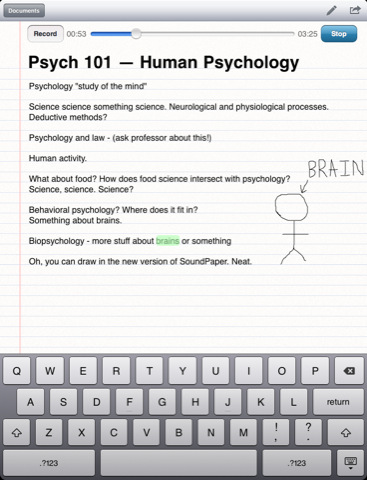
Sitting in meetings is a pain. Trying to take notes in a meeting is probably worse. Trying to make sense of those notes after the meeting is hands-down unbearable. The SoundNote app for iPad looks to alleviate your stress by combining the ability to write notes, sketch objects and illustrations, and make an audio recording all in one app.

Most mobile note-taking apps only allow you to either type/draw notes or sketch objects/illustrations. SoundNote lets you do both on the same page with it’s powerful drawing tool. If you make a mistake or need add to a sketch, you can tap it twice to edit your strokes. Tap the object just once to select it, and drag it to wherever you want on the page or delete it entirely. You can use iOS finger gestures to scroll and zoom objects. If you still want to add traditional notes, you can use the virtual keyboard to add notes on the same page.

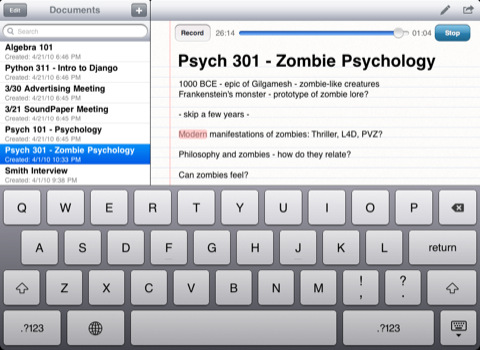
Just in case your shorthand note-taking is not fast enough on your iPad, you can record audio of the meeting so you don’t miss an important detail while you’re trying to draw the perfect arrow. Instead of playing the entire recording back just to locate one detail you missed, tap a word in your notes that and SoundNote jumps to the corresponding place in the recording. If you’re worried about space on your iOS device, a hour of recording takes up only about 25mb. If you’re in a meeting longer than a hour, recording space on your iPad is the LEAST of your problems.

Need to share notes with your co-workers, team members, or clients, you send them out via email directly from your iPad or download the notes to your Mac or PC to backup or for organizational purposes. At $4.99, SoundNote isn’t cheap as far as mobile apps are concerned, but with all the functionality that’s built into this app, at least your notes won’t suffer from your inability to enjoy those bright and early Monday-morning meetings.